


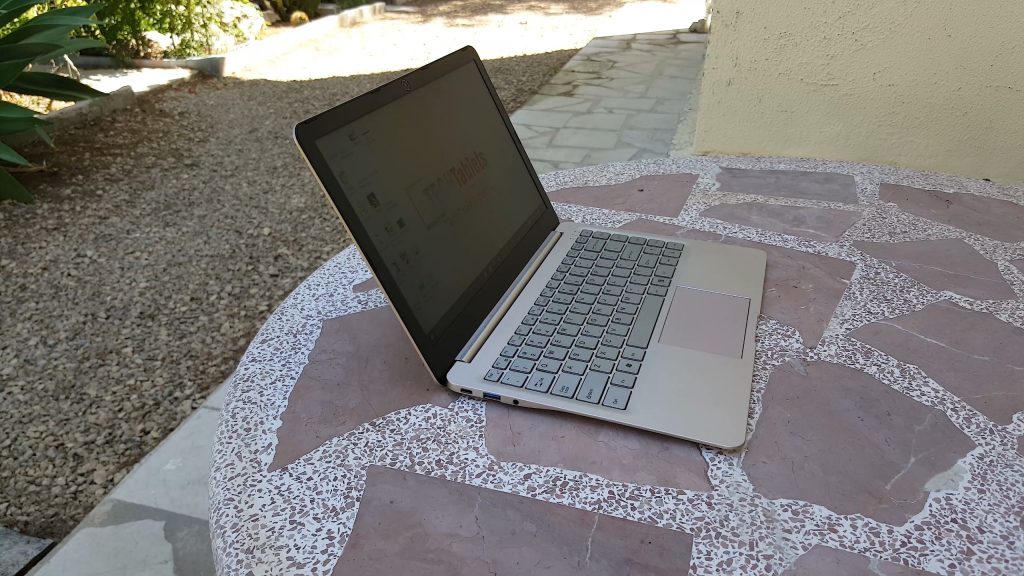
It’s not often we see Core M and 8GB of RAM mentioned, the Livefan S1 is a 13.3″ notebook with a Core M 5Y10, 8GB of DDR3 1600 Mhz RAM, 128GB to 512GB Sata3 SSD options, Intel Wireless-AC, user replaceable SSD and 2560 x 1440 anti-glare screen.

This is a detailed video review, but below you’ll find my review summary pros and cons.
Pros:
- Great screen, bright with good blacks and colors for a TFT panel. The best part it’s practical matte anti-glare coating makes it a joy to use in brightly lit environments.
- It’s thin and light (1.16 kilos)
- 8GB of RAM, the more the merrier! (Who’s going to say, no I wanted 4GB!)
- User replaceable SSD, just open the hatch, 1 screw, and install.
- Alloy lid, bottom and SSD bay
- Keyboard is good to type on, good key travel, spacious layout and nice feedback when typing.
- Good performance (Until you game
- Type-C supports charging and data
- All USB ports (Including the Type-C) can power external HDD’s
Cons:
Thermal throttling, it’s fine for the most part until you game or do something very intensive, then the CPU temps hit 90+ (I saw up to 93 degrees c) and it thermal throttles. Livefan’s heatsink solution for passively cooled Core M-5Y10 just isn’t sufficient. Sure you could mod it with some more copper, thermal pads. But that’s something that shouldn’t happen, it should not get this hot. Take a look at the Xiaomi Mi Notebook 12.5″‘s Core M3, it never goes past 63 degrees C as it has copper heat transfer pipes and a lot of copper in there.
Surface temps didn’t get to any levels I would be concerned about, but it does get quite hot to the touch, around 41 degrees. Again this is only really when gaming or pushing it really hard encoding a 1080p video or something.
- Last gen Core M and not the latest Core M3.
- Left and right viewing angles aren’t as good as IPS panels.
- Touchpad mouse buttons are too deep, they should be more shallow and therefor more confortable.
- Arrow keys on the keyboard don’t feel as good as the rest of the keys for some reason, build issue on my unit?
- No microSD slot or SD slot. Me being picky since I really like to have one using a camera quite a bit nowadays.
Verdict:
I’ve enjoyed my time with the Livefan S1, I do feel it would suit someone that wants something bigger than a tablet with a typing experance thanks to the larger keyboard. The screen and it’s weight make it a decent notebook for travel, sitting a cafe catching up on emails, light work, we browsing and even viewing video content.
The screen is the major win of this notebook, it’s super bright, very clear and a joy to work on without having to worry about screen glare hassling you. It can even be used in brightly lit places like outdoors where glossy screens are a nightmare for reflections.
Battery life if well managed could make it through a day, but it all depends on what you’re doing. Web, video, other light use like docs or emails about 7 hours. Multitasking around 5-6 hours, heavy multitasking 4 hours and gaming only about 3 hours. But I wouldn’t be gaming on this due to the above issue mentioned in cons.


The price is always changing, check it on Banggood where I also purchased this unit to review. I do feel it’s a little-overpriced concidering it has last years Core M, which is still a decent chip by the way.
LiveFan S1 Windows 10 drivers: https://techtablets.com/wpfb-file/livefan-s1-drivers-dump-zip/