


I’m typing this out on my new EZBook X4, Jumper’s latest Gemini Lake laptop. It’s really the EZBook 3L Pro with a few tweaks or the even the Teclast F7 (The current best Apollo Lake Laptop) The build is identical and this isn’t a bad thing, it is also selling for the same price of $299, has full alloy housing, good internal layout and build, plus a nice big copper heatsink.
Two USB 3.0 ports, Realtek USB 2.0 Micro reader (Sadly not USB 3.0) and a surprise. HDMI 2.0A, yes it’s running my 4k monitor at 60hz at UHD. I knew the Gemini Lake supports HDMI 2.0 and DDR4, but I never saw HDMI 2.0 mentioned on the press info so assumed the worse. HDMI 1.4A limiting me to only UHD 30hz which is too laggy for desktop use.
Below is the Jumper EZBook X4 unboxing and hands-on review. (It will be live tomorrow)

EZBook X4 Unboxing Video index:
01:40 – Unboxing
02:23 – Weight & size
02:35 – Design
04:06 – Internals
05:45 – Keyboard & touchpad
07:34 – Bios
08:04 – Unlocked Power Limits
08:29 – First boot, Windows info
09:18 – SSD benchmark
09:42 – Devices
10:00 – Geekbench 4
10:22 – TN panel tests
11:35 – Backlit keyboard
12:03 – Speaker test
13:03 – Linux test
13:43 – First impressions
14:20 – Pros & Cons
The EZBook X4 is only 1.35 kilos in weight and 18mm thin more or less. This again like the EZBook 3L Pro and Teclast F7. The keyboard has the same Teclast F7 feel and layout, but is now silver (Not sure a great move) but with a two-stage backlight. It’s white and bright enough. Something you wouldn’t expect. However, from some angles, it can be hard to read the keys. The same issue I faced on the Xiaomi Mi Air 12.5″ model. The touchpad is a Windows precision one, just like the Tecalst F7 and a good one at that.
Other improvements are the SSD slot is 2242, but can also take all common sizes. 2242, 2260 and 2280. The jumper must have seen use modding the EZBook 3 Pro and installing 2280 SSD’s so great move to allow all sizes. The move from eMMC to SSD is also a good one, double the capacity and speed of the old eMMC 64GB Sandisk drivers.
The RAM is both a pro and con. We get DDR4 2400mhz now, so, much faster. But only 4GB of it which isn’t great, 2018 should set 8GB as the minimal amount you can ship a Windows 10 laptop with. Down 2GB over the Apollo Lake models. DDR4 prices and price point are to blame. But there must surely be plans for an 8GB model with Teclast apparently releasing a Celeron N4100 with 8GB. This brings us to the CPU, 200Mhz more max turbo up to 24Ghz, 2Mb cache more – now 4Mb, HDMI 2.0 support. And other minor tweaks. It runs a stock TDP of 9W. But for now, Jumper has the bios fully unlocked. TDP can be increased or set to unlimited for a real healthy boost to performance at the cost of heat and reduced battery life as seen on the Apollo lake laptops I did the TDP tweak on.
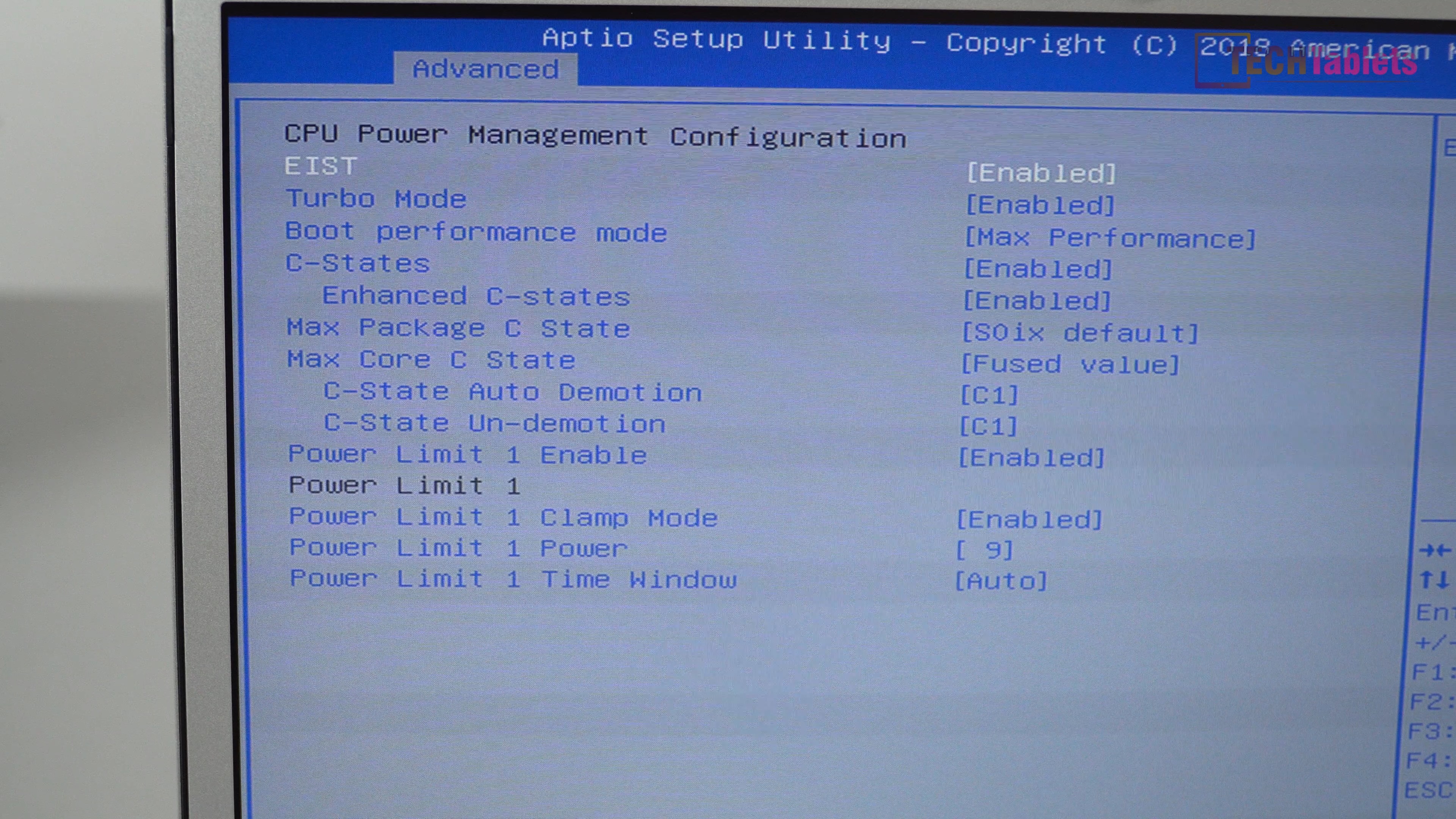
Yes, Jumper has the power limits open to us (for now)
Hopefully, V2 and further updates will not touch the power limits or introduce new issues. Jumper is famous for fixing something that isn’t broke. The EZbook 3 Pro V4 for example.
But it’s not all sunshine and lollypops. Like the EZBook 3L Pro, it has a BOE brand 1920 x 1080 14″ TN Panel. This can be a deal breaker for some. The panel has good colours for a TN panel, horizontal viewing angles are fine. Vertical viewings angels aren’t. But this is where I say it might be a deal breaker. So far using it once adjusted so I’m looking at it full on, it’s perfectly fine. And in a way better than my IPS Teclast F7 screen. It’s the moment I stand up you see the top begins to darken and it’s hard to see the image. So for one on one use, it’s fine, but if you have someone else viewing the screen then one of you will have the degraded poor viewing angle.

Jumper EZBook X4 vertical viewing angles are poor. It’s no IPS.
EZBook X4 improvements over the Apollo Lake N3450 Teclast F7 or EZBook 3L Pro.
- Faster by up to 25% (Factory 9W TDP)
- DDR4 RAM 2400Mhz vs 1600Mhz
- Takes all M.2 SATA3 SSD sizes now without mods.
- Backlit keyboard
- Supports up to 4k/UHD 60hz. HDMI 2.0A spec
- Comes with 128GB SSD (SATA3 BWIN brand)
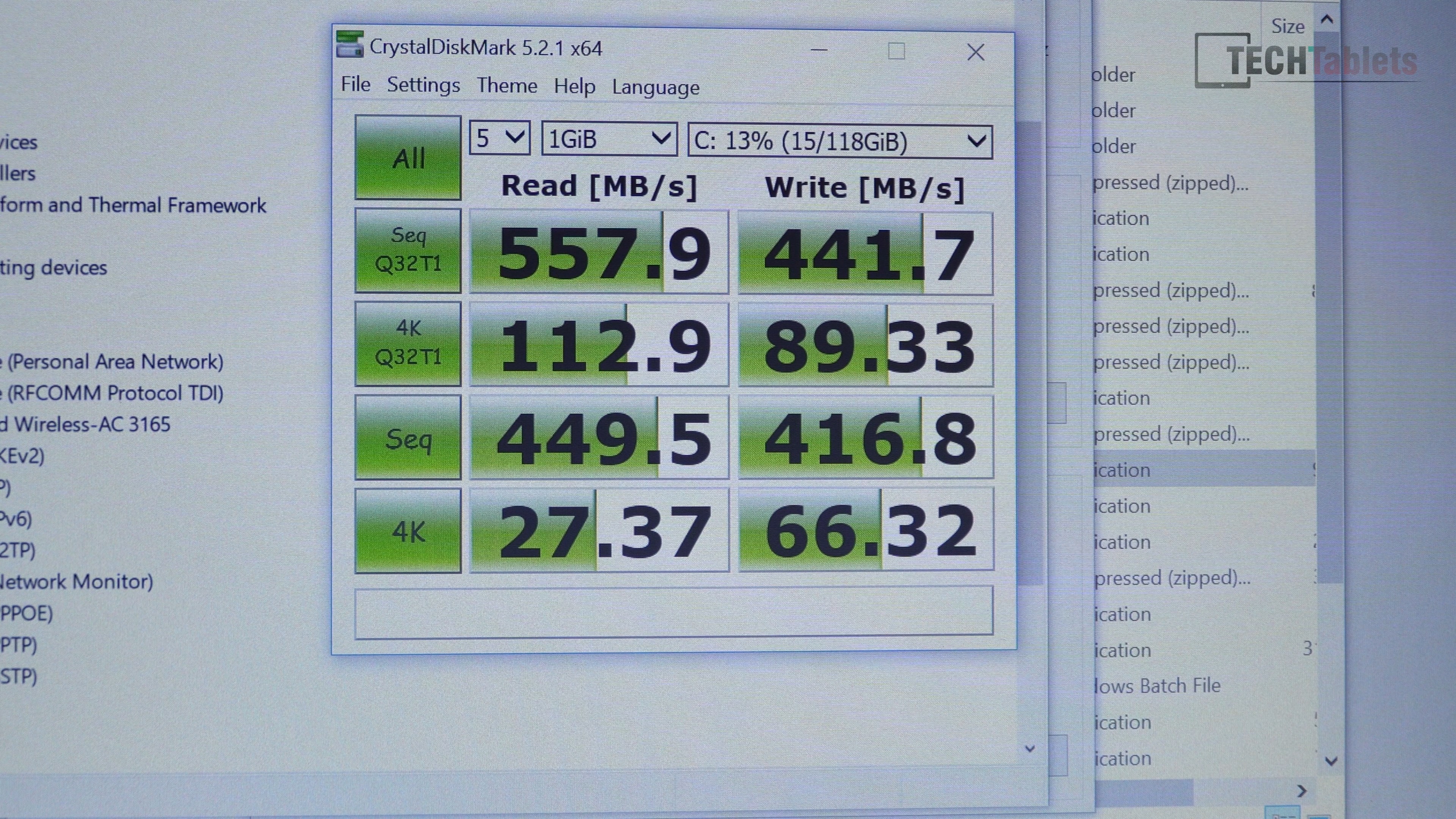
Good SSD speeds for a SATA3 spec 128GB drive.
Cons Vs Teclast F7
- 2GB of RAM less
- Silver keys harder to see
- TN Panel.
Now the speed of EZBook X4 feels somewhat smoother and quicker than the Teclast F7, to be expected from the Gemini Lake with it’s stock TDP (Power limit) of 9Watts got a Geekbench 4 score of 1890+ single core and 5000+ Multicore. This beats the 1400 single and 4100 multi of the Teclast F7’s Celeron N3450.
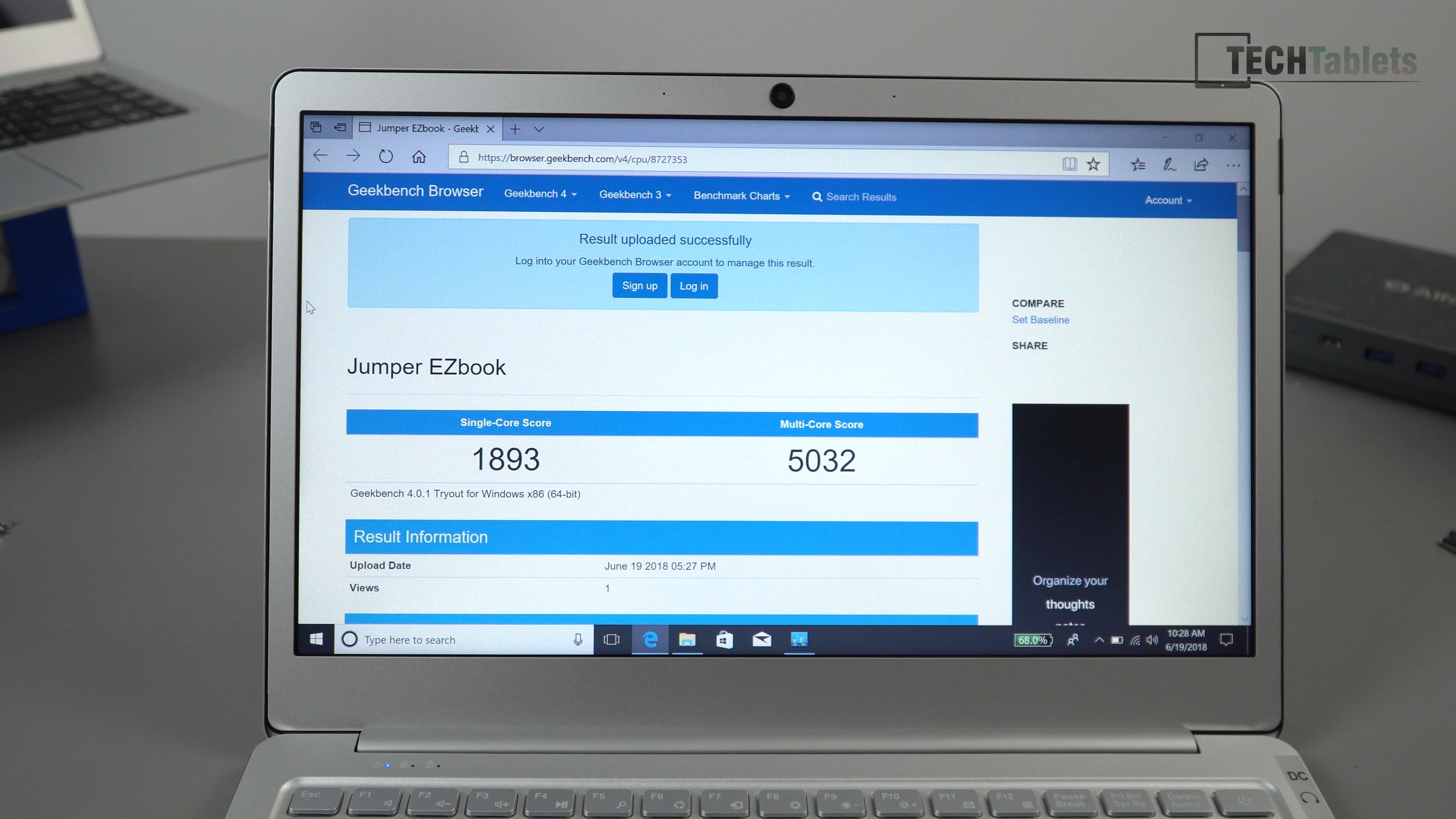
The wireless AC is still the Intel 3165, it’s a decent chipset. But I was hopeful it would ship with the new gigabit wireless cards with Bluetooth 5.0 the Intel 9600 series. In my use now of the EZBook X4 I like it more than the Teclast F7 for its speed and improvements like 4k60hz which has been something I have been after for a long time. In my opinion, the TN panel isn’t great, but since I look at my screen face one, for me this is not a deal breaker. So it’s a keeper, all I’ve done is tweak the calibration with my Spyder Pro5. The Battery cells are 37Wh in total, estimated mixed use of 6 hours. For the $299 price it’s currently selling for and you can live with looking at a TN panel straight on it’s a great laptop so far. I see no “deal breakers”.
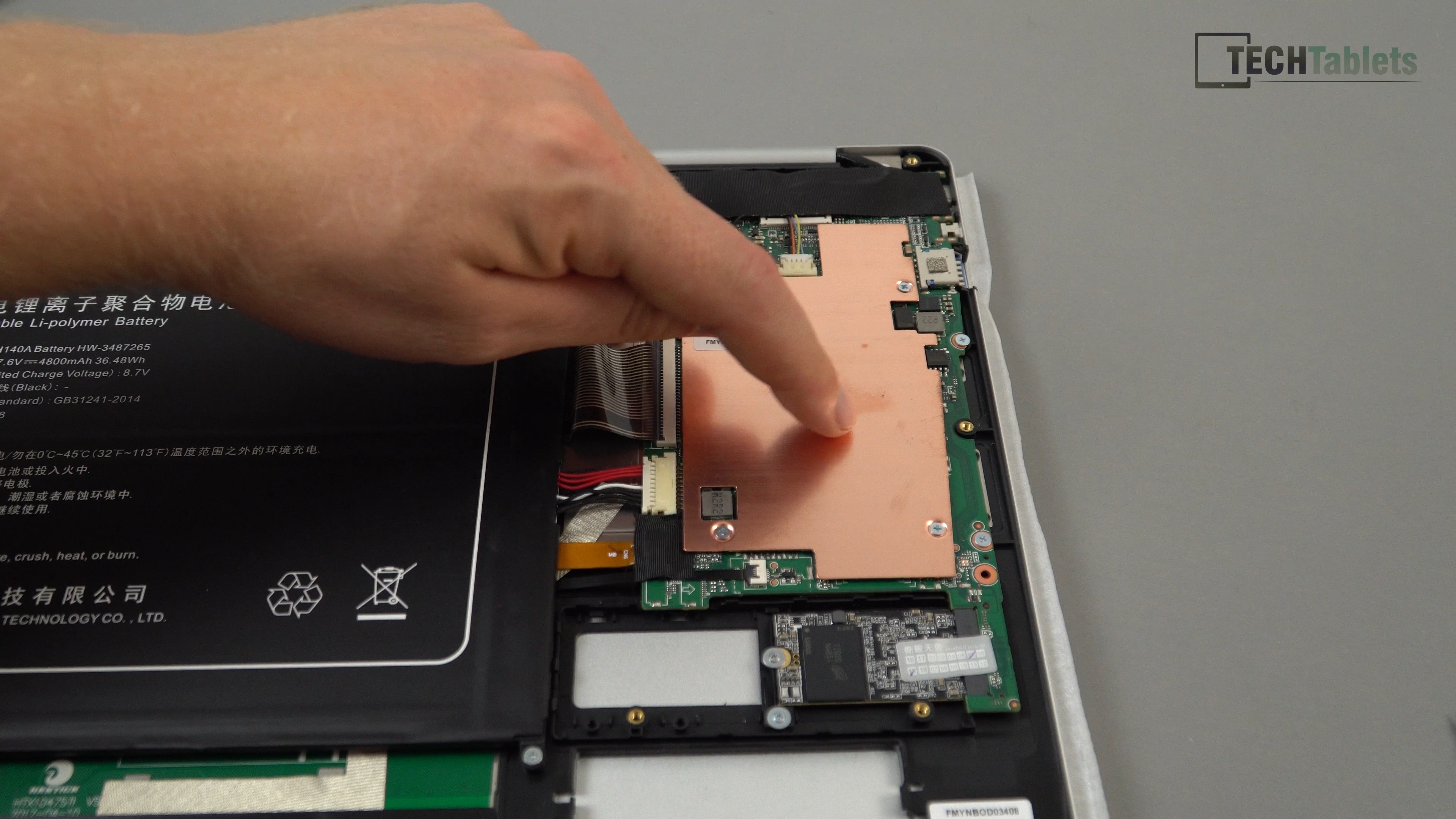
The same sized copper heatsink as the EZBook 3L Pro and Teclast F7
I will see what the thermals are and if they are fine. I will run a 10W TDP or unlimited like I do on my Tecalst F7 and see how this boosts performance. If Teclast or Jumper give us this exact laptop but with 8GB of RAM and an IPS. It will be the new Chinese budget champion for mid-2018. No doubt in my mind.
The full Jumper EZBook X4 review will follow soon in 1-2 weeks time after I’ve used it enough and know all the pros and cons.