


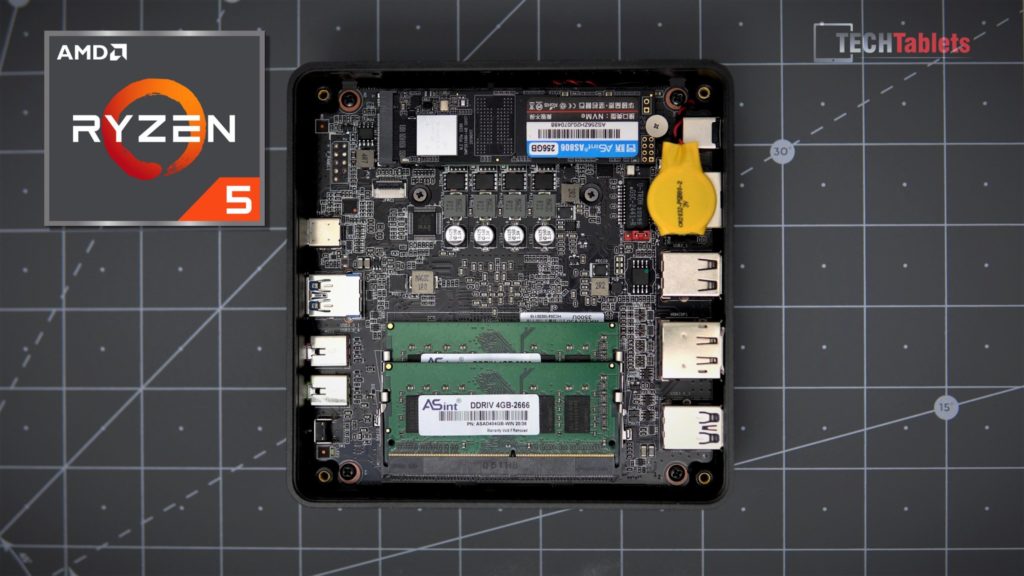
I’ve just posted a long how-to guide for this Mini PC to get the absolute best you can from this fantastic value Ryzen 5 Mini PC, this involves adding the new antennas for the wireless card upgrade. Installing a much better future proof Intel AX200 Wifi 6 card with BT 5.1, installing a 2.5″ drive, reapplying better thermal paste, and boosting performance by 20%+ when gaming with higher power limits. You can find the guide video below it’s aimed for beginners so you don’t need any experience to do these simple mods.

00:00 – Intro & what this video covers
01:31 – Parts used & possible upgrades (also see description)
03:08 – How to open the Mini PC
04:19 – Installing a new (better) $10 Wifi 6 card
06:07 – Replacing the stock thermal paste with a better one
08:32 – RAM upgrades & installing the new antennas
11:20 – Upgrading the NVMe SSD drive and 2.5″ drive installation
13:13 – Thermals, how to boost power limits, performance before and after
19:28 – Gaming performance get’s a huge boost from the TDP increase
20:54 – The Witcher 3 before and after TDP tweaks
22:09 – Shadow of the Tomb Raider gameplay test
22:50 – Final words on getting the maximum out of this great Mini PC
The parts I used (Affiliate links) cheapest option:
- Intel WiFi AX AX200 M.2 card
- Wireless antennas IPEX MHF4 For Intel AX200 / BT 5.1 cards
- Thermals paste MX-4
- M3 x 5 Screws for the 2.5″ drive bay
Possible future upgrades:
DDR4 RAM: https://s.click.aliexpress.com/e/_AMnN9H
Sabrent NVMe SSD: https://amzn.to/3lVboLE
Programs to tweak the power limits and boost performances: https://www.ryzencontroller.com/ (Doing the repaste first will help you use higher limits)
Note: Please be responsible with the power limits. Do NOT run super high limits 24/7 with high temperatures. You WILL reduce the lifespan of the components inside like the VRMs, APU, NVMe, and more. Also, the high power limits will put more of a demand on the system and power supply, as a result, the fan noise will increase.
Original Post 3rd of December 2020:
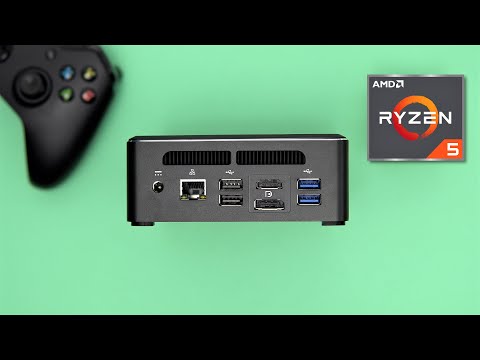
One of my favorite Mini PCs of 2020 for the value it offers, features, thermals, and great fan noise is back with an upgrade. The now labeled T-Bao MN35, comes with the Ryzen 5 3550H (4 cores 8 threads 3.7Ghz Max) with Vega 8 graphics, 8GB of DDR4 RAM in dual-channel, and a 256GB NVMe 2280 SSD. This model like the MN25 offers a lot for the price, but and can now run 3 4k60 displays. It has 3 x USB 3.0 ports, Type C USB 3.1 with DisplayPort, Gigabit LAN, HDMI 2.0A, Displayport 1.4A and 2 x USB 2.0 ports. You can also install a 2.5″ drive and upgrade the Realtek Wireless AC card it has installed.
This Windows 10 Home Mini PC is ideal for a light PC for general tasks but can handle some light 4k video editing, coding, 4k HEVC & VP9 playback, and even a little bit of light gaming with settings. Linux ran fine with no issues on this PC and my full video review of the MN35 is below:
T-Bao MN35 Mini PC Review index:
00:00 – Intro & specs
01:19 – Unboxing
02:18 – Build, ports, and design
03:51 – Internals, and how to add a 2.5″ drive
06:03 – Fan & cooler assembly
06:43 – Bios and how to allocate more RAM to the Vega 8 GFX
07:38 – Windows, devices, Wifi, NVMe SSD speeds
08:32 – Realworld performance, audio latency, and benchmarks
10:26 – 4k video editing and export times
12:25 – Video playback 4k HEVC and 4k60 UHD
13:08 – Wattage, Thermals, and fan noise
14:19 – Gaming tests. GTA V, CSGO, and The Witcher 3
17:25 – Recap with Pros and Cons
Overall for the price it sells for this is the new best Mini PC I’ve reviewed hard to beat at 269 euros. While it might not be the new Ryzen 4000 series it does a little bit of everything well, with the same great fan noise and thermals as the first model. The only real con is the no VESA mounting bracket is included and the wireless card isn’t amazing.
Where to buy:
- 8GB RAM + 256GB SSD model: $319 / 269 Euros with coupon BGTBMN35 here: https://bit.ly/3mz7U2C
- 16GB RAM + 512GB SSD version $379.99 / 312 Euros with coupon BGMNTB35 here: https://bit.ly/3qk80gC