TechTablets › Forums › Cube Forums › Cube iWork10 Ultimate › Cube iwork 10 – Black screen fix
- This topic has 15 replies, 1 voice, and was last updated 6 months ago by
 julia roberts.
-
AuthorPosts
-
October 21, 2016 at 12:28 am #55305
Hello all, I thought I would share my recent fix for what seems a common problem, the black screen with the blue charge / power light working.
Having had two of these tablets with the same issue in 2 months, I took a gamble and rather than return for yet again another warranty exchange and opened mine up. Upon peeling back a big piece of silver tape, it immediately obvious the screen cable located just under the docking ribbon was sitting ajar in it’s socket. Cable reseated and tablet works as required. I can see from the design and location of the tape that it predisposes the male end of the connector to move slightly from physical movement, bumps etc to the tablet case.
There is a second piece of black cloth tape which is placed to hold the screen cable and docking cable down, so I repositioned that tape to hold only the screen cable in place and then put the docking cable with the siver tape over it to hold it in place. Easy fix really and I suppose time will tell if the new tape arrangements will work.
I’ll upload some photo’s when I can edit and mark the cables with some arrows. I hope this helps someone!
Attachments:
You must be logged in to view attached files.October 28, 2016 at 1:31 pm #55890How easy was it to open the case? I am just thinking ahead —when my last tablet PC had an SSD which failed my local tech said it was too difficult to repair, hence I bought a new machine.
October 29, 2016 at 9:07 am #55939Hello all, I thought I would share my recent fix for what seems a common problem, the black screen with the blue charge / power light working. Having had two of these tablets with the same issue in 2 months, I took a gamble and rather than return for yet again another warranty exchange and opened mine up. Upon peeling back a big piece of silver tape, it immediately obvious the screen cable located just under the docking ribbon was sitting ajar in it’s socket. Cable reseated and tablet works as required. I can see from the design and location of the tape that it predisposes the male end of the connector to move slightly from physical movement, bumps etc to the tablet case. There is a second piece of black cloth tape which is placed to hold the screen cable and docking cable down, so I repositioned that tape to hold only the screen cable in place and then put the docking cable with the siver tape over it to hold it in place. Easy fix really and I suppose time will tell if the new tape arrangements will work. I’ll upload some photo’s when I can edit and mark the cables with some arrows. I hope this helps someone!
hi there, could you please elaborate what this issue is about? I have a similar issue on Android: when device goes in deep-sleep and I leave it for hours I’m sometimes not able to wake up it anymore, the only solution is a forced reboot! 🙁
I’m sure that the tablet is still on, because if I attach it to a PC I can still use adb command via command prompt/linux shell!! Is that the same you had?
November 3, 2016 at 1:23 pm #56350Chris, it’s not difficult to open. It took about 15 mins in total taking my time. Like all these things if you rush or use too much pressure you’ll break something. I used a plastic ipod spudger/ opening tool and a guitar pick to create a gap between the metal rear case and the plastic bezel. the metal case has hooks which clip in to spaces in the bezel and it ‘pops’ once you seperate the two. work around the tablet taking your time. As you can see there is noting attached to the metal case like ribbon cables etc. Good luck. R.
December 9, 2016 at 6:23 pm #58313I don’t see any cable where it shouldn’t be, I don’t get it.
December 9, 2016 at 10:21 pm #58320i had the same issue – screen went black, only the hdmi output worked.
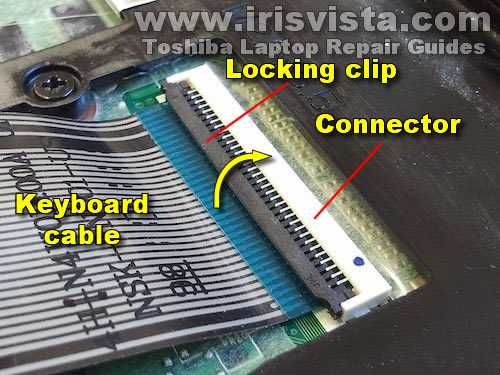
i fixed it the same way. my problem was that the ribbon cable to display was loose, because the brown ribbon connector unlocked itself and cable went loose (probably one time when the tablet fell down on the hardwood floor)
btw this picture illustrates the ribbon cable socket and how it is in locked position.
http://www.irisvista.com/tech/newbie/07-keyboard-connector-locked.jpg
if this happens to you, just push the ribbon cable up a little bit and lock the socket.
easy fix – and i even got 30usd refund from gearbest 😀 as i opened a RMA, cause i didn’t know it would be that easy to fix myself.
December 10, 2016 at 10:21 pm #58362Okay the screen now seems fine the problem I have since last weekend is that it doesn’t charge. Even if I charge it a full night it keeps at like 12%. And the tablet turns off automatically at 3 or 4%, so I can’t fully empty it and reboot the battery. I don’t know if it’s a problem of battery calibration, the battery itself or the cable.
Attachments:
You must be logged in to view attached files.December 12, 2016 at 12:42 am #58427Those Chinese tablets are so badly put inside inside, it’s a miracle they even work.
August 15, 2017 at 5:09 am #70602i need to know witch part of the locking clip slides the black piece or the white? i need better tools to grab these small pieces
August 15, 2017 at 5:19 am #70603i believe the i works 10 is a korean made tablet either way china products are not what they were in the early 90s they are as good as anything we make unless custom in usa because we have sent all our designs schematics machines metals etc to china all they do is assemble to our specifications. this i works 10 has factory flaws though and this should have been found in the testing stage.
September 17, 2017 at 8:10 am #72235Thnaks for all the hints. Now my tablet works 🙂
September 29, 2017 at 6:07 am #72796how did you solve the issue i still have the same problem even all the cables are connected properly but the blue light was blinking long time now it is off and the tablet did not power on.
March 23, 2018 at 1:12 pm #140978I had the same problem and this post really helped me to solve it. In my case, the problem was not in the connector itself, but in the fact that the flex ribbon cable, being long and not having any support, when the tablet was pressed a bit from the back or the screen was being wiped clean, it made the cable move and pull from the connector, causing the flickering.
I simply secured the ribbon with some tape to the battery and it is fine – for now.
March 23, 2018 at 2:10 pm #140979I thought I would report that I have used this Cube Tablet Hybrid 2 in 1 almost every day for two years. The problems I have had (a lot) have been entirely due to the Windows 10 OS, and not at all due to hardware — touch wood I hope this will continue for another couple of years. I did have a prolonged period when I was told by techs and repairers that my problems were due to the SSD (eMMC) having failed, and that no one would be able to repair it event if they could get the case open. Fortunately I was doubtful, for a variety of reasons (such as, if the SSD was kaput why was the Android OS working perfectly — possible but unlikely?). Any way I persisted with my non-expert trial and error fixes, and one by one over several months most of the 12 plus faults were cured. Now after a clean reinstall and updates (including Creators Fall) the machine has never been better.
Looking to the future I am trying to prepare for almost inevitable hardware failures, even if it is only the battery. I have archived posts in this thread describing how to open the case for example. I will not give up on my Cube iwork without a struggle.
I would like to see, in this forum and others, much more attention to the specific hardware issues of our ‘sealed machines’.
April 11, 2019 at 5:48 am #151205Thank you so much for this information!!!
I can fix this problem.
-
AuthorPosts





- You must be logged in to reply to this topic.