


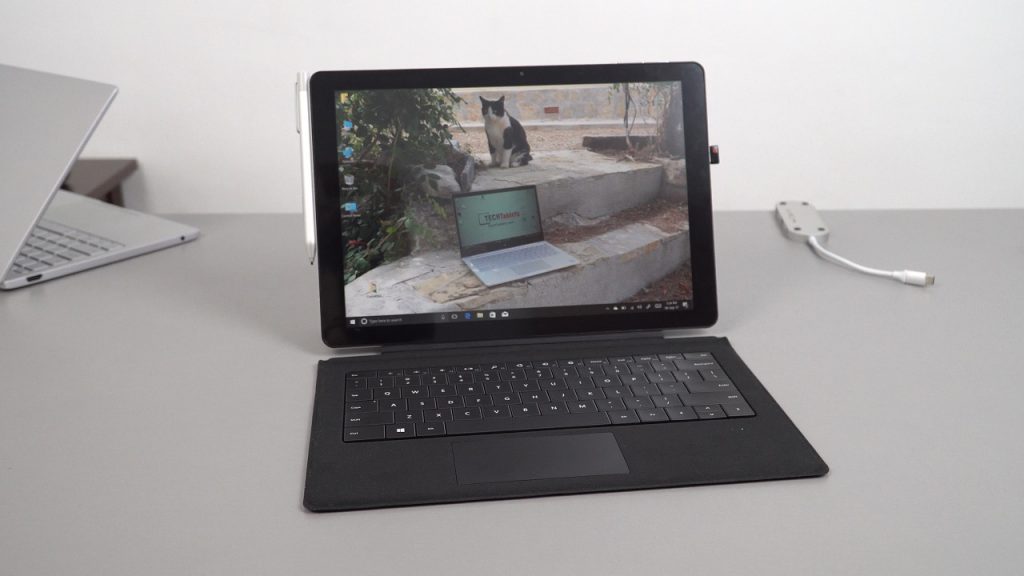
The Surbook arrived at the studio, most of the orders of the 128GB model have shipped if you’re one of the Indiegogo crowd funders. 64GB models to follow. The tablet has the typical Chuwi brown box packaging for the type cover and tablet. The stylus as I suspected is the same model as the Hi13’s the HiPen H3. Below is my unboxing and preview while I work on using it for a week or two before the final verdict in my full review.

Video timecodes:
01:04 – Unboxing
03:38 – Design
06:38 – First boot
08:01 – Screen
08:44 – Devices & Windows
10:12 – Stylus preview
12:03 – Speakers
12:56 – Type-C port
14:27 – Linux test
14:55 – Bios
15:25 – Backlit keyboard
15:26 – First impressions
16:16 – Pros & Cons so far
First impressions:
- The build quality over all is good, feels solid and well put together
- The type cover is very much like what I remember from my Surface Pro 3’s type cover
- At first, I thought the backlight wasn’t working. FN + DEL enables and disables the Surbook’s backlit keys! It’s not marked on the DEL key…
- The keyboard to type on feels good, not Surface type-cover 4 level, but decent. There is no shortcut for print screen. However, shortcuts for the screen brightness.
- The touchpad seems quite poor and not a precision one. It’s accurate at times, but minor small movements can be a very fiddly. (More use needed)
- The screen isn’t fully laminated, the gap is around 1mm and the screen glass does have a pre-applied screen protector. there was also a tempered glass in the box (Us crowd funding backers get this)
- The 267 PPI Surface Pro 2017 / Surface Pro 4’s screen in the tablet is very sharp with great color reproduction and good maximum brightness. One of the best seen in a Chinese tablet. It’s not as good as the Surface Pro, while it’s the same screen being non-laminated means the blacks don’t look as deep and prone to reflections more.
- The USB 3.0 ports are a tight fit and will power external hard drives.
- The type-c port handles charging (Type-C PD supported) data and video out. The port itself on my unit is quite hard to connect my hub to. The trick is you have to push it quite hard. (This is covered in the video)
- The stylus works as expected, just like the Hi13’s stylus.
- The touch digitizer is a Goodix, sensitivity could be better. I’ve noticed some missed touches now and then. I’ll see if the touchsetting.gt can be tweaked similar to this thread for an improved response. It might be the screen protector, seems that if I tap the screen 10 times only 9 times will register.
- The speakers have okay volume, but lack bass and distort at 100% So they aren’t particularly wonderful. Well, like most Chinese tablet speakers. Perhaps they can be improved with some software tweaks.
- The kickstand is firm and the hinge is made out of metal. Behind it, you’ll find the USB 2.0 wired MicroSD card reader. So sadly 23mbs max writes and reads.
Overall first impressions:
So far the Surbook is looking like a very promising 2-in1 tablet, a top end screen, great build, and nice backlit type cover. The only complaints so far are the touch response isn’t always 100%, the type-c port has to have plug’s pushed in hard. I feel it should stick out a bit more the port itself.
It’s a shame it doesn’t have an M.2 slot or even better an access hatch like the Lapbook 12.3
Speakers, well I didn’t expect much to begin with, while loud they lack bass and vibrate at little at 100% volume. I think I live with it.
Benchmarks, battery life, thermals, gaming etc all in the full review as always.