


The Teclast F6 Pro, a convertible laptop with a 360-degree hinge and 1080p IPS touchscreen. Below is my unboxing and hands-on video recently posted. So far this laptop is looking very good, it’s very similar to the Cube iwork5X I review but much faster naturally with a Core M3-7Y30, SSD and 8GB of RAM. It’s so similar I think it must be from the same ODM the shell of it at least. It has type-c which outputs video, data and accepts 12v 2A+ charge. Forget what I said in the video my Havit hub is now working fine after updating the drivers or it just had an off day in my video!

This laptop was just on flash sale for $449 which is a great deal of what’s on offer. But it just ended, it was limited to only 200 units. Now it’s $474 with coupon TECLASTS$300-$15 if not try TLF6PRO for $489. If you don’t mind the non-laminated screen I think so far Teclast has a real winner here. I hope to have the Stylus this week, it supports 1024 pressure levels so should be good.
Further info & some FAQ:
- The bios is unlocked 100% to the end user, change the advanced settings with extreme care. There is a risk of the device failing to boot wit ha bad setting.
- The laptop has a large copper heatsink and so far thermals are good. Yes, copper heatsink mods are possible and you could boost TDP and increase performance.
- The MicroSD reader is wired up via a USB 2.0 hub so max speeds of around 24-30Mb/s. (I wish it was USB 3 spec reader!)
- Linux will boot just fine, more on that in the full review what is working and what isn’t! Use Rufus, GPT and DD image mode to create a bootable USB pen drive
- Type-C USB 3.1 is working 100% now with my Havit Type-C hub. HDMI out up to 4k30hz, data and charging at peak 19W no issues at present now.
- USB 3.0 ports can power my 1TB 7200rpm external drives.
- The keyboard is better than the Cube thinker i35’s (More key travel than the shadow travel on the Thinker) tiny up and down arrow keys might be an issue for some!
- The touchpad is a precision one and I find it to be good if a bit small.
- Fingerprint unlocking works well using Windows hello, within seconds you can login.
- Real battery capacity is 43Wh? looks good for around 6 hours. But more on that when I can get full days use. Battery bar Pro reports 50Wh, I’ not sure that is correct
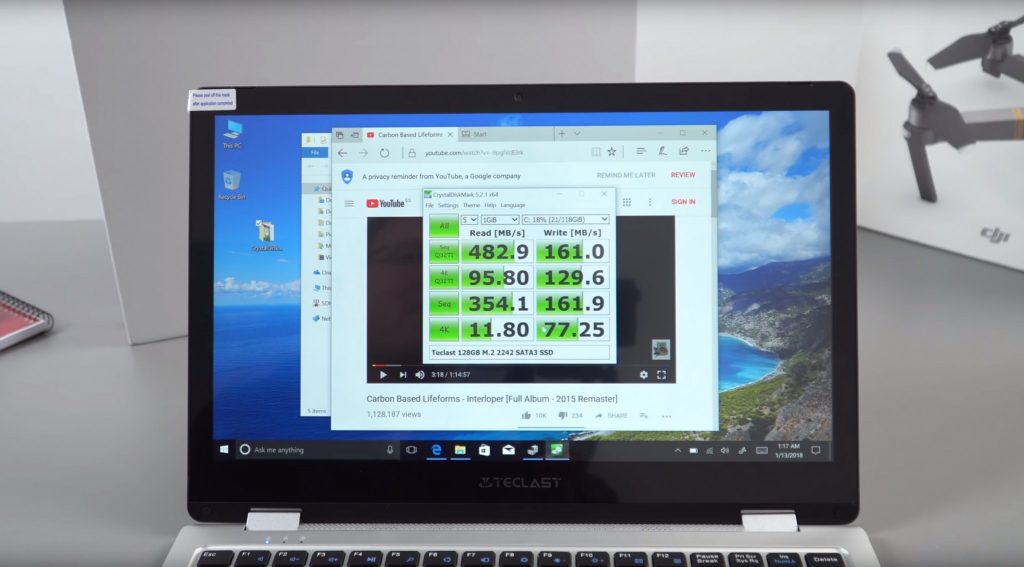
- This laptop uses Teclasts own SSD brand, 128GB so writes cap at around 170mb/s. Reads close to 500mb/s it’s good for this capacity of SSD.
- My Transcend 256GB SSD works fine, no issues. I’ll be using this for the review as 128GB makes it hard to install all the apps and games required for my review.
- Great having the easy access SSD hatch for upgrades. Not so great is we are limited to 2242 spec. Would be nice to have room for a 2260 and 2280 drive.
- The speakers are loud, but quite flat and can distort a little at 100% Not the greatest you’ll hear but better than some of the other Chinese tech I often review
- Wireless AC range is good so far in testing. Bluetooth is working as expected.
- All drivers can be found on Windows via the update system. So a new clean install of Windows isn’t an issue if you lack a drivers dump (I’ll supply one asap)
- Once fully charged and plugged in the battery will stay at 100%.
Overall no issues at present, full report in my review if anything does pop up as I use this as my main PC for a week.