

TechTablets › Forums › Chuwi Forums › Chuwi HiBook Discussion › Chuwi HiBook Pro will be released with 2560 x 1600 2K screen resolution and OGS
Tagged: chuwi hibook pro
- This topic has 25 replies, 8 voices, and was last updated 10 years, 4 months ago by
Alwin van der brugge.

-
AuthorPosts
-
May 28, 2016 at 8:34 pm #38933
This touchscreen starting to get annoying day by day, since I also type frequently using the touchscreen. Here are the text that I type on the touchscreen: thistext is typed on tscreen monitor wthut editing any mistaethat can occur in themiide of typing. as youcan see is is so bad that italways do mistakeat randm pace. i am typing at the rate same with can type with yipad. As you can see, typing using the touch screen is not an option, as it is so horrible. My previous iWork 10 also has this problem, but not as worse as this.
That can’t be normal. You must have got a lemon. I’d exchange it as defective and try another HiBook Pro. The malfunctioning screen may actually be related to the bad performance. Perhaps the HiBook Pro is a good tablet if you don’t get a faulty one? I couldn’t find any other reviews anywhere… but I can’t believe they’re all like that!
Philippians 2:4 Let each of you look not only to his own interests, but also to the interests of others.
May 30, 2016 at 1:50 am #39082So the screen is nice but the touch screen is messing it up? Is it also still slow and worse than the iwork 10?
Yes. The screen is quite nice compared to my iWork 10, but yeah, the touch screen is quite bad. It might just my tablet thought, need more people to confirm is this a problem or just my tablet is plain shit. It is pretty much unusable if you want to type using the touch screen, might work if you type slow enough though.
For speed wise, I notice it is noticeably slower than my iWork 10, probably because of the 2K screen, which is quite strange since Hi12 has 2K screen and same processor has no speed problem. The android is much much slower than the Windows (at least in my tablet). It could just be my tablet, need more people to confirm if this is a problem. I think it is mostly optimization problem on this particular type.
From what I see, this tablet doesn’t sell quite well. Until now, it only sells below 400 units on Taobao, which is quite low compared to another tablet, especially iWork 10.
I probably will not return it since I read on the problem Chuwi is very slow to process the repair, so I just have to live with this problem.
May 30, 2016 at 1:57 am #39083That can’t be normal. You must have got a lemon. I’d exchange it as defective and try another HiBook Pro. The malfunctioning screen may actually be related to the bad performance. Perhaps the HiBook Pro is a good tablet if you don’t get a faulty one? I couldn’t find any other reviews anywhere… but I can’t believe they’re all like that!
Yeah this is not normal even on Chinese tablet level. I believe it is my digitizer plain shitty.
Don’t really want to exchange it though, repair process is quite slow, even though I can send it back easily.
The review on Taobao is quite nice actually, only few saying slow CPUs but none saying about shitty touchscreen, and surprisingly most of them saying the touch screen is very sensitive.
Might need to rethink the need to exchange. My screen is quite perfect, no dust under screen, dead pixel I notice off, and zero backlight bleed.
May 30, 2016 at 4:50 pm #39159OGS!? I’m buying it.
May 30, 2016 at 10:33 pm #39234Yes one of the few OGS Chinese tablets now out. We need more of ’em! I’ve only seen the Onda v118 Core M I think it was, Cube i7, Xiaomi Mi Pad 2 and now this one with OGS. Great to have, but I’m worried that 2560 x 1600 will mean most games in Android will be slow. As it stands the 1920 x 1200 runs more of the demanding games at only 15-20 fps like Mortal Kombat X. So that the new 1600p resolution it will be a 5-second slide show.
Also to add, the iwork10 Ultimate has a very small gap between the glass and IPS panel below it. The HiBook is a good 3-4 times larger that gap. I’m just finishing up my HiBook Windows video review and disappointed in the Windows performance. Games are much slower, I think the HiBook needs some optimization and no doubt the HiBook Pro by the sounds of it.
@dlink377 Maybe your RAM is clocked to only 1066Mhz and not 1600Mhz which it should support? Enter the task manager and under the performance tab, in Memory have a look. It will look like this example (It’s my desktop PC sorry):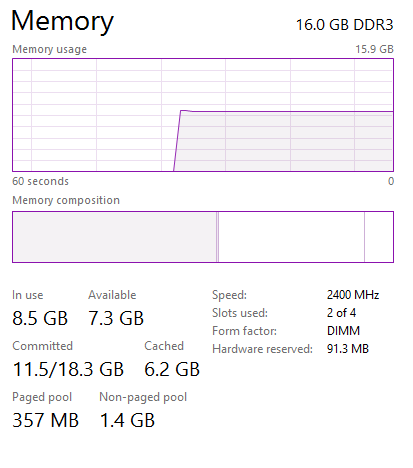
Chris | Admin
Please support us and help keep TechTablets online. Affiliate revenue is used to pay for the server, studio apartment (Techtablets HQ) and buy new tech to review. Without it, this site would be dead.
Next up for review:
Ordered and waiting for my: BMAX S15 & Teclast F6 Plus
Currently testing: LG G8X & Redmi K30May 31, 2016 at 1:56 am #39253Yes one of the few OGS Chinese tablets now out. We need more of ’em! I’ve only seen the Onda v118 Core M I think it was, Cube i7, Xiaomi Mi Pad 2 and now this one with OGS. Great to have, but I’m worried that 2560 x 1600 will mean most games in Android will be slow. As it stands the 1920 x 1200 runs more of the demanding games at only 15-20 fps like Mortal Kombat X. So that the new 1600p resolution it will be a 5-second slide show. Also to add, the iwork10 Ultimate has a very small gap between the glass and IPS panel below it. The HiBook is a good 3-4 times larger that gap. I’m just finishing up my HiBook Windows video review and disappointed in the Windows performance. Games are much slower, I think the HiBook needs some optimization and no doubt the HiBook Pro by the sounds of it. @dlink377 Maybe your RAM is clocked to only 1066Mhz and not 1600Mhz which it should support? Enter the task manager and under the performance tab, in Memory have a look. It will look like this example (It’s my desktop PC sorry):
Yes, my RAM is clocked at 1067Mhz rather than 1600Mhz. I already set it to 1600Mhz, should give me small boost in performance.
Anyway, I’ve done few small tweaks to increase the performance:
- Disabling background Windows 10 apps
- Disabling telemetry services and cortana, including random background desktop apps
- Increase Intel HD Graphics to take 512MB of my RAM fixed on the BIOS, since it is 2K screen, probably need more VRAM than normal FHD screen.
- Increase to 1600Mhz RAM clock recently
- Disabling Intel Dynamic Thermal DPTF on BIOS
Disabling Connected Standby in registry, and set to High Performance rather than balancedThis will also disable the sleep function of the tablet, so if you close the lid or press the power button, it will just hibernate. Just stick with CSEnabled to 1.- Enable smooth scrolling on Google chrome using about:flags
- Disabling Windows Update service and Windows Defender
- Set the tablet to hibernate after 30 mins of sleeping (to prevent any Connected standby bullshit)
All of those give me much better performance than my first day use.
PS: Wow, a 2400Mhz clock RAM, I bought DDR4 2400Mhz stick for my i5 Skylake just to found out 2400Mhz just supported on K variant. I am so stupid to not to do some research.
Edit: Intel DPTF rather than DMTF, and add Windows Update and Defender
Edit2: Connected Standby must be turned on for sleep to work.
May 31, 2016 at 2:33 am #39260Nice list there, @dlink337. That’s going to surely help some people, even if they don’t have this model.
I tried to look up DTMF to learn more about it… did you mean DPTF?
Philippians 2:4 Let each of you look not only to his own interests, but also to the interests of others.
May 31, 2016 at 5:42 am #39271Nice list there, @dlink337. That’s going to surely help some people, even if they don’t have this model. I tried to look up DTMF to learn more about it… did you mean DPTF?
If your tablet performance is good enough I don’t think the need to cripple it by disabling functions, haha. Also the GPU is now using 512MB, so your RAM effectively only 3.4GB, which is quite low for my needs, especially Chrome is big memory hog. I still need to use Chrome just because of the uBlock Origin, as Microsoft Edge doesn’t have adblocker that I know of.
Yes, it is Intel DPTF, edited it. And I also recently disable Windows Update service and Windows Defender.
I’ve done a bit research of what is the purpose of DPTF, seems it is just for extending battery life and prevent so much heat that will cause skin to be uncomfortable. I’ve disabled it for one night though, will need to observe few more days for the effect. My battery drain still on okay rate though, 20% for 1 hour mixed usage (50% brightness).
Now the tablet performance is quite okay, although still major slow down using chrome on big website. At least YouTube 1080P doesn’t shutter so much already. Touch screen still shit as always, but I found out if you use the tablet as potrait mode, it is so much responsive, but still don’t register touch especially keys on the edges (a, or space).
May 31, 2016 at 6:48 am #39282If your tablet performance is good enough I don’t think the need to cripple it by disabling functions, haha. Also the GPU is now using 512MB, so your RAM effectively only 3.4GB, which is quite low for my needs, especially Chrome is big memory hog. I still need to use Chrome just because of the uBlock Origin, as Microsoft Edge doesn’t have adblocker that I know of.
My browser of choice has changed from Chrome to Firefox over the last year or so. I also insist on using uBlock Origin in all my browsers. I believe Firefox has better performance than Chrome, and while I’m a Google fan, I love the ethics and drive behind Mozilla. They also support Vista still, which makes them the only real choice for some of my holdout customers who don’t want to replace their old still-working computers, but need current browsers. Chrome refuses to play. The other better performing browser is Opera. I don’t currently use it on anything, but I’ve never had problems with it, and it has a uBlock Origin add-in. This browser performance comparison I found might be interesting to you: http://www.pcworld.com/article/2966127/browsers/the-best-web-browser-of-2015-firefox-chrome-edge-ie-and-opera-compared.html?page=1
Yes, it is Intel DPTF, edited it. And I also recently disable Windows Update service and Windows Defender. I’ve done a bit research of what is the purpose of DPTF, seems it is just for extending battery life and prevent so much heat that will cause skin to be uncomfortable. I’ve disabled it for one night though, will need to observe few more days for the effect. My battery drain still on okay rate though, 20% for 1 hour mixed usage (50% brightness).
Ok, that’s good to know. There’s a chance it doesn’t impact heat in any significant way, but hampers performance pretty badly. I have PassMark’s BurnIn-Test & PerformanceTest software and it sounds like I should run them and track temps and performance on both settings to see what happens! I only have the standard HiBook, but the results will still be meaningful.
Now the tablet performance is quite okay, although still major slow down using chrome on big website. At least YouTube 1080P doesn’t shutter so much already. Touch screen still shit as always, but I found out if you use the tablet as potrait mode, it is so much responsive, but still don’t register touch especially keys on the edges (a, or space).
That must be so frustrating about the touchscreen. It would be such a deal killer for me. I’m looking forward to reading some other reviews on this tablet to see if it’s prone to it, or what.
Philippians 2:4 Let each of you look not only to his own interests, but also to the interests of others.
May 31, 2016 at 8:44 am #39308My browser of choice has changed from Chrome to Firefox over the last year or so. I also insist on using uBlock Origin in all my browsers. I believe Firefox has better performance than Chrome, and while I’m a Google fan, I love the ethics and drive behind Mozilla. They also support Vista still, which makes them the only real choice for some of my holdout customers who don’t want to replace their old still-working computers, but need current browsers. Chrome refuses to play. The other better performing browser is Opera. I don’t currently use it on anything, but I’ve never had problems with it, and it has a uBlock Origin add-in. This browser performance comparison I found might be interesting to you: http://www.pcworld.com/article/2966127/browsers/the-best-web-browser-of-2015-firefox-chrome-edge-ie-and-opera-compared.html?page=1<span style=”line-height: 1.5;”>
</span>
I actually use Firefox exclusively until 2013. The addons collection is probably beats any browser available today. I just don’t use it anymore since Chrome is more common, and I just use what most people use to prevent any strange problem. Also most website seems optimized to Webkit rather than Gecko, so I just follow what the standard.
I always have Firefox and Chrome installed in all of my computer, just for backup. I will probably try Firefox on the tablet later, to see if it is more stable and faster than memory hogging Chrome. It is a bit strange since it was Firefox that usually called memory hoggers, so most people move from it, now it seems Chrome is the memory hoggers. :).
Ok, that’s good to know. There’s a chance it doesn’t impact heat in any significant way, but hampers performance pretty badly. I have PassMark’s BurnIn-Test & PerformanceTest software and it sounds like I should run them and track temps and performance on both settings to see what happens! I only have the standard HiBook, but the results will still be meaningful.
I am planning to use AIDA64 system stability test, but it is charging now, so probably will do the test midnight, just to check if it overheating or not.
That must be so frustrating about the touchscreen. It would be such a deal killer for me. I’m looking forward to reading some other reviews on this tablet to see if it’s prone to it, or what.
I suppose this is just a problem with my particular tablet, since I cannot find any review as evidence that this touch panel is plain shitty. I checked both Taobao and Chinese Chuwi Forum and there are none report regarding the touch screen. I am planning to open the tablet to see anything that can be fixed, maybe just the touchscreen connector loose.
June 2, 2016 at 6:18 am #39568How is the battery life?
-
AuthorPosts





- You must be logged in to reply to this topic.
