TechTablets › Forums › Teclast Forums › X98 Plus Discussion › OTG hub or adapter that works with the X98 Plus
Tagged: Ikea usb mircro charger
- This topic has 47 replies, 20 voices, and was last updated 9 years, 3 months ago by
Chris.

-
AuthorPosts
-
February 28, 2016 at 3:44 pm #27410
Anonymous
Inactive- Posts: 44
Same as MadMax i am keen to know more about Eduardo’s powered USB expansion hub before i splash the cash. Especially so in the case of the Teclast X98 Plus dual boot, as goodness knows what tweaks and workarounds Teclast have done to make the tablet work. Eduardo, i will be grateful if you can you provide more detail of the tests that you did. I’m specifically interested in Windows 10 to connect a USB mouse, keyboard and memory stick and this is the important bit at the same time provide charge to the tablet.
March 12, 2016 at 7:57 am #28987Eduardo: Really it works with all devices connected to the hub and is still charging.?
March 16, 2016 at 6:19 pm #29669so… anyone find a working OTG HUB that charge this tablet??
May 1, 2016 at 8:01 pm #35745Great! this is my third tablet and the third one that does not fully support OTG HUB chargers! 🙂 I’ve found out that in Aliexpress some sellers mention that this HUB&chargers are not supported by X98 plus tablets…
Any update? Is there any device that works with the X98 plus? I have the typical 4port HUB and it works with another tablet (it keeps the battery level, but can’t charge), with an ASUS charger and a good cable, but no luck…
May 2, 2016 at 7:13 pm #35836It’s the tablet it self which is not able to charge at the same time..
May 2, 2016 at 11:25 pm #35861Does this work? http://www.ebay.com/itm/322086694275 I might buy one.
May 3, 2016 at 4:03 am #35875Razer it does not, i have like three of them from different sellers and none of them charges or at least just for couple of seconds. Like a lot of people mentioned it is the problem with our tablet.</p>
May 3, 2016 at 5:59 am #35882That sucks i really like to charge and have usb outputs.
May 3, 2016 at 6:18 am #35885That sucks i really like to charge and have usb outputs.
You won’t be able to do that. Only if someone could hack the bios and he/she is able to enable it. But I guess this is difficult.
Just have a look to this topic:
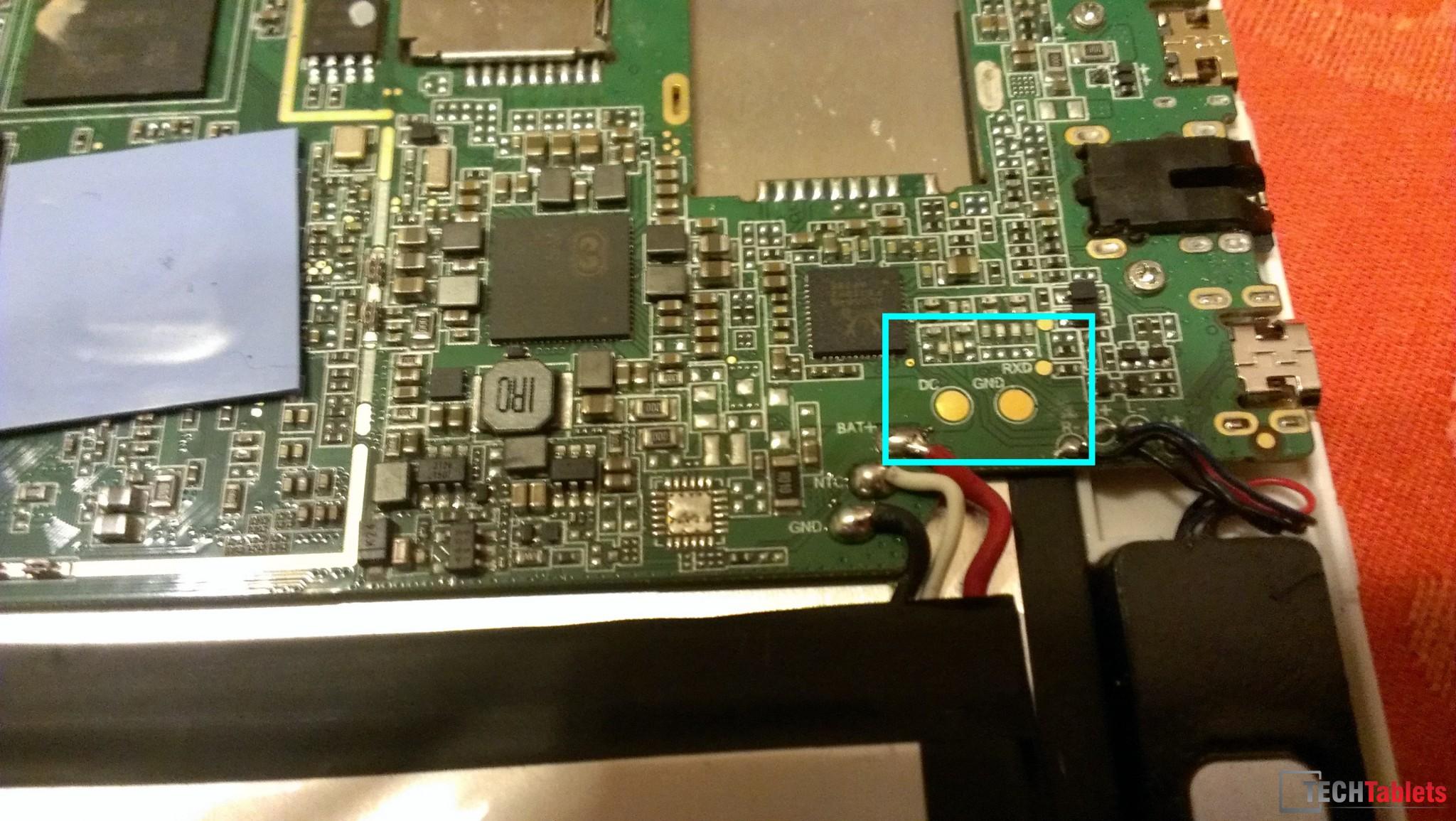
May 3, 2016 at 8:12 am #35894I think it should be possible to use an external charger on our tablets, see here:
http://techtablets.com/wp-content/uploads/2016/03/IMAG0430.jpg
May 15, 2016 at 9:00 pm #37468Any update on this? It looks like the BIOS way is not safe….
May 17, 2016 at 12:47 am #37616Not sure if it’ll work, but my old Dell 8″ Windows tablet behaved like this – apparently because of a BIOS setting from what I had read. To get it to work, I bought a cheap charge/sync cable from eBay, and started the tablet on charge, until post BIOS (IE Windows logo came up), then switched to sync mode. This allowed the tablet to keep charging, and since it was plugged into a cheap powered hub (regular, not otg – a handful of splitters were involved!), I had full time mouse keyboard, external drive, and card reader. I was even able to drive a 1680×1050 monitor over USB, though it was a bit laggy (usb 2.0 FTL) for anything beyond casual browsing and office use – no full screen YouTube!
The only downside was that if it wasn’t touched almost daily, it would go to sleep long enough to discharge and I’d need to restart the process. Not a huge deal for me, but a show stopper for my wife, who gamely used it for 6 months, before I upgraded the tablet.
No guarantee that this will work, but I can probably track down a part list if anyone is interested. (Total cost was about $10, plus shipping from China to Canada).
May 17, 2016 at 9:42 am #37669Brendon
Unfortunately it does not work on X98 Plus.
June 14, 2016 at 7:42 pm #40993Finally I decided to buy the hub recommended by Eduardo because I want to use the tablet like a laptop too….. but it does not work ? Did anyone find the way to use a powered usb otg hub?
June 16, 2016 at 6:01 pm #41198Apparently it is possible
http://pinoutsguide.com/PortableDevices/usb_otg_pinout.shtml
You need to put a certain type of resistor between the ID connection instead of the standard gnd
I’ll post if I have success
Attachments:
You must be logged in to view attached files. -
AuthorPosts





- You must be logged in to reply to this topic.