

TechTablets › Forums › Chuwi Forums › Chuwi Vi10 Discussion › [SOLVED]Battery recalibration for maximum battery
Tagged: Battery capacity, Battery life, Chuwi Vi10
- This topic has 15 replies, 1 voice, and was last updated 7 months, 3 weeks ago by
atrao.

-
AuthorPosts
-
June 25, 2015 at 5:34 am #6190
Hi Chris and all the Vi10 owner,
i read from Chris’ review about Vi10 and his statement about battery life seems very good, with total runtime exceeding 7 hours.
Meanwhile mine barely exceed 6 hours 30 minutes.I try to use same widget like Chris does to measure the battery, which is Battery Bar. I found my capacity to be lower than the one in the review product. Here is the difference:
Chris:
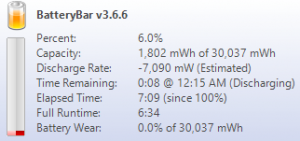
My Vi10
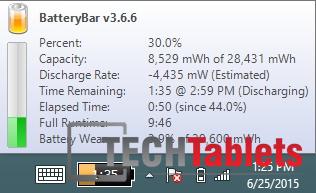
I am a very light user. My screen brightness is not even 40%, only around 25-30%, very little internet browsing and intensive stuff. I sit close to the WiFi router, and my bluetooth is turned off. Windows Update also turned off.
Is there anyone also having same problem? I suspect the different in batch also affect the battery that use by Chuwi manufacturer.PS: also i find sometime the screen is auto adjusting the brightness, even though i have turned off adaptive brightness in PC setting. When i view something with many white parts in the screen, such as Windows Explorer, Firefox, the screen turn up the brightness a little bit. When i view something with many dark parts, it turns down the brightness too.
Attachments:
You must be logged in to view attached files.June 28, 2015 at 4:43 pm #6318Hi, this is common. I’ve had this brought up before with a user. Try fully draining the battery until it powers off. Then try and power it on again, if if only the boot logo appears. Keep doing this until it is well and truly dead. Leaving the tablet off overnight leave it to charge. Check again and you should have my reading.
Chris | Admin
Please support us and help keep TechTablets online. Affiliate revenue is used to pay for the server, studio apartment (Techtablets HQ) and buy new tech to review. Without it, this site would be dead.
Next up for review:
Ordered and waiting for my: BMAX S15 & Teclast F6 Plus
Currently testing: LG G8X & Redmi K30July 2, 2015 at 3:59 pm #6461Is it safe to do so, Chris? If i am not mistaken, a lithium ion is not be fully depleted.
Regardless, i will try your suggestion. Thank you 😀July 2, 2015 at 10:38 pm #6474I don’t think it’s going to hurt it if you do it once or twice to calibrate the battery. I do it to all my Chinese tablets as often they sit at 7% for a while.
Chris | Admin
Please support us and help keep TechTablets online. Affiliate revenue is used to pay for the server, studio apartment (Techtablets HQ) and buy new tech to review. Without it, this site would be dead.
Next up for review:
Ordered and waiting for my: BMAX S15 & Teclast F6 Plus
Currently testing: LG G8X & Redmi K30July 7, 2015 at 2:34 am #6618I don’t think it’s going to hurt it if you do it once or twice to calibrate the battery. I do it to all my Chinese tablets as often they sit at 7% for a while.
Chris, thank you very much for your suggestion. I drain my battery to 5% but Windows turn it off automatically before it hits 2%, i can’t set below 2% in Power Option menu. Good protection feature, but i need to completely drain until no power left, so with only 3% left, i just go into BIOS setting by pressing ‘Esc’ key when Chuwi chinese writing logo appear when booting, left it on for approx 45 min until it powered off.
Now i have the same battery capacity with yours.
July 7, 2015 at 10:56 am #6631Yes this method seems to work well.
Chris | Admin
Please support us and help keep TechTablets online. Affiliate revenue is used to pay for the server, studio apartment (Techtablets HQ) and buy new tech to review. Without it, this site would be dead.
Next up for review:
Ordered and waiting for my: BMAX S15 & Teclast F6 Plus
Currently testing: LG G8X & Redmi K30August 3, 2015 at 5:38 pm #8382Thanks for this information. Seems that they must not calibrate properly out of factory or I’m wondering if switching between OS’s may cause some calibration issue. Anyway I followed this on my Vi10Pro and noticed a good jump in expected run time. Now shows as almost 9 hours.
PS. Love the site Chris. Keep up the awesome work with the reviews etc.
August 15, 2015 at 11:36 am #9755I did the recalibration and when i booted up it did show that now it is ~29k mWh but after playing and working. I noticed that it went down again. What’s the problem??
Attachments:
You must be logged in to view attached files.August 15, 2015 at 12:29 pm #9758Battery wear? Mine is like this:
I can still get 6 1/2 hours so I’m happy with that.
Attachments:
You must be logged in to view attached files.Chris | Admin
Please support us and help keep TechTablets online. Affiliate revenue is used to pay for the server, studio apartment (Techtablets HQ) and buy new tech to review. Without it, this site would be dead.
Next up for review:
Ordered and waiting for my: BMAX S15 & Teclast F6 Plus
Currently testing: LG G8X & Redmi K30August 16, 2015 at 5:19 am #9823Probably, but i noticed that i only get 3:49 full runtime. Bad battery perhaps or apps use alot of battery??
August 17, 2015 at 11:26 am #98936 hours? HOW? I can’t belive. Only with wifi+firefox, 50%light runed 5 hours. And no more. I think, somebody laying, it won’t running more than 5 hours. If i playing on droid, with Angry birds2, or Iron force battery life is only 3 hour.
August 17, 2015 at 2:35 pm #9908@freeware Gaming takes a big hit on the battery. If I game it will be around 3 hours. But with IE, Wifi on, about 40% battery I can get 6+ hours all the time. I have full WiFi signal. I have proof in my review too, I got 6:30 hours. I still get around this amount with web use. I have no reason to lie, why would I? Battery life varies from user to user. Cycle your battery a few times also helps you get full run times.
Are you running things in the background that are using up battery life too?
Chris | Admin
Please support us and help keep TechTablets online. Affiliate revenue is used to pay for the server, studio apartment (Techtablets HQ) and buy new tech to review. Without it, this site would be dead.
Next up for review:
Ordered and waiting for my: BMAX S15 & Teclast F6 Plus
Currently testing: LG G8X & Redmi K30August 18, 2015 at 6:28 pm #10005If i use android, at 8% automatically shutdown. If i turn on it after that in win8, running 1hour. Android cant start. So now i believe 6 hour. How can repair android? Today at 100% deleted battery stat, but not helped. The windows shows 7% for 50min, and after than fall to 3% quickly.
September 2, 2015 at 4:00 pm #10762If i use android, at 8% automatically shutdown. If i turn on it after that in win8, running 1hour. Android cant start. So now i believe 6 hour. How can repair android? Today at 100% deleted battery stat, but not helped. The windows shows 7% for 50min, and after than fall to 3% quickly.
I feel the same!
September 3, 2015 at 1:00 am #10808Battery calibration for LiON units is supposed to happen over time with natural use.
The battery reaches its peak performance after a few deep cycles so its totally normal if you want to drain or cycle the battery however note that naturally, through regular use cycles the battery life should improve over time (for the first few hundred cycles)
Additionally if you are using Windows 8.1 or 10 it is possible you have recieved your Windows configuration set as Connected Standby by default.
This is a feature meant for SOC systems like the one on the Vi10 and the purpose is to have Low power standby, similar to Android where the device just sleeps meanwhile allowing background connectivity.
This is the reason you need a widget to tell you how much battery is remaining. When Connected Standby is enabled the power settings are limited and the time remaining feature is disabled.
However you can revert to regular power modes and you will have a longer lasting battery life at the cost of some performance (sleep and wake working slower like as if it was a laptop as well as true hibernation)
Quick google search should reveal what the registry change is to disable Connected Standby
-
AuthorPosts





- You must be logged in to reply to this topic.
