


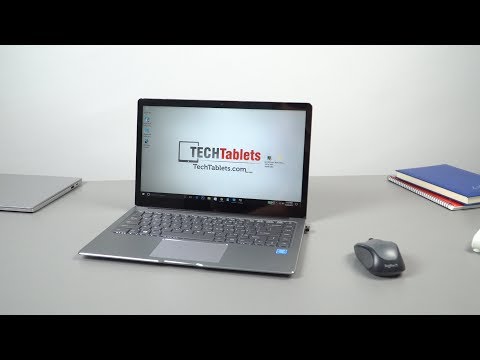
This Chuwi Lapbook Air could be the last Apollo Lake N3450 laptop I review, and possibly the best one? Maybe even topping the EZbook 3 Pro V4. It’s also the first Apollo Lake laptop to get 8GB of RAM, only a few Apollo Lake mini PC’s use 8GB and the rest of the laptops I’ve reviewed have 6GB or 4GB. So it’s great having the extra RAM.
Video index:
02:11 – Design
04:15 – Keyboard
05:35 – First Boot
06:32 – Memory speed
06:57 – Precision Touchpad
07:13 – Screen
07:41 – Backlit Keys
08:00 – SSD Installation
08:37 – Bios
09:18 – Benchmarks
10:23 – Speakers
10:48 – Linux Test
11:16 – First Impressions
11:33 – Pros & Cons (So Far)
The eMMC is also a Samsung 128GB one with very good speeds (as per the results in the video above). The screen is a fully laminated AUO B140HAN01.7 from AU Optronics. Not quite the same panel as the one in the Chuwi Lapbook 14.1, but similar brightness and colors. It’s also super bright.
The build quality is good, the screen bezels and dark grey look of the Lapbook air remind me a lot of the Mi Notebook Pro I recently reviewed a premium laptop. The touch and keyboard are so far great. The touchpad is a precision one like the EZBook 3 Pro V4’s and the keyboard also reminds me of the one on the Lapbook 14.1, plenty of travel around 1.5mm and as a result, the keys are quite high. But very comfortable I think to type on. It’s also backlit, and due to the high, some light can be seen under the keys. A little distracting maybe and some of the keys are brighter than others. I’ve definitely seen better backlighting.
My unit also has a minor bend in the middle. If you have a good eye you can see in it the video, not sure if this is from DHL ruff handling or it left the factory like this.
The RAM I see is only 1333Mhz spec & not 1600Mhz like other laptops, Geekbench 4 tests are a little lower as a result. But really isn’t much of an issue as the RAM times are better than the 6GB units that normally have 15 – 15 – 15 latency timings, this has 12 – 12 -12 according to HW info. In my quick gaming test, the 8GB of RAM seems to help.
And with that power limit disabled my Half-Life 2 lost coast benchmark at 720p was 104 FPS. Which is the fastest score I’ve seen to date on an Apollo lake? The Cube iWork 5x gets 58 FPS with the factory 6W TDP, the Jumper EZBook 3 Pro with the power limit disabled gets 89 FPS so it’s about 10 percent faster than the EBook 3 Pro V4.
So far the initial impression is this is shaping up to be the fastest & best Apollo Lake laptop I’ve reviewed with the second best screen, the Chuwi Lapbook 12.3’s Surface Pro screen can’t be beaten. But it’s also the most expensive selling for around $380 USD over at Gearbest with coupon GBTPC
First impressions & further info:
- The build is good, but not perfect. The middle of the keyboard on my unit is bent in a little
- The bios is fully unlocked, power limits can be disabled to greatly boost FPS in games. But increase temps
- The battery is 38Wh, so far estimates so around 7-8 hours light use like other Apollo Lakes.
- The Lapbook Air feels faster than other N3450 laptops. I think it’s the extra RAM that’s helping.
- Chuwi is using Samsung DF4128, eMMC 5.1 spec with 280 MB/s reads & 120 MB/s writes
- It’s partitioned like so 40GB for Windows 75GB for Data
- Intel Wireless AC 3165 chipset. Good range and speeds.
- Camera is a 2MP unit with two microphones either side. The screen protector covers them.
- The screen feels like tempered scratch resistant glass. The hardness scale according to Chuwi is 7H
- There is no PWM flicker on the screen at all. None my eyes can see anyway
- Reflections are a bit of an issue on the glass covered screen (As expected) not as good as the Lapbook 14.1’s anti-glare covered screen.
- Maximum temps with the power limit disabled are 87 degrees C. No thermal throttling after 20 minutes gaming. But could do with a thermal mod if you really wanted to push it hard without the power limit on.
- The touchpad feels like the same one as the Jumper EZBook 3 Pro V4’s, this is a great touchpad.
- MicroSD cards it in flush and have max speeds of 23/MBS (It’s attached to a USB 2 hub)
- The Windows 10 Home version isn’t the latest creators update build. But you can update to it of course
- The keyboard has a huge amount of shortcuts, everything is there including number pad shortcuts.
- The speakers sound exactly the same as the EZBook 3 Pro’s, maybe the same hardware? They could be louder.
- The two USB 3.0 ports on the right side are a little close together, both power hard drives without issues.
- The 3.5mm sound is loud and clean