

TechTablets › Forums › Onda Forums › v919 3G Core M Discussion › Mine came today
Tagged: Onda V919 3G Core M
- This topic has 34 replies, 7 voices, and was last updated 11 years, 1 month ago by
Will Maitner.

-
AuthorPosts
-
August 31, 2015 at 7:49 pm #10668
So far so good. Booted into an Asian laced Android without Google services. Expected. Never using this setup before took a minute to find how to switch to Windows. My Windows 10 Pro was activated and in English. Oh, and it works with my Plugable UD-Pro8 dock, well, not for charging, but everything else.
More info to come as I upgrade the SSD..
Attachments:
You must be logged in to view attached files.August 31, 2015 at 10:45 pm #10681Good to hear, less issues than mine which is a first release unit. Does your mic work? And does your sim card read work? Both mine and broken… And can you try and run any game in a lower resolution and see if you have scaling issues. So far those are my problems inhibiting my review and desire to fully review the V919 3G Core M….I’ve also found it becomes incredibly slow at times and bogs down for now reason, like a strange throttling effect. Only a reboot will fix it.
I flashed the Android 5 rom today, and I see no way to switch to windows anywhere within the rom. Can you tell me how to switch over? Not the pull-down menu or the power button menu like most tablets. Seems I’m missing a Windows switching app somewhere?
Chris | Admin
Please support us and help keep TechTablets online. Affiliate revenue is used to pay for the server, studio apartment (Techtablets HQ) and buy new tech to review. Without it, this site would be dead.
Next up for review:
Ordered and waiting for my: BMAX S15 & Teclast F6 Plus
Currently testing: LG G8X & Redmi K30September 1, 2015 at 4:12 am #10697If you slide the notifications down further, to where you adjust brightness, that is where the switcher is hiding. I’m working on getting Google Play Store installed.
Edit: I changed the resolution in Windows to 1280×1024 and saw the scaling issue. I’m going to play some more with it after I’ve upgraded the SSD (in about 45 minutes)..
September 1, 2015 at 7:55 pm #10719Seems like this resolution thing is on going… that’s a shame.
Chris I never noticed this lag issue with mine and I can’t remember the last time I did a full reboot, it just hibernates overnight.
Also to add I did set the ram speed to 1333 from auto and I noticed a real difference in chrome, the scrolling etc was so much better. My battery runtime has been totally uneffected.
September 1, 2015 at 8:33 pm #10723Well, I swapped out the SSD. Installed Windows 10 Pro from a USB stick, skipped putting in the key, where it asked twice, but once I logged into my Microsoft account, it activated Windows. No additional key needed. Now working on drivers. I’ll update about the graphic issue once I’m done.
September 1, 2015 at 9:00 pm #10724@bill-hedworth Any tips on the ram setting, what steps did you take? Overclocking bios tab and I see Ram at the bottom, just a bit worried as the last time I changed a bios setting in a Chinese tablet I bricked it.
The slow down I’m experiencing hasn’t come back, again today. But it feels like throttling, but the thermals are good. However, the system is half as fast and geekbench 3 scores halved. As for my microphone and sim card slot not working, that is going to have to be fixed by opening it up I think and checking the connections.
I;m going to try Android on it just for the hell of it, never seen Android on a Core M natively, just emulated. It should fly with that 4GB and 2.0Ghz x 2 broadwell ulv cores.
Chris | Admin
Please support us and help keep TechTablets online. Affiliate revenue is used to pay for the server, studio apartment (Techtablets HQ) and buy new tech to review. Without it, this site would be dead.
Next up for review:
Ordered and waiting for my: BMAX S15 & Teclast F6 Plus
Currently testing: LG G8X & Redmi K30September 1, 2015 at 9:06 pm #10725It wasn’t in the overclocking tab on mine, just in the normal type configurations it had memory speed set to “auto” I just changed it to 1333 been running for a few days totally stable.
September 1, 2015 at 9:25 pm #10730Okay thanks, I’ll look for that setting. Downloading the Android image now.
Chris | Admin
Please support us and help keep TechTablets online. Affiliate revenue is used to pay for the server, studio apartment (Techtablets HQ) and buy new tech to review. Without it, this site would be dead.
Next up for review:
Ordered and waiting for my: BMAX S15 & Teclast F6 Plus
Currently testing: LG G8X & Redmi K30September 1, 2015 at 9:53 pm #10731If you can figure out installing Google Apps on that Android image….. =)
September 2, 2015 at 12:26 pm #10758Well that was fun, I bricked the tablet flashing the dual boot bios… @$^%$#!! Now I see why Onda pulled it from their website.
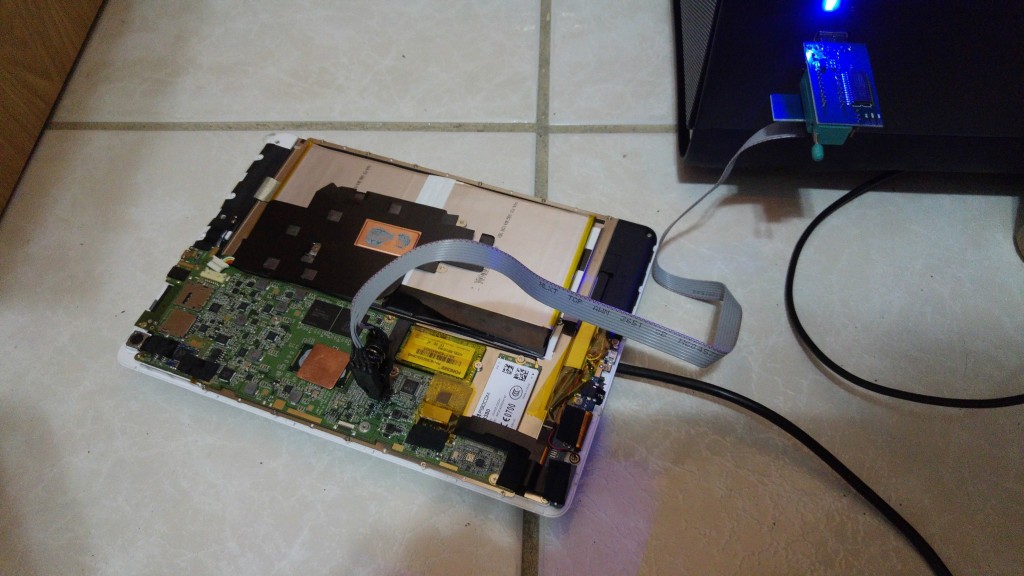
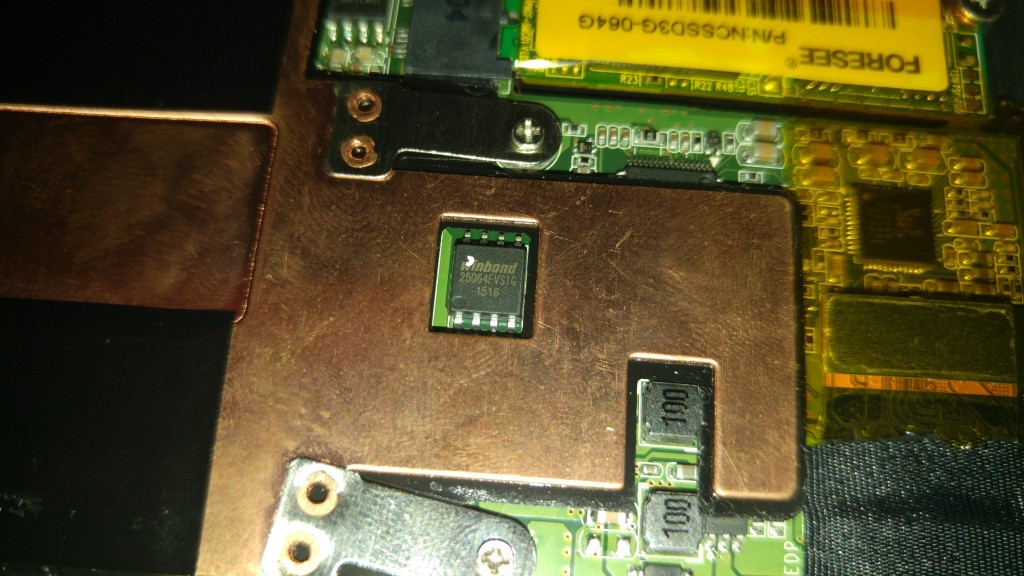
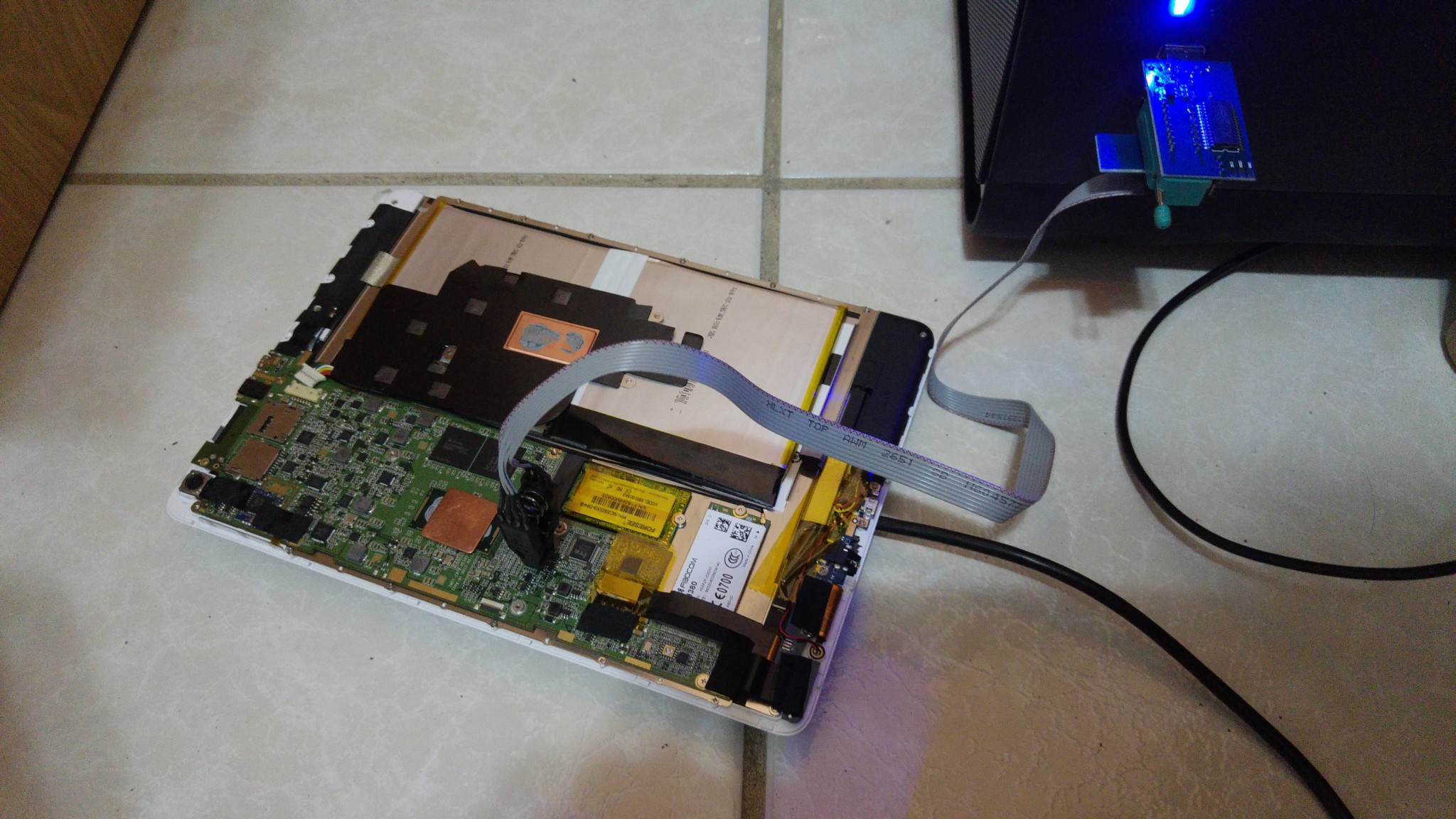
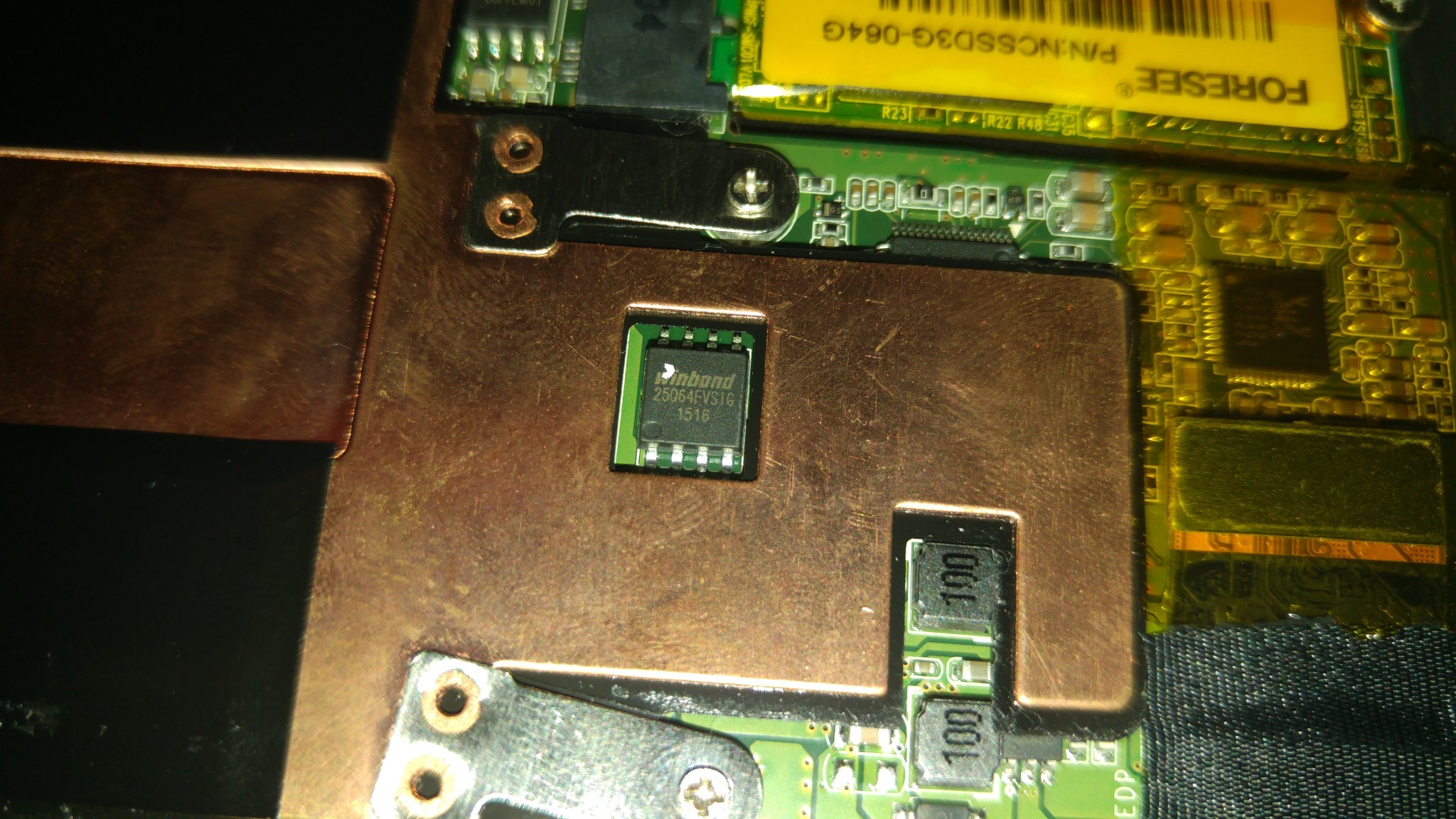
All went well according to the onscreen prompt, but it failed to boot. Just a red light in the home button. I’m lucky I have my USB flasher for the Winbond 8 pin EPROMs. (by the way the bios chip is a Winbond 25Q64FvIg 1516) I will manually reflash the dual boot bios with a the clip and flasher I have. Lets hope the chip can handle the 3.3volts of the flasher and my bios isn’t fired in the process or I will have a $389 brick. 🙁
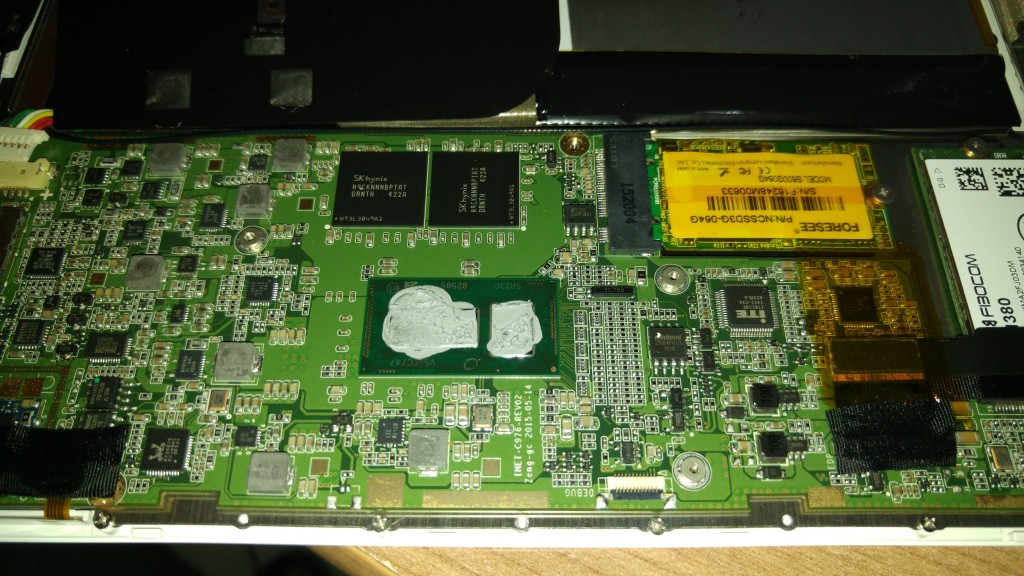
I recorded a video if the tablet’s internals and took some photos I will upload them soon. I had to open the tablet up and remove the headsink to access the bios, the clip wouldn’t fit with the surrounding copper heat sink.
Chris | Admin
Please support us and help keep TechTablets online. Affiliate revenue is used to pay for the server, studio apartment (Techtablets HQ) and buy new tech to review. Without it, this site would be dead.
Next up for review:
Ordered and waiting for my: BMAX S15 & Teclast F6 Plus
Currently testing: LG G8X & Redmi K30September 2, 2015 at 10:16 pm #10792Well, mine is coming along nicely. Installed the Transcend 256gb SSD. The benchmarks below are my current install on this SSD with the driver rar. If someone figures out how to add Android back on, root it and install Google apps, I’ll be happy. Right now I’m trying Duos..
Attachments:
You must be logged in to view attached files.September 3, 2015 at 1:17 am #10812Well mines dead, I managed to reflash the bios using the programmer. But it will not power on. I’m not sure what is going on. It’s late and I’ll have to try again. Here are some internal shots and trying to flash it. I had to remove the heat spreader to get at the eprom…
Chris | Admin
Please support us and help keep TechTablets online. Affiliate revenue is used to pay for the server, studio apartment (Techtablets HQ) and buy new tech to review. Without it, this site would be dead.
Next up for review:
Ordered and waiting for my: BMAX S15 & Teclast F6 Plus
Currently testing: LG G8X & Redmi K30September 3, 2015 at 2:52 am #10818The W25Q64FVSIG is a 3.3V chip so it should work with the programmer, i also noticed that version 1.18 sometimes causes problems. Version 1.23 seems to work fine but is only available as trial.
What i’m mostly doing is: identify chip with 1.18, then with 1.23 Erase -> Blank -> open Bios file -> Write -> Verify
Attachments:
You must be logged in to view attached files.September 3, 2015 at 3:06 am #10820Anonymous
Inactive- Posts: 41
…..If someone figures out how to add Android back on, root it and install Google apps, I’ll be happy..
I was messing around with changing partition sizes and killed the android partition. Putting it back on wasn’t too tough. The hardest part was trying to make sense of Chinese translated to English instructions. You can get the instructions from the Onda Forum site and the files from Techtablets including the hardware drivers .
In a nutshell first setup a keyboard and mouse then you install their Android images and then the Windows 10 image. The reboot after the Windows update will be Windows 10 and it will be all in Chinese. I wouldn’t even bother trying to change it to English. Just enter quick info just to get you past the opening screens and on the desktop. Insert your USB Windows install stick and from within Windows use file manager to run “setup” which will launch the English setup routine. You will get a few warns about the language is about to change which of course is what want. Don’t delete or format any partitions. You just want to update the current install. I can’t quite remember but I think you want delete personal files etc. And start fresh. After the setup Completes you will have a clean English Windows 10 setup. Go into the disk clean program to delete the system back that was made of the Chinese version of Windows. If you want you can go into recovery and do another complete reset. Finally install all the device drivers and then the OS switching software and you are all set.
September 3, 2015 at 3:15 am #10821Well campers, looks like my 3g isn’t going to work. Doesn’t even recognize the sim card is installed. I wonder if there is a driver missing from the Onda driver pack, as I end up with one unknown device after installing the whole pack. Maybe that’s why my 3G modem doesn’t work…
-
AuthorPosts




- You must be logged in to reply to this topic.
