

TechTablets › Forums › General › General Discussion › Server upgrade and move to the EU
- This topic has 28 replies, 7 voices, and was last updated 11 years, 2 months ago by
 Chris G.
-
AuthorPosts
-
August 7, 2015 at 10:09 pm #8992
Yes it says Howdy.
When I click on messages it takes me to:
August 7, 2015 at 10:42 pm #8994I’m testing it on other ID’s here and it seems to be all working, can you please try again?
August 7, 2015 at 11:03 pm #8997Still have the problem. It may be related to the fact that I have to login using google.
due to earlier issues, i dont know my password and reset wasnt working
August 7, 2015 at 11:10 pm #9000Still have the problem. It may be related to the fact that I have to login using google.
due to earlier issues, i dont know my password and reset wasnt working
So it was working before the server move / issues?
Chris | Admin
Please support us and help keep TechTablets online. Affiliate revenue is used to pay for the server, studio apartment (Techtablets HQ) and buy new tech to review. Without it, this site would be dead.
Next up for review:
Ordered and waiting for my: BMAX S15 & Teclast F6 Plus
Currently testing: LG G8X & Redmi K30August 7, 2015 at 11:28 pm #9004So it was working before the server move / issues?
Yes it was.
I tried a password reset again and it did the same as last time. I click on the emailed reset link and it takes me here:
http://techtablets.com/#login?action=reset_success
Of course it didn’t let me specify a password
August 7, 2015 at 11:40 pm #9005So it was working before the server move / issues?
Yes it was.
I tried a password reset again and it did the same as last time. I click on the emailed reset link and it takes me here:
http://techtablets.com/#login?action=reset_success
Of course it didn’t let me specify a password
You can only reset your password if it’s created here in the system, if you logged in with Google, twitter, discuss, facebook etc then those passwords are handled by them and reset with them. If your logged in with Google you should be fine to leave and come back, you just have to give google ID access.
It’s odd because I have logged in and out with other ids and can send messages and see them.
We will get to the bottom of it!
Chris | Admin
Please support us and help keep TechTablets online. Affiliate revenue is used to pay for the server, studio apartment (Techtablets HQ) and buy new tech to review. Without it, this site would be dead.
Next up for review:
Ordered and waiting for my: BMAX S15 & Teclast F6 Plus
Currently testing: LG G8X & Redmi K30August 7, 2015 at 11:42 pm #9006Now I actually logged in (I think using my reset password. But its acting really strange and I still cant read my messages
The weird thing is I can send a message but cant view my inbox
August 8, 2015 at 12:05 am #9008Try logging out and clearing your cache and cookies. If it still doesn’t work try this: http://techtablets.com/members/*YourID*/messages/
Chris | Admin
Please support us and help keep TechTablets online. Affiliate revenue is used to pay for the server, studio apartment (Techtablets HQ) and buy new tech to review. Without it, this site would be dead.
Next up for review:
Ordered and waiting for my: BMAX S15 & Teclast F6 Plus
Currently testing: LG G8X & Redmi K30August 8, 2015 at 6:02 am #9022Login, messages etc working fine for me 🙂
August 8, 2015 at 7:02 am #9024Login, messages etc working fine for me

Good to hear, seems just Tecknight has affected 🙁 But he sent me a message so seems him logging out and back in did the trick!
New server is set up and looking good now, I’m still working with the server tech.I will transfer more downloads to drive to hopefully solve the downloads ending without completing.
Chris | Admin
Please support us and help keep TechTablets online. Affiliate revenue is used to pay for the server, studio apartment (Techtablets HQ) and buy new tech to review. Without it, this site would be dead.
Next up for review:
Ordered and waiting for my: BMAX S15 & Teclast F6 Plus
Currently testing: LG G8X & Redmi K30August 8, 2015 at 7:10 am #9027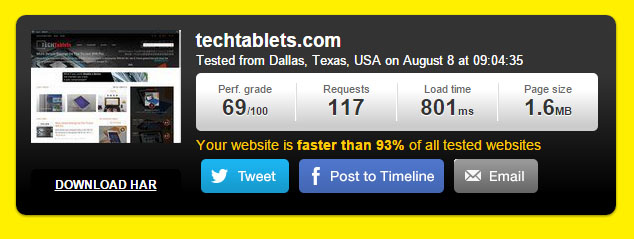
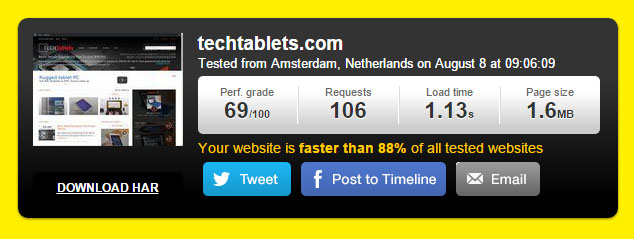 Sites now flying, loads in under a second for the US and just over one for the EU. Today we are working a few minor things and then the server should be all set and if you see anything funny, error codes or something not working please let me know while I still have this tech around.
Server box might have to reboot I’m told, but will be back up in minutes.
Chris | Admin
Please support us and help keep TechTablets online. Affiliate revenue is used to pay for the server, studio apartment (Techtablets HQ) and buy new tech to review. Without it, this site would be dead.
Next up for review:
Ordered and waiting for my: BMAX S15 & Teclast F6 Plus
Currently testing: LG G8X & Redmi K30August 8, 2015 at 7:54 am #9031Got a couple of errors right now, but the page loaded when I refreshed. It was something about cloudflare.
Edit: Some more 503s right now.
August 13, 2015 at 9:09 am #9530About cloudflare chaching for zip, it’s not active by default in the free plan, but can be enabled, assuming you have not used your 3 page rules yet, add a rule for .zip extension, the filter will be something like
Set the “custom caching” field to “cache everything”, if you are not sure how to set your server headers for caching, just force value in the “Edge cache expire TTL” and “Browser cache expire TTL”, you can set huge values if you want to maximize the cache (and in case you messed up an upload, just upload it under a different name so there will be no side effects from caching)
Apply the rule, wait a couple minutes, try downloading a zip in Chrome, in the dev tools, network tab, check the response headers, you should see a “cf-ray” field, then try to download again the same zip, and check the header, this time there should be a “cf-cache-status:HIT” header, which indicates that the file was served from the cloudflare cache CDN and not your server.
August 13, 2015 at 10:06 pm #9624@zarg Thank you! I will give it a go. I have just moved recently the bulk of the massive downloads over to Google Drive now and upgraded my drive to the 1TB plan this should help. I had no choice really, pushing 3TB a day over the 1Gbps port I had bandwidth overages last bill and it wasn’t cheap per 1GB… So it was a matter of move the downloads for now or go bankrupt…
I will larger maybe search for a 1Gbps unlimited server just for downloads. But backing up a huge amount of data is costly and a nightmare if the server fails. Google drive can worry about that now 🙂
I’ll look to cache smaller site zips soon thanks to your help.
Chris | Admin
Please support us and help keep TechTablets online. Affiliate revenue is used to pay for the server, studio apartment (Techtablets HQ) and buy new tech to review. Without it, this site would be dead.
Next up for review:
Ordered and waiting for my: BMAX S15 & Teclast F6 Plus
Currently testing: LG G8X & Redmi K30 -
AuthorPosts





- You must be logged in to reply to this topic.
