

TechTablets › Forums › Cube Forums › Cube iWork10 Ultimate › Cube CDK05 transformer keyboard dock for Cube iWork 10 Ultimate
Tagged: cube CDK05, Cube iwork10 Ultimate, keyboard dock, tranformer
- This topic has 25 replies, 17 voices, and was last updated 10 years ago by
Zinji.

-
AuthorPosts
-
February 5, 2016 at 6:15 pm #25068
For those who are interested in buying a keyboard companion for the Cube iWork10 Ultimate tablet :
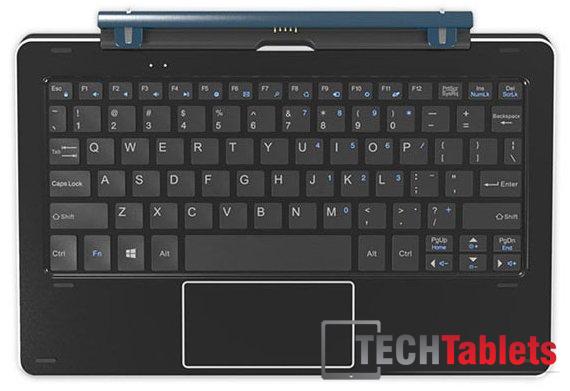
The Cube CDK05 transformer keyboard dock has 4x rubber feet on the bottom to prevent it from sliding around on flat services, and 6x rubber feet on the top to prevent the tablet from touching the keys and possibly creating scratches on the tablet’s screen.
The keyboard dock feels pretty good and has sufficient weight to balance the keyboard+tablet combination, it features 2x status LED’s above the top row function keys to indicate the Caps Lock (left LED) and Touchpad Disabled (right LED) status. The main keys are approx. 13×13 mm in size. Key travel is very minimal but typing on the keyboard actually feels good and comfortable enough to provide a good experience for long typing sessions (like coding or writing reviews).
The Touchpad area supports multi-touch events to process gestures like single-finger tap (left-click), 2-finger tap (right-click), 2-finger pinch/zoom (zoom in/out) and 2-finger swipe up/down or left/right (scroll vertically or horizontally), and it also provides a click feedback at the bottom of the pad to indicate a mouse left-click and right-click event.
As indicated above, the Touchpad can be disabled/enabled (by pressing Fn+F11) so that you don’t accidentally trigger touch events that could mess up what you’re doing during typing.
The docking hinge feels very sturdy and provides a click feedback response to indicate that the keyboard-tablet combination is in fully closed position. It features a so-called 5-pin “pogoplug” docking connector in the middle to provide the connection with the tablet and 2x docking fins on the sides that hold the tablet horizontally into place. The tablet is magnetically held into the docking clamp to prevent it from falling out or disconnecting unintentionally.
The transformer-type keyboard dock also features 2x USB 2 ports (1x on the left and 1x on the right side of the dock) for plugging in additional USB devices such as a mouse or USB stick.Overall, I think that the Cube CDK05 transformer docking keyboard is an excellent companion for your Cube iWork10 Ultimate tablet, and worthy of considering to buy for those who prefer a sturdy transformer-type docking keyboard over the floppy keyboard cases. 🙂
Attachments:
You must be logged in to view attached files.February 5, 2016 at 10:45 pm #25082Awesome, looks great. Mine should be here next week. Cube iwork10 for review and this very keyboard. Thanks for the post, very informative and detailed.
Chris | Admin
Please support us and help keep TechTablets online. Affiliate revenue is used to pay for the server, studio apartment (Techtablets HQ) and buy new tech to review. Without it, this site would be dead.
Next up for review:
Ordered and waiting for my: BMAX S15 & Teclast F6 Plus
Currently testing: LG G8X & Redmi K30February 5, 2016 at 11:28 pm #25088You’re welcome, mate. 😉
Thanks for creating a sub-forum for the iWork10 Ultimate tablet, this will make it easier for people to find the relevant info for this specific model. Keep up the good work, Chris !!! 😀 😀 😀February 22, 2016 at 1:37 am #26658Why are keyboards for Chinese tablets so expensive? They’re getting to be as expensive as microsoft surface case keyboards. I mean the Chinese ones look just as nice but still I would hope they would be cheaper.
February 23, 2016 at 3:37 pm #26794They sure aren’t cheap, especially when you compare them with the price of the actual tablets they are supposed to accompany… 🙁
And what I also don’t really like is that these keyboards don’t come in localized versions (like Belgian AZERTY, in my case). 🙁 🙁 🙁
I have purchased a sticker kit and put it on the keyboard’s keys so that it has the AZERTY layout visually, but the problem is that this is only a cheap solution because (in my case with a Belgian AZERTY layout) the stickers cover some keys that have extra “Fn“-functions (marked in blue), and I am missing 1 extra key that doesn’t appear on a standard QWERTY keyboard : the “<>\”-key that is supposed to be in between the (smaller on QWERTY) Shift key and the “W”-key (“Z” on a QWERTY keyboard), on the lowest row of letter keys. And if you happen to do some software and/or website developing then the “<>\”-key is a key that you need very often… 🙁The tablet manufacturers would make a really nice gesture to the international customers if they would produce localized versions of the keyboards…
I must say that I am very pleased with this keyboard, despite its layout drawbacks. It is the perfect companion for my iWork10 Ultimate tablet. It is a joy to be able to use the keyboard and plug in 2x extra USB 2 devices (like a mouse and something else) and have the microUSB 3 port on the tablet itself free for connecting a fast USB 3 device. It turns the tablet into a mini-laptop… 🙂 It was worth the high price, if you ask my personal opinion.
February 23, 2016 at 3:59 pm #26810I’ve got the tablet and keyboard on order right now and the main worry i had was in regard to the quality of the trackpad on the keyboard (supports gestures + physical click). This information has put my mind at ease, Cheers man.
March 5, 2016 at 9:19 am #28071Hello, I have bought this keyboard, and already in use. If you have any questions, you can ask me, I am willing to answer for you.
March 7, 2016 at 5:15 pm #28336Hi, i order two of this tablets but i cant find the keyboard on stock anywhere, not even banggood has it. Does anyone know where i can buy it?
March 7, 2016 at 11:33 pm #28385Anonymous
Inactive- Posts: 69
I’m also waiting for the keyboard to become in stock at GearBest so that I can purchase the combo package deal with the iWork 10 Ultimate, seems like a very good keyboard despite it being a bit overpriced for a Chinese company product.
Cube’s website has the keyboard in stock however it’s slightly more expensive then the package price (with tablet purchase) at GearBest and has shipping charges too:
http://www.cube-tablet.com/original-cube-iwork10-ultimate-ultrabook-rotary-shaft-keyboard.html
March 9, 2016 at 12:52 am #28541Hi, i order two of this tablets but i cant find the keyboard on stock anywhere, not even banggood has it. Does anyone know where i can buy it?
nice question, i ordered it on banggood last week when it said they’d be restocking on the 7th… my order is still processing so i contacted them and they said they don’t even know IF the item will be restocked, ever -_________-
March 10, 2016 at 4:11 pm #28736I purchased mine on aliexpress, and it still seems to be available there.
March 10, 2016 at 6:54 pm #28743good to know, in the meantime however, gearbest is taking another 4 to 10 working days to ship the tablet…
March 11, 2016 at 10:52 am #28807keyboard is apparently in stock at banggood, 2€ less than before, yet my order has not been shipped yet -_-
edit: now marked as shipped… yet i have no tablet 😛
March 25, 2016 at 3:51 pm #30841Hello, I have bought this keyboard, and already in use. If you have any questions, you can ask me, I am willing to answer for you.
Thank you for your proposal. Could you please tell me if the key cap are clipped and can be removed ? (it is often the case on many keyboards)
I would like to change the layout in order to have an AZERTY keyboard without having to put stickers on the Keys.
Thank you
March 27, 2016 at 6:17 pm #31052I would like to change the layout in order to have an AZERTY keyboard without having to put stickers on the Keys. Thank you
@Henry Atcorner : take a look at the keyboard dock cover picture that I posted in my original post and notice the spacing in between the keys and how it is constructed. You will see that the keys are “sunken” into the top cover which has key cutouts for each individual key. You will face a lot of difficulties removing the keys from this keyboard dock because there is not enough room to get your key removal tool legs underneath the actual keys, unless you disassemble the keyboard dock itself and remove the top cover… So I recommend that you go with the sticker option if you want to avoid the trouble and the risk of damaging your keyboard dock.Also keep in mind that these small sized QWERTY keyboards are missing 1 key when compared to our AZERTY counterparts (in between the left Shift key and the Z key) : they have a much larger left Shift key in place of the 2 keys that we have. And that 1 specific key that is missing happens to be very important for those who do a lot of programming with an AZERTY keyboard layout… 🙁 🙁 🙁
-
AuthorPosts




- You must be logged in to reply to this topic.
