

TechTablets › Forums › Teclast Forums › X98 Plus Discussion › New X98 Plus System Installation Files (Dec 15/2015)
Tagged: bootloop, problem, reinstall windows, Teclast plus
- This topic has 36 replies, 15 voices, and was last updated 10 years, 7 months ago by
 anhaltmike.
-
AuthorPosts
-
January 22, 2016 at 8:11 pm #23387
-
The freezing rain kept me indoors today, so I decided to download these files. (Hint: you can use this chrome addon Baidu Exporter along with aria2 to bypass the baidu downloader) Anyways, I threw the files up on my mega account in case anyone wants to download them (i removed the chinese characters from the file names). mega.nz link (6 gigs) Looks like it’s a complete windows 10 build. Haven’t had the chance yet to compare it to the current build on my x98 plus.
Janx thank you for uploading the files to mega! You just saved me and my x98 plus. I was having problems with drivers after a clean install, and the only way to solve the problem was with the Teclast system files that you provided in your mega account. Again, thank you.
Cool, glad to hear it worked for you!
January 29, 2016 at 3:58 pm #24310Hi everybody,
Houston i have a problem! I received my teclast plus (only windows) from banggood and a have a bootloop problem.
The tablet start and freeze in teclast icon, and reboot forever… never was started by me.
I try to install @Janx mega iso, thanks in advance, but the problem is that the install dont start, freeze at same point.
Of course i choose bios option for 1 option boot my 16gb usb, labeled WINPE and Fat32 with all archives from the folder, is that correct?
What can i do? any idea?
PD: Sorry if i dont write correctly, english isnt my native language and try to dont use google translator
January 30, 2016 at 10:04 am #24393-
The freezing rain kept me indoors today, so I decided to download these files. (Hint: you can use this chrome addon Baidu Exporter along with aria2 to bypass the baidu downloader) Anyways, I threw the files up on my mega account in case anyone wants to download them (i removed the chinese characters from the file names). mega.nz link (6 gigs) Looks like it’s a complete windows 10 build. Haven’t had the chance yet to compare it to the current build on my x98 plus.
Janx thank you for uploading the files to mega! You just saved me and my x98 plus. I was having problems with drivers after a clean install, and the only way to solve the problem was with the Teclast system files that you provided in your mega account. Again, thank you.
Cool, glad to hear it worked for you!
Hope you can help me too
February 2, 2016 at 10:15 am #24742Anonymous
Inactive- Posts: 124
Someone mentioned it once in the previous page, but I feel obliged to do so too.
These system files do NOT include the newer WIN.10 VERSION (NOVEMBER 2015).
February 11, 2016 at 9:01 pm #25747Can anyone tell me if this is the proper file to use from the downloads section of the forum to reinstall windows 10 on an a5c8? Do not need android, just windows. X98PlusBIOSUpdateTool (2.7 MiB)
Thanks
February 12, 2016 at 5:36 am #25775Can anyone tell me if this is the proper file to use from the downloads section of the forum to reinstall windows 10 on an a5c8? Do not need android, just windows. X98PlusBIOSUpdateTool (2.7 MiB) Thanks
I bet it wont allow to install older bios version.
February 12, 2016 at 6:26 pm #25823Duh on me. You are quite right. That was not really what I need but in my haste I asked the wrong question. I’m really looking for win 10 files to flash.
Thanks for the reply
February 13, 2016 at 2:23 pm #25884Can I restore Android only as I have broken my Android installation by using a tethered recovery and allowing system modifications. Windows boots fine and the dual boot bios is fine, unfortunately Android hangs at Teclast logo. I have Intel flash tool installed and working but I am concerned that an Android flash will destroy my Windows install.
February 13, 2016 at 10:15 pm #25938Because my windows update is stuck at 95% and then goes into a reboot loop, I am attempting to do a new install using the files that janx posted to his mega account and the steps that vgiozo posted on February 7, 2016 at 10:10 pm. Everything works as stated (powered hub, keyboard, mouse and usb stick plugged in to hub, boot tablet, hit del key and go into boot menu) until I get to the point where I am supposed to change the boot option to the usb stick in the boot menu.
Unfortunately I do not see this option in my boot menu. I have the standard three options (windows, android, UEIF) but apparently it doesn’t see the usb stick. I have tried reordering all combinations of the boot order including disabling all three with no luck.
The only thing I can think of is that because the files on the stick are in a folder, the tablet doesn’t see the files/stick. This doesn’t seem right but thought I would ask before I extract all the file individually to the stick.
I have found that I can get into the boot menu with a start up combination of power on and vol – so I don’t really need to use the keyboard/mouse. This means that I could eliminate the hub and plug the usb stick directly into the tablet. Haven’t tried it yet but wondering if anyone has any thoughts about why I can’t see the usb stick as a boot option.
Thanks for any help.
February 13, 2016 at 10:45 pm #25939Inactive- Posts: 124
Are you sure you are looking at the right place in the bios?
There are some settings in the BIOS regarding USB, I don’t remember now, but if changed they allow support for more usb devices…now I am working on the PC and cant disconnect the keyboard/mouse to test, but they have been mentioned in the forum here at some time before.
You need the keyboard and mouse to make changes to the bios, it does not recognize touch.
The tablet should still see the USB device as such…its contents are not important for detection.
February 13, 2016 at 11:24 pm #25942Here are a couple of screen shots of the configuration and the boot menu. I will look for the switch to enable further usb device support.
Thanks
Attachments:
You must be logged in to view attached files.February 18, 2016 at 7:26 pm #26416Can anyone help me figure out how to get the x98 to recognize a usb and boot from it? I need to flash the windows install but none of my boot options include the usb stick.
Thanks
February 18, 2016 at 10:12 pm #26433Does mashing F7 during boot bring up a boot source menu on yours? (Need a USB keyboard attached, obviously. A hub is very helpful.)
February 19, 2016 at 12:41 am #26440I can get to the boot menu (see screen shot below) but there is no option to boot from the usb port/stick. This is what my problem is. I have played with as many options as I can in the boot menu including disabling all of the boot order, turning on/off various switches, etc. but cannot bring up a “boot from usb” option.
Aa an FYI, although I am using the hub/keyboard/mouse it is possible to get into the boot menu without them by holding down the vol- key and the power on key at the same time when you boot up. After that it turns out the boot menu is usable via the touch screen and you really don’t need the hub etc.
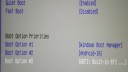
Thanks for the help.
February 19, 2016 at 1:41 am #26441You are mistakenly calling the BIOS a boot menu.
Check out my attached photo; that pops up when I mash F7 while booting. Have you tried that yet?
When I have a bootable USB key inserted it shows up in this menu; I have it selected in the photo.
Attachments:
You must be logged in to view attached files. -
-
AuthorPosts






- You must be logged in to reply to this topic.
