TechTablets › Forums › Jumper Discussion › EZBook series › Newly arrived EZbook 3 pro v4 – questions
Tagged: 100, led, power charger, vp9
- This topic has 26 replies, 15 voices, and was last updated 8 years, 9 months ago by
Jack.

-
AuthorPosts
-
September 28, 2017 at 3:08 pm #72768
Hello,
I’m 95% satisfied with the notebook, just have some questions for you. 🙂
1. Using the charger, I noticed that the notebook – even after some hours after reaching 100% battery level – never stops charging. Is it normal? My other notebook (a cheap Lenovo) correctly stops charging at 100% and resume charging only if battery level become lower than 95%, preserving battery life and minimizing wear level. I believe this should be the correct behaviour. What do you think about that? Someone tested this with some instrument? Is continuous charging real and can this be a problem for battery life?
2. On the top of the notebook there are 5 led lights. One is always blue, the other four are always down. What they are supposed to do? Is it possible that there is not a light associated with internal storage (e-mmc / ssd) usage?
3. I’ve updated Windows and graphics card drivers, but have some problems viewing VP9 8 bit HD videos downloaded from Youtube. I’ve tried using Kodi, MPC-HC and VLC but no-one of these players use hardware decoding for VP9 videos, just slower software decoding, while H264 and H265/HEVC videos are decoded using internal hardware acceleration without problems. I’ve seen in the specifications of the Apollo Lake N3450 processor that the VP9 8 bit decoding is hardware supported, but never succeeded with this. What am I doing wrong?
Waiting for your comments. Bye for now.
Carlo
September 28, 2017 at 10:00 pm #72785Auto-responding question n.3:
I’ve tried reading the problematic VP9 video files using the latest Libreelec (a mini live Linux distribution containing Kodi working out-of-the-box) for pc and… know-what? They work great with hardware decoding acceleration under Linux!!
Maybe there are still some problems with Windows and some drivers… I’ll retry formatting the eMMC and installing a clean Windows 10.September 28, 2017 at 11:37 pm #727872. On the top of the notebook there are 5 led lights. One is always blue, the other four are always down. What they are supposed to do?
Mic, mic, power, caps and scroll lock.
September 29, 2017 at 9:42 am #72802Thank you very much, mushi!
The first two holes seemed to me like led lights… but they are for the mic… interesting!! 😀
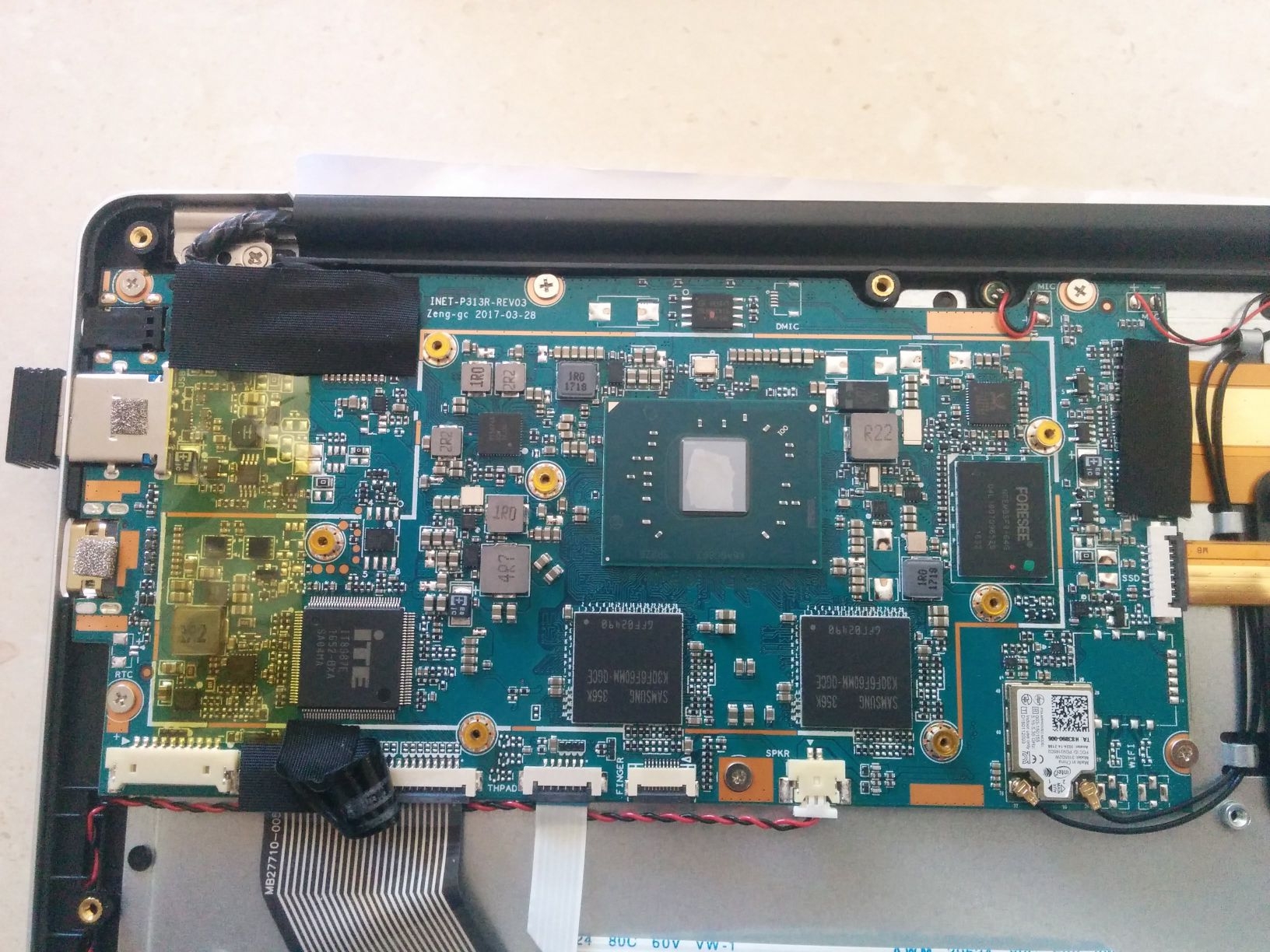
Do you also know what is the hole on the top-right of the notebook, just near the power connector?September 29, 2017 at 2:50 pm #72818Do you also know what is the hole on the top-right of the notebook, just near the power connector?
Pretty sure it has no function, since it seems there is nothing mounted on PCB.
https://techtablets.com/wp-content/uploads/2017/07/mainboard-3.jpg
September 29, 2017 at 5:40 pm #72823Answer to question 1: Mine does this also. I believe it’s a reporting issue from the battery itself but I haven’t seen any problems crop up from it.
September 29, 2017 at 8:41 pm #72830I’ll take a shot at Question 1.
That’s normal behavior for this laptop. The orange LED does not change color when the battery reached 100%.
As with any lithium ion battery, it’s not good to leave it plugged into the charger for an extended period of time.
Just charge it for three hours and unplug it. I don’t usually charge it overnight. I don’t want to wake up to a battery fire 🙂
September 29, 2017 at 8:51 pm #72831nswer to question 1: Mine does this also. I believe it’s a reporting issue from the battery itself but I haven’t seen any problems crop up from it.
I’ll take a shot at Question 1.
That’s normal behavior for this laptop. The orange LED does not change color when the battery reached 100%.
Actually users from 4PDA (russian forum about gadgets) say that it’s faulty charger.
With some chargers (that came with laptop) LED does change color, with most of them it doesn’t.If someone have appropriate equipment (I guess something that can emitate load up to 36 watts?) and have this problem check that voltage is consistent 12v. If it’s lower, then it’s probably reason why it doesnt charge to full and change color.
(I understand that there must be an step-down converter, because battery is only 7.4v, but still)
September 29, 2017 at 10:12 pm #72833You said “it doesn’t charge to full and change color (the LED)”, but the battery charging icon in Windows indicates 100% charge when I unplug mine.
The LED is still orange when the icon shows 100% charge. Wouldn’t the battery icon show a lesser charge, say 98%, if the battery wasn’t fully charged by the charger?
I am not sure why most of the chargers would be faulty and only a few chargers fully charge to change the LED color. That doesn’t seem right.
Is the LED supposed to turn green, or what color? How can we get a good charger that turns the LED green every time?
September 30, 2017 at 1:54 am #72836@mushi again:
I went here: https://4pda.ru/forum/index.php?showtopic=812082&st=2920 and found some scant anecdotal evidence that the charging LED turns green, but it appears that most are getting a constant orange LED, even at 100%. My LED doesn’t turn green even when the laptop is off, as one user at that forum claims. Mind you, I did not read all 150+ pages of the forum, but just about half of it. For those of you that are interested, the forum is in Russian, but you can translate the pages with Google Chrome. If your LED charging light is turning green, please let me know!
September 30, 2017 at 5:40 am #72838On the version 2 of the 3 pro it went green, but in version 3 and 4 seems to stay orange.
September 30, 2017 at 9:41 am #72845@dendrite
I’ve seen at least one user claiming, that he got laptop to charge fully (LED color change and status in windows that battery is fully charged) by using charger from his friend’s ezbook 3 pro that charges properly.My led is in an unknown state, since I would get laptop on my hands only on 3 October.
October 1, 2017 at 5:36 pm #72892”On the version 2 of the 3 pro it went green, but in version 3 and 4 seems to stay orange.”
I agree with this statement. I had v1 and it was green now the v4 stays orange after an overnight charging which it got me surprised but it seems I am not alone.
October 1, 2017 at 7:23 pm #72895”On the version 2 of the 3 pro it went green, but in version 3 and 4 seems to stay orange.” I agree with this statement. I had v1 and it was green now the v4 stays orange after an overnight charging which it got me surprised but it seems I am not alone.
can you try to charge v4 with the charger of v1, if you still have both of them?
October 2, 2017 at 9:45 pm #72932Pretty sure it has no function, since it seems there is nothing mounted on PCB.
Sorry but “that” led light is for the charging indicator. 😀
As with any lithium ion battery, it’s not good to leave it plugged into the charger for an extended period of time. Just charge it for three hours and unplug it. I don’t usually charge it overnight. I don’t want to wake up to a battery fire
Ok, but for office use? If I use the notebook only on battery and charge it when battery is empty, the battery life would be dramatically shortened by the frequent power-cycles!
I think it’s more than normal to use the notebook on charger even at 100% battery level.Actually users from 4PDA (russian forum about gadgets) say that it’s faulty charger.
On the version 2 of the 3 pro it went green, but in version 3 and 4 seems to stay orange.
I’ve seen at least one user claiming, that he got laptop to charge fully (LED color change and status in windows that battery is fully charged) by using charger from his friend’s ezbook 3 pro that charges properly.
I just bought this charger:
https://www.amazon.it/gp/product/B072L3W1PK
Mainly to have a longer cord and to have an EU connector (I hate power adapters, they are so big and unstable).
Know what? Charger is perfectly working, but after 3 hours at 100% battery level it continues to show orange led light anche battery in charge under Windows.
I think this behaviour can be due to the BIOS or mainboard hardware revision. I’m ok with that, hoping that battery life will not suffer too much when using the notebook in charge at 100%.Little question to V1 and V2 users: can you post a photo of your charger? Maybe yours is different from what V3 and V4 users get in the package.
-
AuthorPosts





- You must be logged in to reply to this topic.