

TechTablets › Forums › Jumper Discussion › EZBook series › EzBook 3 Plus heatsink mod
Tagged: ezbook 3 plus
- This topic has 25 replies, 6 voices, and was last updated 8 years, 3 months ago by
Francesco.

-
AuthorPosts
-
November 28, 2017 at 9:34 pm #75497
Hi guys, i’ve ordered the EzBook 3 plus for 339€ with the cyber monday deal (shame on me for not getting the air 12 i know, but the almost 100€ price difference was a bit too steep for me).
Since the core M runs quite hot i’d like to do the heatsink mod, however i’m not an expert and the only times i’ve opened my notebook i’ve simply dusted the fan. I’ll probably stick to connecting the copper heatsink to the rear lid with a thermal pad, it’s a good idea? And how thick should the thermal pad be?
Here is the only pic i found of the internals, a shotout to @sleinad for providing it
And since i’m here are there any news on the wireless card problem?
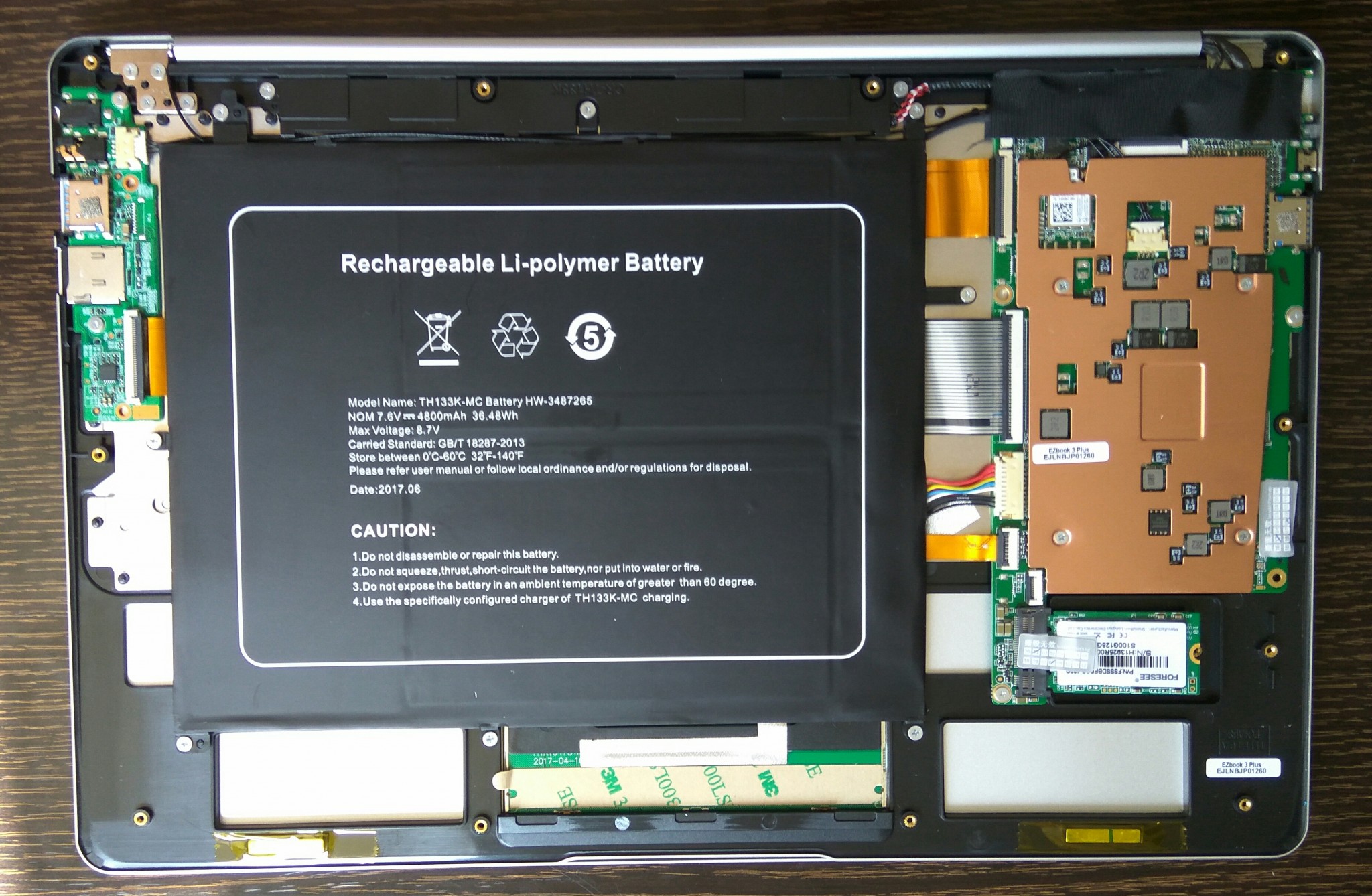
thanks!
November 30, 2017 at 5:12 pm #75549Bump
November 30, 2017 at 5:18 pm #75550Hi, if you remove the copper lid on the right side, there is already a termal pad covering the core-m3.
Attachments:
You must be logged in to view attached files.November 30, 2017 at 8:02 pm #75553Thanks, however i’d rather not mess with the m3-heatsink combo, just adding a thermal pad to connect the rear lid to the heatsink. Do you think a 1mm thermal pad is thick enough?
December 1, 2017 at 11:17 am #75560Yeah, sould be enough.
December 4, 2017 at 5:11 pm #75629I have a couple of related questions if that’s OK
- Is it right to assume that a larger-sized M.2 drive can’t be installed in this laptop because of where the slot is positioned?
- Is the thermal pad underneath the copper shield a silicone one and if so then would replacing it with a copper shim improve thermals/performance?
TIA
December 6, 2017 at 4:34 pm #75691Not tested, but probably you can install a 2260 M.2 unit. For sure 2280 m.2 will not fit. Regarding the thermal pad, is a silicone one.
December 6, 2017 at 4:59 pm #75693Not tested, but probably you can install a 2260 M.2 unit. For sure 2280 m.2 will not fit. Regarding the thermal pad, is a silicone one.
Great, thanks. Do you know if there is any copper on the interior of the bottom casing or is it just the same casing as the other EZBooks 3’s?
My current plan is just to remove the copper shield, place a shim and some MX-4 on the CPU die and then re-use the silicone thermal pad on the top of the copper shield in the area that’s circled in your picture. Do you think that would offer any improvement?
December 7, 2017 at 5:56 pm #75721Yes you find exactly that recomendation shown in one of Chris videos
Need Help?
1981 soldered my first Sinclair computer 1K, tapedeck * 1984 build and sold IBM clones 8Mhz, 512K, 20MB HDD * 2018 messing with ultrabooksDecember 7, 2017 at 11:34 pm #75728I think that’s where the idea came from however he was working on a different laptop/chipset at the time. Information/guides for the EZB3 Plus seems a little rare tbh.
December 11, 2017 at 7:49 pm #75783I should get mine soon (if christmas shippings don’t slow down it too much), i’ve ordered a 50x50x1.5 mm arctic thermal pad, i’ll keep you guys updated and try to answer any questions 🙂
December 11, 2017 at 10:54 pm #75790If you plan on doing any gaming on it then I think the cooling will definitely need some work. Mine was hitting above 90 degrees running Skyrim SE tonight and that’s in the cold of winter.
December 12, 2017 at 4:11 pm #75804Yeah i’ll connect the heatsink to the rear panel, hope that’s enough because messing with the internals is a bit too much. are the performance in skyrim good? I’d like to play it 🙂
December 12, 2017 at 4:52 pm #75805The performance on standard Skyrim is absolutely fine, even at 1080p. I’ve had to tweak SE to get it to run at a stable 30 though but I doubt the high temps are helping much at the moment. I was hoping the copper shim I ordered last week would be delivered over the weekend but unfortunately it wasn’t.
December 12, 2017 at 5:38 pm #75809The performance on standard Skyrim is absolutely fine, even at 1080p. I’ve had to tweak SE to get it to run at a stable 30 though but I doubt the high temps are helping much at the moment. I was hoping the copper shim I ordered last week would be delivered over the weekend but unfortunately it wasn’t.
Even at 1080p?! You made my day man 🙂
Please post the results with the full heatsink mode once you’re done, i may consider risk it if the gains are really good
-
AuthorPosts



- You must be logged in to reply to this topic.
