

TechTablets › Forums › Cube Forums › i7 Core M / i7 Stylus Discussion › How to upgrade the SSD in the Cube i7 Stylus (Video and Pics)
Tagged: Cube i7 Stylus SSD upgrade, how to, SSD, SSD upgrade, teardown
- This topic has 45 replies, 26 voices, and was last updated 10 years, 2 months ago by
Michael Welshy Lloyd.

-
AuthorPosts
-
July 25, 2015 at 4:53 pm #7450
The Cube i7 Stylus as of the time of writing this guide only includes a 64GB SSD option. For me, that’s a little too low and ideally a 128GB drive would be better and they aren’t really that expensive. The drive within the Cube i7/i7 Stylus is an M.2 22 x 42mm or M.2 2242 SATA3 SSD, they are now becoming more common and easier to source. The most common is the 2260 or 2280 drives. Unfortunately these will not fit, I have a Sandisk X110 2260 M.2 drive from my old Dell Venue 11 Pro while there looks to be space for it, the place where you screw in the drive to secure it in place is in the way. I didn’t want to cause any damage to the screen so I thought it best to leave it. So a 2242 drive would be the best option here.
I recommend you only proceed if you have done this sort of thing before, thing could go wrong and TechTablets is not responsible if you break, damage, brick or burn your Cube i7
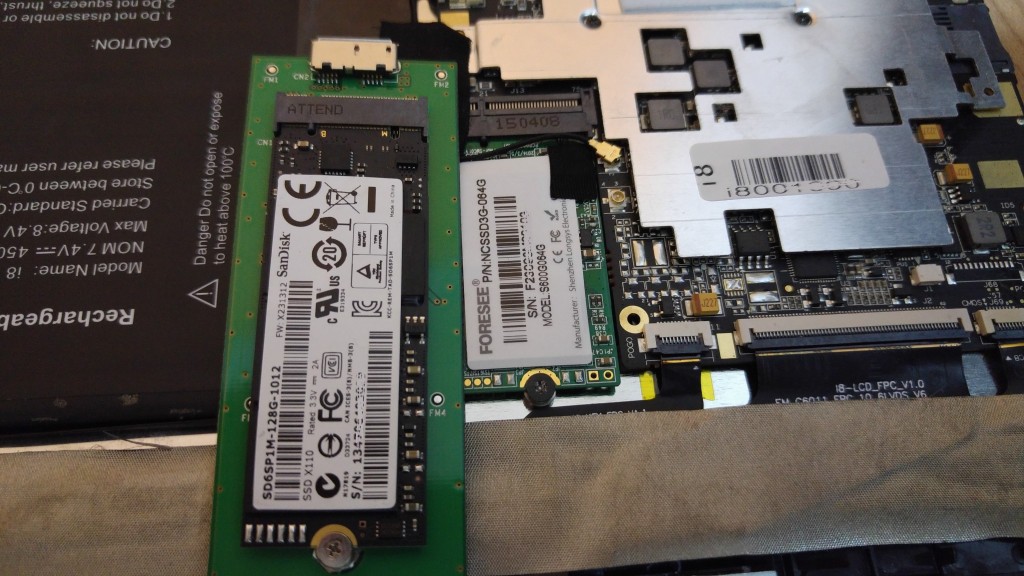
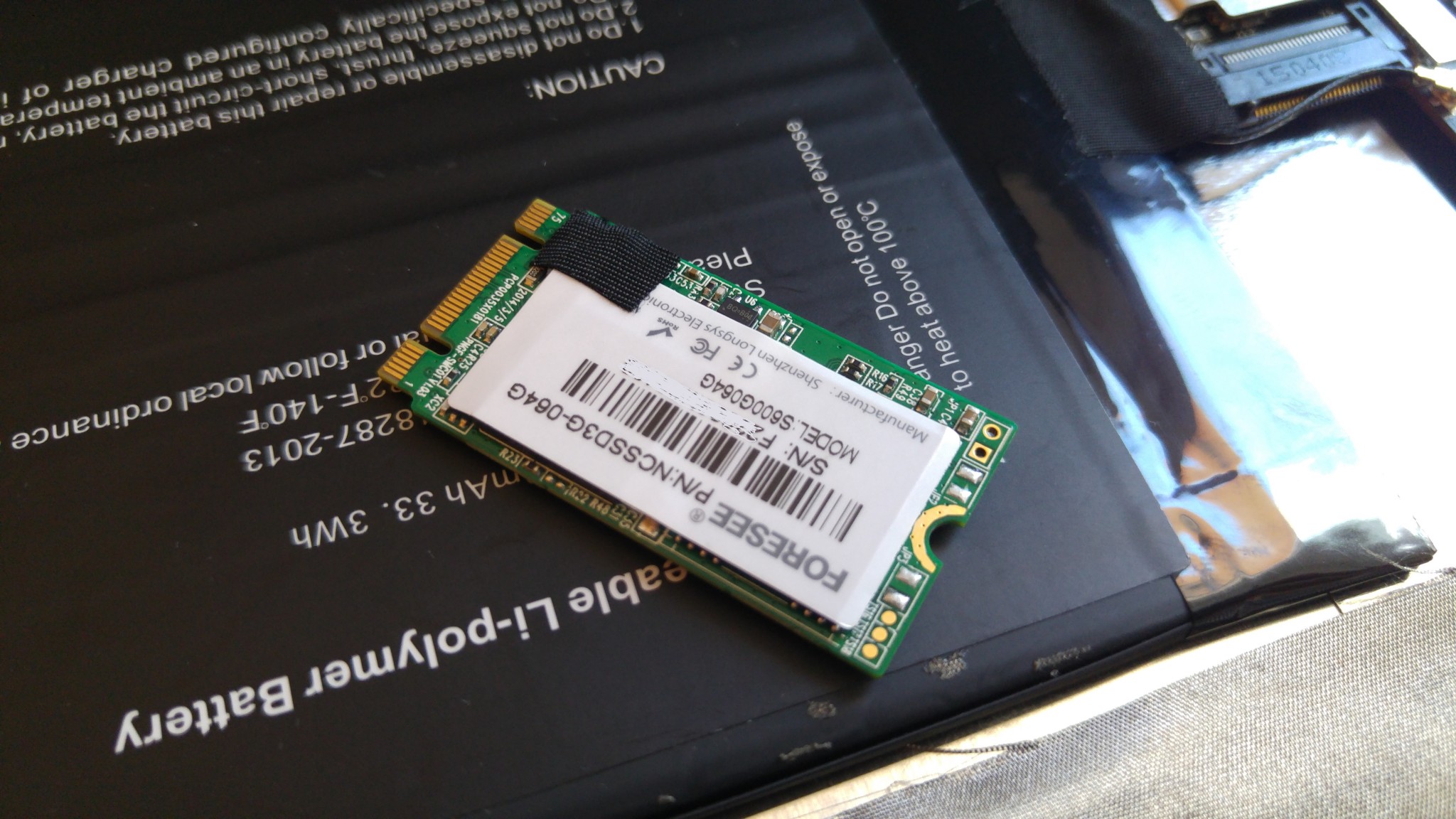
The 2242 FORESEE SSD, next to my Sandisk X110 2260 M.2 drive.
The tablet is quite hard to crack open, it has plastic clips all around it that latch into the rear metal housing, separating these once started isn’t too hard. But getting started was the hard part, luckily Wootever a member of the XDA forums gave me a great tip that got me on my way to opening up the drive.
He discovered the best place to use a pry tool to open it up is around the power and volume buttons. Once started it was easy enough to work my way around and unclip the plastic casing and screen assembly from the rear metal unibody housing. Be extra careful around the corners. I did the top ad left and right first, the clips on the speaker side broke, so watch out for that. The bottom was easy as I just pushed down the metal backing to slot it off. See my video guide below:
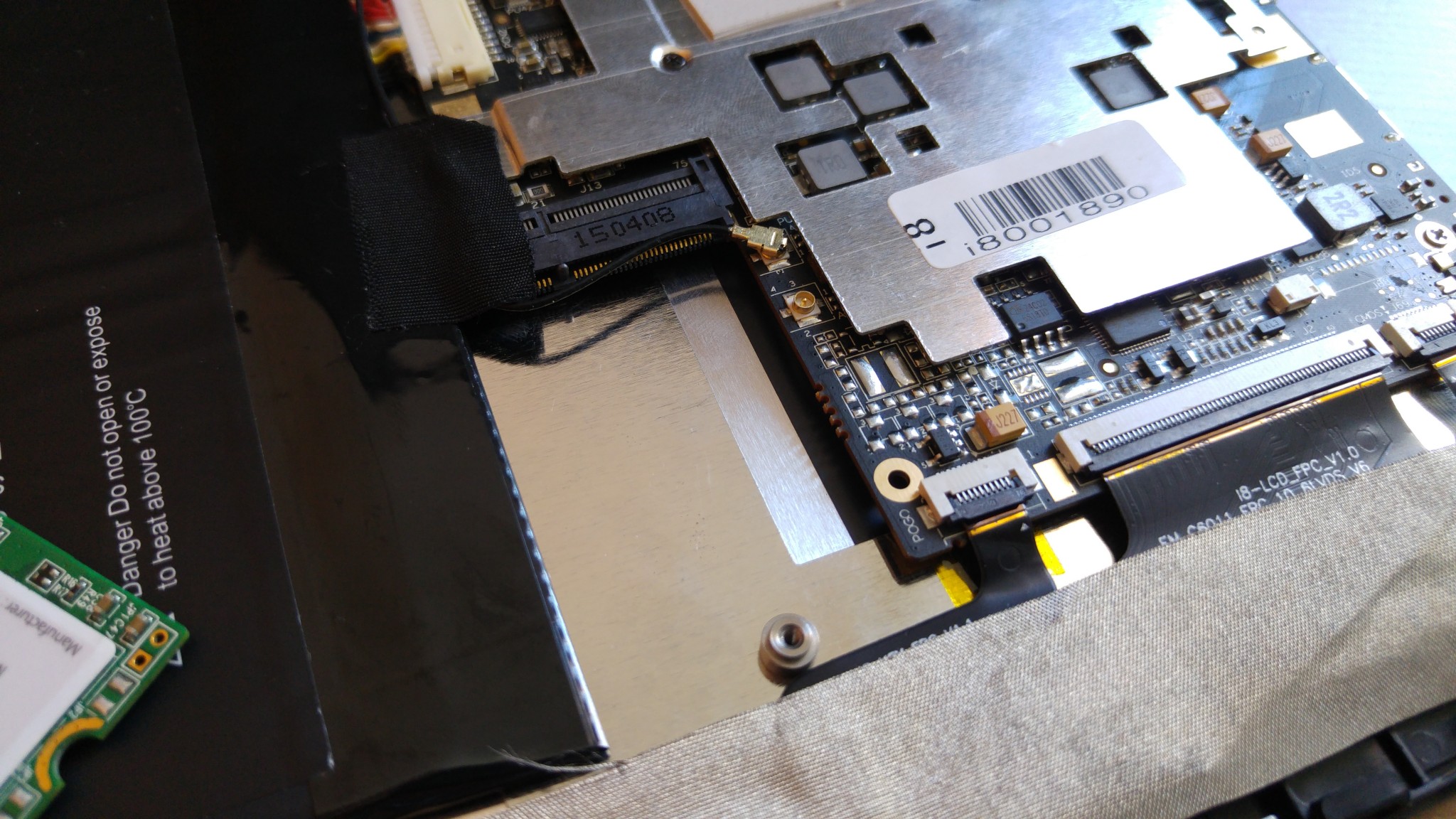
The drive is easy to replace, one screen and up and out it comes. Make sure you have a Windows USB pen drive or image backup before upgrading the SSD.
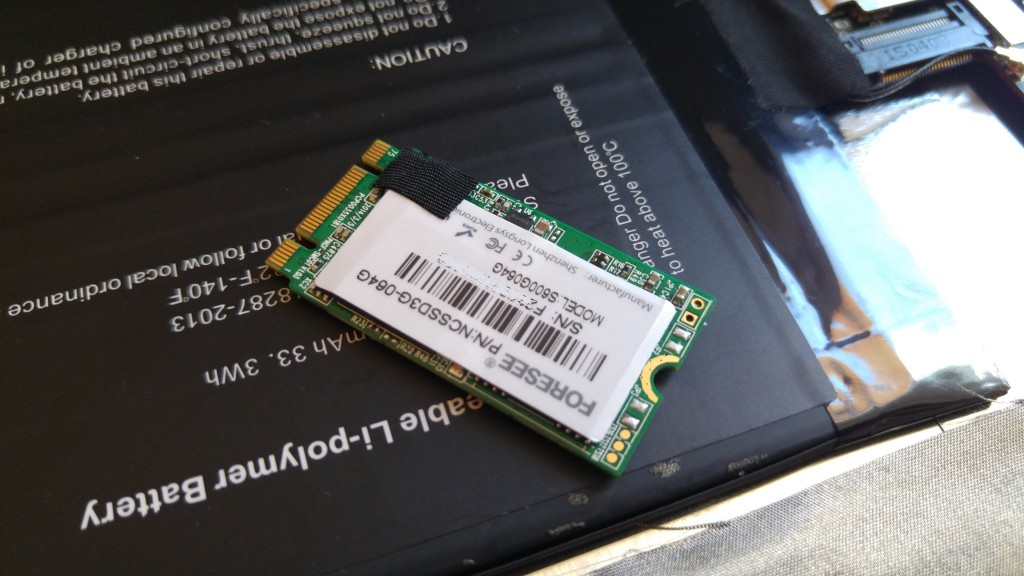
The Stock 64GB SSD is a FORESEE Brand 2242 M.2 type.
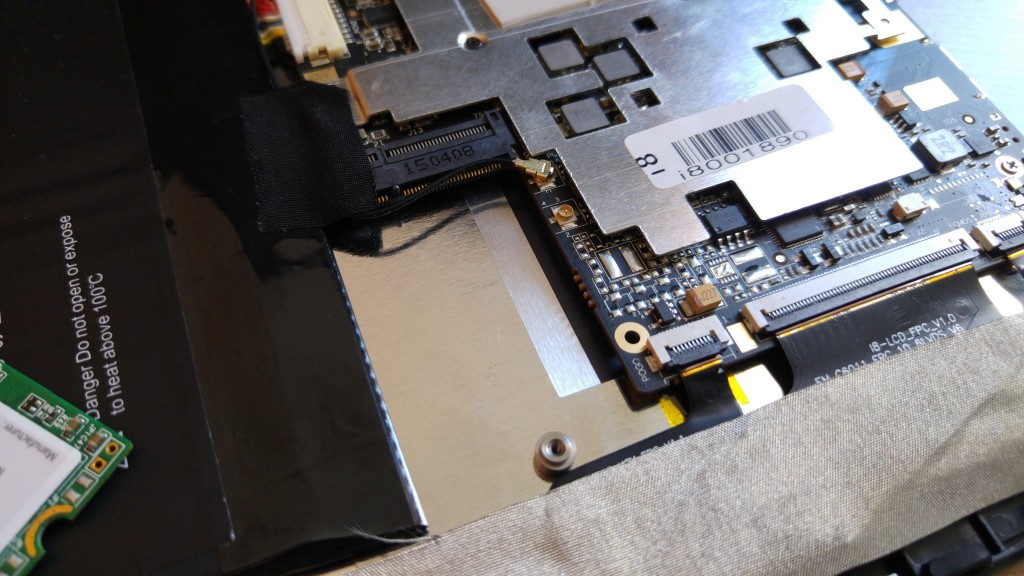
The 64GB SSD removed.
Chris | Admin
Please support us and help keep TechTablets online. Affiliate revenue is used to pay for the server, studio apartment (Techtablets HQ) and buy new tech to review. Without it, this site would be dead.
Next up for review:
Ordered and waiting for my: BMAX S15 & Teclast F6 Plus
Currently testing: LG G8X & Redmi K30July 25, 2015 at 6:00 pm #7455Nice Chris; it does get warm in that area, but moreso while charging obviously. Nice to know that it’s relatively easy to drop something beefier in there for the drive; btw, since there is a bit of space just above the battery, I want to wish you the best of luck with your “How to simply go about setting up liquid-cooling for the i7-Stylus” video.
it’s inevitable; you must not deny us this! 😉
July 25, 2015 at 6:16 pm #7456thanks chris
July 25, 2015 at 9:17 pm #7477Nice Chris; it does get warm in that area, but moreso while charging obviously. Nice to know that it’s relatively easy to drop something beefier in there for the drive; btw, since there is a bit of space just above the battery, I want to wish you the best of luck with your “How to simply go about setting up liquid-cooling for the i7-Stylus” video. it’s inevitable; you must not deny us this!

Haha 🙂 Liquid cooled tablet, how practical lol. Sure It gets warm, but I can deal with it getting to 45 degrees on the back. It’s only when pushed hard and not an issue in day to day use. My Dell Venue 11 Pro gets hot there to, but throttles more I think due to having plastic on the back. But the Venue 11 Pro has a huge copper heatsink.
Chris | Admin
Please support us and help keep TechTablets online. Affiliate revenue is used to pay for the server, studio apartment (Techtablets HQ) and buy new tech to review. Without it, this site would be dead.
Next up for review:
Ordered and waiting for my: BMAX S15 & Teclast F6 Plus
Currently testing: LG G8X & Redmi K30July 25, 2015 at 10:02 pm #7503Really nice tutorial. That 64gb SSD is one of the few weaknesses of the i7 stylus, so this give us more oportunities to improve it.
Good job.
July 26, 2015 at 6:12 am #7517Hi Chris can you show us more pics of the heat sinks and and other tips to make it more cooler I will be doing the same with mine while swapping the ssd drive but one thing theat size of m.2 is hard to find with chose of brands I can only see transcend 256gb
July 26, 2015 at 9:03 am #7521Should we remove the battery connector before swapping the ssd?
Attachments:
You must be logged in to view attached files.July 26, 2015 at 10:45 am #7524<b>Thanks to the site I bought and want to upgrade</b>
<b>I think increasing the SSD 128 and the instructions are very efficient.</b>
<b>I have a question, is it possible to install double-bot and add Android?</b>
<b>If so where can I get specific instructions for each process?</b>
<b>Of course in i7</b>
July 26, 2015 at 3:26 pm #7538Could you give more info on those extra thermal pads you installed?
Did they work, and which ones did you use?
July 26, 2015 at 4:46 pm #7542Hi Chris can you show us more pics of the heat sinks and and other tips to make it more cooler I will be doing the same with mine while swapping the ssd drive but one thing theat size of m.2 is hard to find with chose of brands I can only see transcend 256gb
Unfortunately, I put the lid back on without taking pics of the thermal pads! I don’t want to risk more damage to the plastic tabs opening it up again for the second time. All I did was place some above and below the one already there. So it will transfer some more heat to the back of the tablets metal casing and away from the CPU/GPU. Plextor do a 2242 in 128GB and 256GB and Transcend.
Should we remove the battery connector before swapping the ssd?
Yes, it wouldn’t hurt. I had mine completely powered off (Not connected standby) And had no issues.
Could you give more info on those extra thermal pads you installed? Did they work, and which ones did you use?
I used some Artic Cooling thermal pads 1mm and cut them to fit, like these
So far I’ve seen little effect, maybe a few degrees cooler. Not really worth it unless you’re already there upgrading the SSD. The rear still gets very hot to the touch when gaming or benchmarking.
Chris | Admin
Please support us and help keep TechTablets online. Affiliate revenue is used to pay for the server, studio apartment (Techtablets HQ) and buy new tech to review. Without it, this site would be dead.
Next up for review:
Ordered and waiting for my: BMAX S15 & Teclast F6 Plus
Currently testing: LG G8X & Redmi K30July 26, 2015 at 9:09 pm #7560thanks chris has anyone got there tablet dispatched yet and witch brand better plextor or transend ?
July 26, 2015 at 9:21 pm #7561hi guys i have a samsung msata 840 will a m.2 to msata adapter fit
July 27, 2015 at 12:11 am #75832242
August 7, 2015 at 7:47 am #8909I’m planning to buy a 256gb NGFF 2242 SSD for this but i am afraid i am missing a few instructions how to upgrade the ssd. If anyone’s upgrading their setup can you please make a complete step-by-step and watchouts so we dont break the lcd glass or the digitizer? also if possible make a video?
thanks
August 10, 2015 at 11:56 am #9289successfully installed 265 gb ssd
https://www.memoryc.ie/storage/ssd/256gb-ztc-armor-42mm-m2-ngff-6g-ssd-solid-state-disk.html
had a major issue the screw holding down the sdd it was stuck and couldn’t be removed, i used the correct screw driver head.
had to break it off. ill tape it down or something.
ill use the ssd that came with it as a handy external drive.
no issues installing a clean windows 10 via usb.
-
AuthorPosts




- You must be logged in to reply to this topic.
