TechTablets › Forums › Cube Forums › Cube iWork10 Ultimate › Tips for restoring android+win10 from official images
- This topic has 37 replies, 21 voices, and was last updated 9 years, 4 months ago by
Imasser.

-
AuthorPosts
-
November 18, 2016 at 3:17 pm #57102
hi,
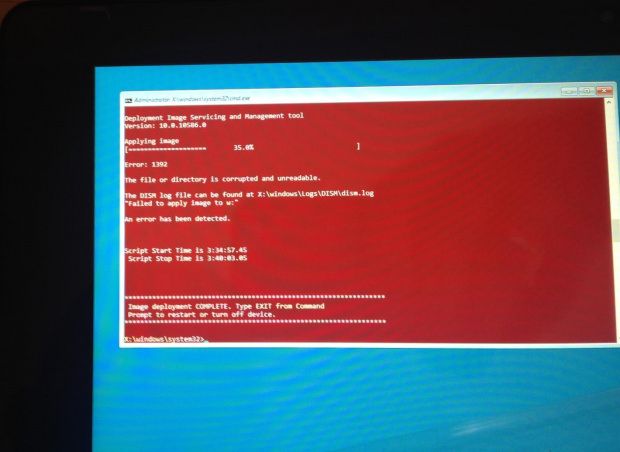
i’m getting error as per the file attached.
what can be the solution/
http://images83.fotosik.pl/172/10561913264b4bdagen.jpg
Attachments:
You must be logged in to view attached files.November 18, 2016 at 4:06 pm #57106I was unable to re-install Windows 10 using this method and the only option was to install from fresh Windows installation & usb.
how can I active Windows now?
December 11, 2016 at 10:34 am #58390Dear All,
I have found that there were released new firmware for Cube iWork 10 Dual Boot in May http://www.51cube.com/ch/DownShow.asp?ID=400
Is there somewhere a mirror with better download speed? Thanks in advance.
March 26, 2017 at 9:24 am #64019i537070,
I got the same problem. I have fixed this by change the volume name of both USB to WINPE then you are able to install the Windows 10 image.BTW you need to connect both USB during the installation.
April 18, 2017 at 4:16 pm #65590Worked for me. But some tips i had to change:
- The Word chinese tutorial says about using a hub. You’ll need one to both pendrives and plug in a usb keyboard, because the original magnetic keyboard didn’t work to me;
- These two lines to change not worked when i deleted. Worked when i wrote “rem” before them. It wiil be like this:
rem@echo select volume “0”>>x:\winpart.txt
rem@echo attributes volume set hidden>>x:\winpart.txt- I didn’t need to use the cmd to make a bootable flash drive. I just nedded to create a Fat32 and NTFS pendrives, name both WINPE and copy related files to related pendrives;
- The english Word tutorial is missing some information. Follow the chinese tutorial with Translator.
June 12, 2017 at 11:38 pm #68114Hello
I am facing a very strange problem i try every thing you mention without any success
I try to put the rem and change the chinese path
In the end i get a very strange error please help
Note:see the attached photo
Attachments:
You must be logged in to view attached files.June 15, 2017 at 7:00 am #68183Hi guys, So I just had to struggle with this today and got me frustrated! I created an image with clonezilla a couple of days ago and formatted the drive, however it didn’t go as planned so I restored the clonezilla image and it screwed up the android partition, it wouldn’t boot! I could go to the recovery and wipe data and factory reset and it still won’t boot. So I decided to just reflash the tablet. I followed the steps I gathered from here, the word document, and @Daan’s post as much as I can get out of them, However I still get an error when attempting to install windows, and every time it does it screws up the USB2 stick, only to find out by checking out the chinese word document that also the USB2 stick HAS TO BE labeled “WINPE”. Once I made sure both USB sticks are labeled “WINPE” it worked flawlessly.
well, thanks for the usefully tip. it took me hours on finding an answer for this question.
I know what you mean,the data recovery depends on whether the data is stored on your phone
-
AuthorPosts


- You must be logged in to reply to this topic.