Forum Replies Created
-
AuthorPosts
-
January 21, 2018 at 3:01 pm #77436
I would like to use the possibility to dictate text within the AOSP keyboard – in mails, for example – just like for my other tablets. What do you mean by “allow Google to record audio first before speech-to-text worked as expected” ? Does the option will be reenacted then in the settings ? Also, Is there a way of reinstalling the Quickboot option ?
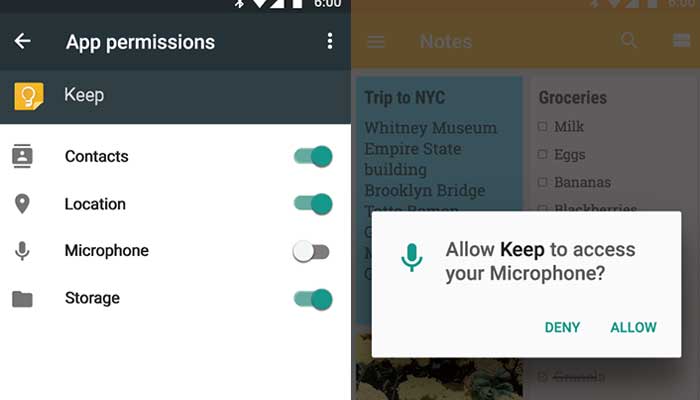
I don’t use the AOSP keyboard, so maybe it is not possible to dictate text with it. I prefer GBoard (the Google Keyboard) which works fine for text dictation. The first time I clicked the microphone button within GBoard, I got a pop up box asking for Google to allow access to the microphone similar to this.
As for quick boot, I never used it, so I don’t know anything about it. I rarely turn the tablet off.
January 20, 2018 at 4:35 pm #77372I did not see also in both versions the voice input capability so no possibility to dictate a text.
What app are you using to dictate a text? I’m using Gboard (Google Keyboard) to do speech-to-text in any app. I also tried the Google app and it works with “Ok Google”. Note that I had to allow Google to record audio first before speech-to-text worked as expected.
I agree that Quick Boot appears to have been removed, even though using Search to find it shows it should be in Accessibility.
The main improvement for me was the ability to install regular Chrome.
November 26, 2017 at 9:17 pm #75431Thanks again for your help @mathiastt . I finally found a laptop that worked with the firmware update software. And I was able to download the latest firmware version using the link you provided. So now the tablet is upgraded, and regular Chrome works just fine.
I suspect that we won’t see any additional firmware updates after this.
September 2, 2017 at 6:47 pm #71429The driver had installed just fine.
I have an older laptop that I can try instead of my desktop PC.
Where did you find the latest update? I’m interested in getting (non-beta) Chrome working.
August 29, 2017 at 9:16 pm #71160Thank you for the detailed directions. I appreciate the effort. Unfortunately, I couldn’t get my tablet to update. After the “Press ‘Download'” step and connecting the powered-off tablet with the USB cable, the tablet would show the battery charging screen, and then nothing else would happen. I tried several different USB 2.0 and 3.0 ports without success. Everything up to that point was successful, so perhaps my computer setup just doesn’t work with the BeTools software correctly Oh well, the tablet seems to be running just fine as is. But thank you again for posting the instructions!
August 29, 2017 at 5:48 pm #71155Did you update yours? If you didn’t and want to I can post the instructions here (not available as OTA unfortunately).
I didn’t realize an update was available. If you have instructions, I would certainly appreciate them. Thanks!
August 8, 2017 at 6:19 pm #70292Allright, going to order one today for 122 USD.
Sounds like a decent price. I hope it arrives in good condition, and meets your expectations.
August 6, 2017 at 9:46 pm #70204Would you mind running Sensor Box just for clarification of the sensors?
The only ones that worked were Accelerometer Sensor and Sound Sensor. Vendor “MTK”.
August 3, 2017 at 8:33 pm #70087Yep, Netflix works just fine. Note that I’m in USA.
August 3, 2017 at 12:20 am #700356 hours of battery life is about average for my use.
I tried MTK Engineering Mode, but it wouldn’t report anything without a SIM card. However, I had an un-activated T-Mobile SIM with full-size adapter that allowed me to run the app. Screenshots are available at the “Photos and Screen Captures” link. LTE Bands: 1, 3, 5, 7, 8, 28, 38, 39, 40, and 41.
Malwarebytes reported no issues. 360 Security reported no issues.
July 31, 2017 at 9:30 pm #69943(1) Bands: I don’t have a SIM card installed, so I cannot confirm the bands. However, BangGood.com (link above) lists the following bands:
2G: GSM 850/900/1800/1900MHz
3G: WCDMA B1 2100MHz,WCDMA B2 1900MHz,WCDMA B5 850MHz, WCDMA B8 900MHz ,TD-SCDMA: TD-SCDMA B34/B39
4G: B1 2100MHz,B3 1800MHz,B7 2600MHz,TD-LTE Band 38/39/40/41(2) Wireless: Yes, I have successfully connected to both 2.4GHz and 5GHz wireless networks.
(3) Android 7. Yes, please look at the pictures in the “Photos and Screen Captures” link above.
April 29, 2016 at 2:51 am #35478I think you first have to decide what your “must haves” are for the tablet. Screen size/resolution? Low price? Tech support? Etc.
Assuming you meant “Surface 3” and not “Surface Pro 3″, the screen sizes are different. Cube i9 is 12.2″, Teclast X3 Pro is 11.6″, and Surface 3 is 10.8″, all with similar resolutions. Also, I’m guessing the prices you quoted for the Cube i9 and Teclast X3 Pro do not include the keyboard cover, which adds to the total cost (assuming you intend to use the keyboard).
I wanted a 12” screen, so I bought the Cube i9 during a sale last month. The total cost for both the i9 and its keyboard cover was about $450 US. I think it’s a decent tablet, but it’s not a Microsoft-quality tablet. I’m not sure I would buy it again given the chance, but part of the “fun” for me was experimenting with a Chinese tablet. The Core M processor is nice, but I think it depends on your use-case scenario for day-to-day use if you would notice a major difference from the x7-Z8700 found in the Surface 3.
Plus it’s easy to return a product to Costco if you decide it’s not fast enough for your use.
April 28, 2016 at 6:16 pm #35398The keyboard I got from AliExpress has several language options listed shown as the colored squares. Hover your mouse over each color square to see the keyboard language. However, no Scandinavian listed.
April 28, 2016 at 6:08 pm #35397I have the Windows 10-only version of the tablet (ordered from banggood a week before the dual-boot version was available, unfortunately). It also has a small white, cloudy spot on the screen. It’s about 2mm in diameter. It’s annoying. I thought it might be due to the screen protector, but I removed that. No change.
Sad to hear that this is a problem for other users.
April 23, 2016 at 2:25 am #34739What bios version do you two guys have? Mine is from march so my i9 detects the card, but I am getting the wrong read and writing speeds. So still something wrong with the bios.
My bios screen shows build date of 03/04/2016 20:08:40, but I can’t really say for sure what version of bios it is.
Attachments:
You must be logged in to view attached files. -
AuthorPosts