

TechTablets › Forums › Cube Forums › Cube iWork10 Ultimate › dual OS version announced
Tagged: Cube i10 Ultiamte dual os, cube i10 ultimate, Cube iwork 10 Ultimate bricked, Cube iwork dual boot files, Cube iwork10 Ultimate Google Play, EEPROM USB Flasher, USB flashing, USB Programmer
- This topic has 62 replies, 24 voices, and was last updated 8 years, 4 months ago by
tommyvca.

-
AuthorPosts
-
February 23, 2016 at 10:34 pm #26857
On the Chinese Cube site .. they show a dual OS version of the iWork 10 flagship version for 26/02.
Hopefully they will make an upgrade download available quickly after 🙂
Attachments:
You must be logged in to view attached files.February 26, 2016 at 5:40 pm #27192The dual OS for the iWorks 10 flagship download is available through the the cube51 website. Its a 5.93GB download.
February 26, 2016 at 10:29 pm #27207May you post a link? 🙂
February 26, 2016 at 10:32 pm #27208Kris : can you please provide the link for the download so that other members can also find the update file(s) ?
Have you downloaded and installed this package ? And if yes : can you please tell us how much free disk space there is available in Windows 10 and Android (5???) after installing ?
February 26, 2016 at 10:35 pm #27209February 27, 2016 at 6:00 pm #27266I have the Cube iWORK 10 with the keyboard, stylus (3x stylus are shipped Friday from Gearbest) and I´m very satisfied. Now with dual OS it will be even better!
My only problem is the VERY slow download from BAIDO for the above file. It´s always interupting after minutes and even downloading with download manager it´s a pain as Baido is always asking for a new password once the transfer is interupted.
If someone has successfully downloaded the file maybe you could upload the file to one of the known file hoster? I think everybody outside China will have similar problems getting this download done from Baido.
Enjoy your Cube!
February 28, 2016 at 7:28 pm #27463has somebody tried the dual boot rom yet?
February 28, 2016 at 7:29 pm #27464I’m downloading it now.
I’ll try to flash it soon. http://pan.baidu.com/s/1c0ZXA96 password f5rb I’ll post a mirror up of it soon to my google drive or mega.
Edit: It’s slooooooooooooooooow and keeps stoping at 40% or 50%
No good, some error again in red. Can someone please try and mirror this file?
Attachments:
You must be logged in to view attached files.Chris | Admin
Please support us and help keep TechTablets online. Affiliate revenue is used to pay for the server, studio apartment (Techtablets HQ) and buy new tech to review. Without it, this site would be dead.
Next up for review:
Ordered and waiting for my: BMAX S15 & Teclast F6 Plus
Currently testing: LG G8X & Redmi K30February 28, 2016 at 7:34 pm #27466has somebody tried the dual boot rom yet?
Trying to download it first, are you able to help? http://pan.baidu.com/s/1c0ZXA96 password f5rb
Chris | Admin
Please support us and help keep TechTablets online. Affiliate revenue is used to pay for the server, studio apartment (Techtablets HQ) and buy new tech to review. Without it, this site would be dead.
Next up for review:
Ordered and waiting for my: BMAX S15 & Teclast F6 Plus
Currently testing: LG G8X & Redmi K30February 28, 2016 at 8:32 pm #27472Alright I have the files. I’m uploading them to drive now. Will take an hour or so.
Edit: Here you go : https://drive.google.com/file/d/0B4EXB7Ngka9pVXJ0X2dsYzBxeVU/view?usp=sharing
5.93GB. Haven’t tested this myself yet. No idea, use at your own risk!
Chris | Admin
Please support us and help keep TechTablets online. Affiliate revenue is used to pay for the server, studio apartment (Techtablets HQ) and buy new tech to review. Without it, this site would be dead.
Next up for review:
Ordered and waiting for my: BMAX S15 & Teclast F6 Plus
Currently testing: LG G8X & Redmi K30February 29, 2016 at 1:45 am #27511God dammit, bricked it… FFS Another bricked tablet, I must have the record 🙁
DON’T FLASH THE BIOS, Wait for a new STABLE version.
End in an error: Error 7 Hardware sequencing failed Make sure that you have access to target flash area!
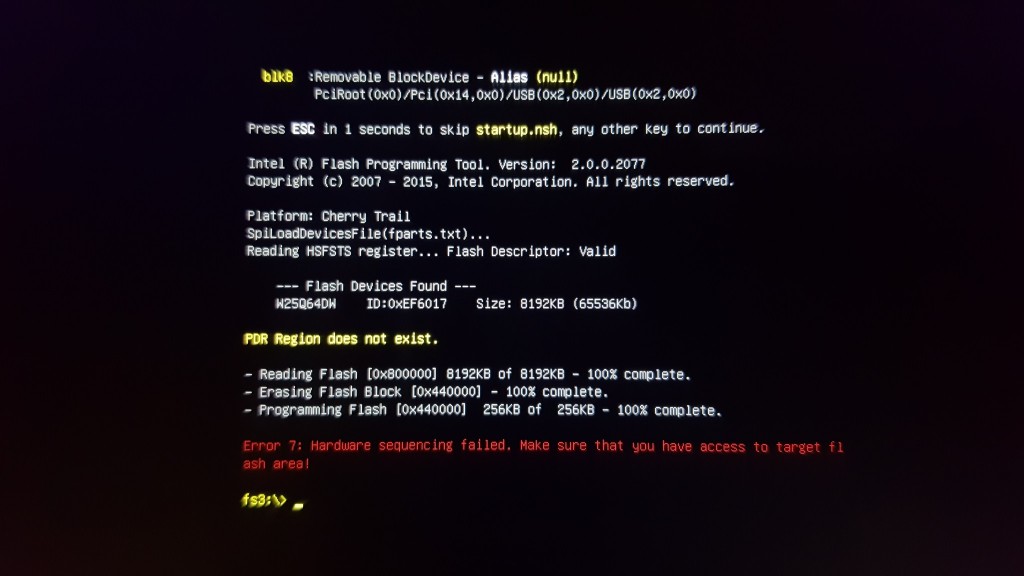
The eprom is a W25q64DW
@moonboom @evil-e @luka-stemberger I need your help now guys & gals. Can someone please make a dump of their bios so I can try to use a programmer and save my tablet.Please download this: FPTW
And in the Command Prompt in as admin run:
fptw64 -d biosbackup.bin
Or if that fails
fptw -d biosbackup.bin
This will dump your Cube i10 Ultimate bios file. Please zip it and upload it for me, I’ll be super thankful. 😀 🙂
Chris | Admin
Please support us and help keep TechTablets online. Affiliate revenue is used to pay for the server, studio apartment (Techtablets HQ) and buy new tech to review. Without it, this site would be dead.
Next up for review:
Ordered and waiting for my: BMAX S15 & Teclast F6 Plus
Currently testing: LG G8X & Redmi K30February 29, 2016 at 7:00 am #27521Sure, as soon as I get home from work, in 5-6 hours 🙂
February 29, 2016 at 9:19 am #27528Of course! If Luka isn´t successful I will give it a try too.
February 29, 2016 at 10:28 am #27532damn, wth is wrong with the chinese releasing broken stuff all the time? sorry to hear that…
did you have to open the tablet ? got any pictures?
February 29, 2016 at 10:59 am #27536well, looking at cube’s forum it seems you’re not the only one that ended up with a bricked tablet Chris…
http://bbs.51cube.com/thread-106296-1-1.html
google translate:
We care! iwork10 Ultimate single system dual system brush, wood tutorial! Refresh bios becomes brick it!
bing translate: (which is far superior for chinese atleast)
Everyone be careful! Iwork10 ultimate system brushless system, wood has the tutorial! Refresh BIOS bricks! -
AuthorPosts







- You must be logged in to reply to this topic.
