Forum Replies Created
-
AuthorPosts
-
December 9, 2016 at 10:21 pm #58320
i had the same issue – screen went black, only the hdmi output worked.
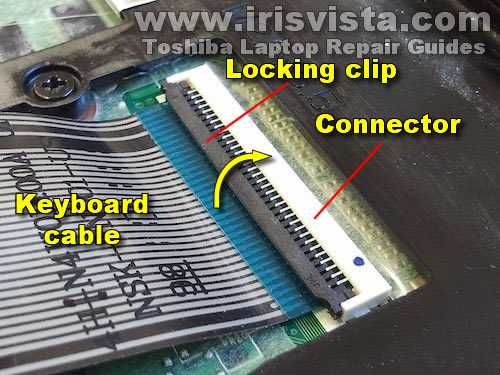
i fixed it the same way. my problem was that the ribbon cable to display was loose, because the brown ribbon connector unlocked itself and cable went loose (probably one time when the tablet fell down on the hardwood floor)
btw this picture illustrates the ribbon cable socket and how it is in locked position.
http://www.irisvista.com/tech/newbie/07-keyboard-connector-locked.jpg
if this happens to you, just push the ribbon cable up a little bit and lock the socket.
easy fix – and i even got 30usd refund from gearbest 😀 as i opened a RMA, cause i didn’t know it would be that easy to fix myself.
August 16, 2016 at 2:23 pm #47021well the baidu one cannot be uninstalled.
what about those soft buttons ?
Is it safe to remove Teclast-boot app ?
BTW when i compare my x98 plus II to cube iwork10 ultimate – x98 display is indeed little bit dimmer and colors are more warmer than on cube iwork. I actually prefer warmer colors of Teclast, the only thing which sucks are two bright backlight bleed spots 🙂
August 16, 2016 at 1:36 pm #47015Hi,
no it was not difficult at all, there are no screws holding the back metal piece. You just have to pry between the screen and metal part to loosen up the back.
August 16, 2016 at 11:52 am #46997hi guys, i have a quick question.
I’ve bought the x98plus II android only and want to ask you, how can i get rid of the Baidu appp ?
Or how can i disable the additional software buttons (screenshot, volume and other bshit that i don’t need – i just want the standard 3 buttons there).
Thanks
August 10, 2016 at 9:46 pm #46360The brown socket in the picture was in unlocked position and ribbon cable was loose and not connected properly. I’ve fully unlocked the socket, connected the cable back in properly and locked it (by pressing the brown lock down)
August 4, 2016 at 4:23 pm #45618I’ve fixed it. The ribbon cable socket was somehow unlocked and cable got loose.
Fixed within 2mins.
Attachments:
You must be logged in to view attached files.August 4, 2016 at 1:07 pm #45595guys anybody can give me some how-to guide how to open up the tablet? i don’t want to break anything, i tried searching the web, but unfortunately havent found anything relevant.
I guess it should not be that hard, but i don’t want to break it even more than it is right now.
Thanks
MiroslavAugust 4, 2016 at 8:09 am #45556hi Chris, that was also my assumption.
I’ll try to open it during the weekend and check the internals, cause sending it back to china would just be waste of time and money…
August 3, 2016 at 10:41 pm #45517same thing happened for me, suddenly display stopped working.
have you managed to get it fixed somehow ?
thanks
June 15, 2016 at 4:23 pm #41111here i made a tutorial to disable the gestures for touchpad
June 1, 2016 at 2:59 pm #39490manufactured 29.10.2014
mine says full charged capacity 7351
designed capacity 4300
and number of charge discharge cycles is 41069 😀well after 41 thousand cycles, i guess it wouldnt be able to power anything 😀 i guess its a bug
May 26, 2016 at 12:09 pm #38675Hi, overall i’m quite pleased with it. It even runs me a GNS3 network sim without issues, which suprised me as i use it every day for my networking lab work. Display is very good quality i would say, only minor bleed but it isn’t even noticeable. Battery-wise,, its like everyone stated before 5-6hours for normal work.
I’ve also tried steam streaming from my desktop pc to tablet and it worked flawlessly (much better with the LAN(RJ45)-usb connector, wireless wasn’t that good).
overall great tablet 🙂
btw i got the normal T version not TL with windows professional.
May 24, 2016 at 11:15 am #38460i just got the tablet. after two months and 7 days after i paid for it. But at least it arrived 😀
May 4, 2016 at 5:15 am #35997how long did it take for you guys using postNL to be able to track the shipment? mine is still saying:
Item is not found at this moment, If necessary, please verify with the package sender and check back later.i’m really curious what should i do next as 60 days will pass in 13 days. If i should open claim with paypal, even though they tell me that the package has been reshipped, but one can not be sure with the Gearbest.. and i don’t want to lose the money.
May 2, 2016 at 10:48 am #35798After some pressure they replied to my ticket that they’re resending the tablet today via postNL and gave me tracking number which is not working yet. Ill see tomorrow
-
AuthorPosts