


Forum Replies Created
-
AuthorPosts
-
I let the emmc on and did a format After booting from ssd.
Do you have driver issues or missing driver? Because there is a driver dump in the Download section
if you are having issue`s with ssd – its not fully compatible…
thats what i`ve figured out.
go with crucial mx300 ssd`s its a safe way…
this looks way better 🙂
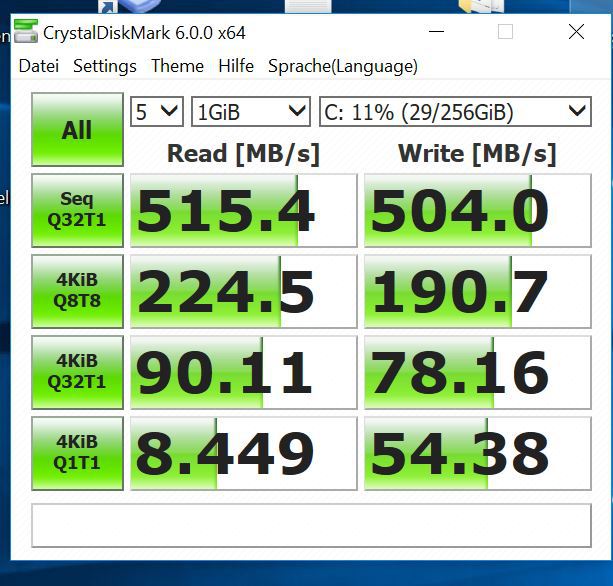
its working !!!!!!!!!!!!!!!!!!!!
finally….I just bought the Crucial MX300 275GB version and cloned the EMMC ….
its booting directly to ssd :))so i can say if its not possible to boot from ssd its incompatible!!
the speeds are fine now, tookeep us updated ! :))
i just ordered a Crucial MX300 275GB to test if this works on my device 🙂
ok tank you.
i got a flashed v6 bios….i will order a different ssd to test this out….
my ssd is listed in SATA as in bios boot order as in windows… so i dont know whats going ondisable emmc: go to bios -> south cluster -> disable emmc support
Hi Ernst,
could you please send me a link to the hynix ssd?
are you on V6 bios?i failed 2 times yesterday again 🙁
i think there is a compatibility issue with WD green.I disabled the EMMC in bios but thats not really helpful in my case.
yes i see it in bios / windows / windows setup…..
installed directly on the ssd but the emmc is taking part of….i cant believe that there is no way to fix this 🙂
hey ernst,
switch to my new thread to let this thread only for flashing 🙂
fs1 isnt correct either… mine was on fs5 and usb stick on fs6 :))
Servus Ernst 🙂
i have a 120gb WD green on my Ezbook. The bios and win10 detected it but i cant boot windows from it….
i`m trying several methods to get this working since 1 week :X
@giovanni: thats what i did….but it doenst work 🙁just a short question about installing bootloader on emmc and win10 on ssd. do i have to erase all in windows pre-setup expect the ssd partition and make partitions on emmc and choose ssd to install?
@schlomi i disabled emmc and now i will do a fresh install on ssd. We will See :))
Im one of the unlocked Ones now!
thanks for your Great work!
now i Need to disable the emmc to get the ssd to work (maybe…)
-
AuthorPosts

