


Forum Replies Created
-
AuthorPosts
-
try to disable auto / 40 mhz channel width in wireless driver settings (device manager -> wifi card -> advanced). on my ezbook when i put it on flat surface ping rise to 1000ms and there is pocket loss. after switching to 20 mhz only there are no such problems anymore.
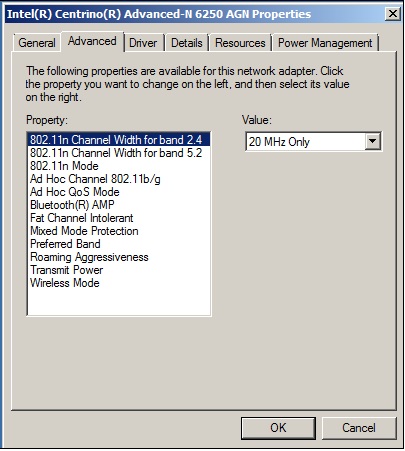
MAN you are my hero! This solution should be posted EVERYWHERE.
Speedtest before the fix = 4mbit/5mbit with notebook raised a little from surface and drop till 0 when placed on surface.
After fix = FULL 10mbit of my net with no drops, no disconnections etc. Absolutely AWESOME. And yes, it’s placed on a totally flat surface.This answer should be pinned and posted EVERYWHERE. Thanks man!
Done, I’ll report later if something changed^^, thanks for help 🙂
Same problem with my v6… Left USB randomly disconnect, plus, when I have a device connected on left USB, my wifi seems stop work… I mean, it still say I’m connected to it, but browser won’t load any page etc…
Any hint? I bought this laptop for my father, I don’t want so many problems, especially because we have only 2 usb ports… And one it’s used for mouse…
I really not know what to do now… Get a refund and find another 2242 ssd will be painful… P.S. On the other pc, the ssd work flawlessy
No, it does not work yet. I unlocked the bios, but nothing has changed. I don’t understand why it doesn’t work. I will try with some ssd on amazon, at least there are no problems with refund.
That’s what I will do. Ask a refund for the DogFish ssd, and get an Crucial Mx300 2280, I’ll need mod the ssd enclosure but seems that’s the only one that work absolutely without issue on the Ezbook 3 Pro
unfortunately no…
Did you found a solution? 🙁
I have a similar Issue with my DogFish 240gb 2242 ssd…
It’s being recognized from BIOS and Windows (but I had to format it on another pc) but I can’t do anything with it. CrystalDiskMark fails, if I copy a file it’s VERY slow or even hangs… I don’t know what to do.
My EzBook3 arrived today, and it has the locked bios 🙁EDIT: I unlocked the bios (I have a V6) and still nothing, even if changed some settings in Bios etc, the ssd still work super slow and it’s totally useless…. It’s 5 minutes I started the CrystalDiskMark Bench, and still nothing happened…. From Task manager I can see there is 100% activity on the ssd, but, ms are very high (even 2000) and speeds are very slow, it seems work “intermittently”.
I really not know what to do now… Get a refund and find another 2242 ssd will be painful…P.S. On the other pc, the ssd work flawlessy
I got lot of problems with the DogFish SSD.
It work perfectly on my Desktop computer, but strangely behave on the EzBook 3. It’s recognized on bios, but when I try to install in it Windows, I get errors after few minutes of waiting. When I’m on windows, the SSD is recognized, but if I start a Bench with CrystalDiskMark, it won’t start at all (works as I said on my desktop without a problem) and if I copy a file on the SSD, it start FAST, and then goes to 0..
I really not know what to do, any advice? Maybe bad SSD compatibility?Should be fine without any mods. If he doesn’t plan to try and game on it, no point software modding the TDP so it will not need a copper heatsink mod and thermals will be fine.
That’s awesome! I’ll report in next days which Bios version I have etc.
Thanks for your answer ^^P.S. If my father want start gaming, he has my Desktop with Ryzen 7 1700 + 1080ti ahahah
EDIT: So I got a blocked bios version (not a problem for my father use). Display is perfect (not noisy under 50%), keyboard seems fine also.
I just need to decide where install windows now, but I think I’ll use the dogfish SSD for better speed ^^Laptop arrived ^^
Waiting few tips if you have some, can’t wait to see my father unboxing it XD
Hi guys.
I bought this laptop for my father (60 years old) and should arrive during end of this week or next week.
I got it from Amazon.it (I’m from Italy) but the sellers it’s GbeastEU.
Which version should I expect? V5? (someone reported on Amazon.it that he got Bios V6).
I even bought an dogfish 240gb 2242 ssd, but I really think to use it just as storage, because I think the EzBook 3 Pro will be already enough fast for my father (he has a VERY old 11 years Toshiba Satellite), but if I decide on the contrary, someone has feedback with this SSD?
I saw even some “hardware” mod for get temps lower etc. On the new versions we still need such mods for get better temps? I’m accustomed to do these kind of things but if temps are ok, I’ll not lose time on it lol (maybe just few TS downvolting will be enough).Thanks Guys ^^
-
AuthorPosts

