


Forum Replies Created
-
AuthorPosts
-
I’ve already explained that, on la test revision of Chuwi Tablets, we need to use linux kernel 4.6 and up about format and repart filesystem. Most of recent linux USB live bootable systems use linux 4.4 by default.
If you want use gparted or other tool, you need to modify any squashfs file of livesystem and replace linux 4.4 by linux 4.6 or 4.7
Awesome ! Waiting patiently. 🙂
Unfortunatly, Dax89 don’t have Hi10, and it’s the only driver developer for our tablets… The good way can be to add money on paypal account, and gift to him a Chuwi Hi10 DualOS for working on it (and HiBook, except touchscreen it’s the same internal hardware/software). 🙂
I’m ready to give 20€/$, there is people who want participate ?
I have uploaded now Firmwares and Linux drivers Modules of Hi10 :
Firmwares : http://vavar60.online.fr/share/tablet/chuwi_hi10/Linux_3.14.37/firmware/
Modules : http://vavar60.online.fr/share/tablet/chuwi_hi10/Linux_3.14.37/modules/
The Wifi driver is on AUR repository for ArchLinux and Manjaro. 🙂
I have Manjaro Linux Gnome Edition (06/16 build) with 4.6 kernel and latest packages.
Manjaro is what Ubuntu/Mint are for Debian, easy to install and use, but rolling release distro. 😉
Do you mean install Remix OS on the Android partition without formatting it, or what? Did you do do this and it’s working? How is it done?
I’ve published in Hi10 forum how to install TWRP on this tablet. So, with this recovery, do a FUll backup, go to settings and select wipe with “rm -rf” method, then wipe system, and flash RemixOS zip for HiBook, and restore the boot partition backup. 😉
RemixOS for HiBook work on Hi10 DualOS too, same Firmware/Hardware except touchscreen, we just have to not flashing boot partition (kernel) and use the original of Android for Hi10 by chuwi
Good news ! A developer work on the Touchscreen driver : https://github.com/Dax89/chuwi-dev/tree/master/drivers/chipone_ts
His profile on TechTablet : http://techtablets.com/members/dax89/
I can’t test it actually because my touchscreen is broken, if somes peoples want to test it… 🙂
Hi guys! I’m new here, but I have followed all topics related to Cherry Trail tablet issues for months (especially this topic and the Linux Mint on Hi10 one), I own a Chuwi Vi10 Ultimate and it seems that those tables shares the same issues (Wifi, Sound, Touch and Battery). I have worked much more with the touch screen issues: searching on internet I have found the some people have found the datasheet for ChipOne IC88xx and an user called SergK have developed a polling based driver for those touch screens, development is stopped for two months because there was some issues about waking up the screen. I have developed an ACPI, Interrupt based driver from scratch based on those informations (link), now I’m able to detect the number of fingers on screen and move the cursor, even the capacitive button is detected (but not handled), I’m testing it on Antergos with kernel 4.6.3. I’m a developer, but this is my first (useful) driver, so forgive any trivial errors in its source code ? I share the code here because it might be useful to other tablet owners (Vi10, Hi10 and other brands too)
Hi ! Welcome Dax89 ! 🙂
Thanks for your contribution, hope your gonna successfully write drivers ! 🙂
We need people like your, and i’m thinking about one thing… What do you think about make a pot ? Every people interested give somes £/€/$ if he can and are interested, then we buy a specific tablet for that pot, and gift it to a developper who want develop free linux drivers for it and report patchs/commit for the linux kernel. 🙂
I’m ready to donate 10/20€ about Hi10 Single/DualOS support ! Maybe somes others people are interested ? 🙂
purpose your ACPI HID of your Wireless SOC
@tikilou, I have not read ALL of your previous posts. Did you explain how to do this in a way for people to understand how to do, who do not know as much as you about BIOS and Linux drivers?
I’ve forget that, sorry !
Dump ACPI Table :
sudo acpidump > acpi.dat(or take what you want in /sys/firmware/acpi/tables with root user)
Extract ACPI Table :
acpixtract -a acpi.datDecompile DSDT :
iasl -d dsdt.datIn dsdt.dsl (apparently we can found somes things in /sys/firmware/acpi/tables/SSDT* decompiled tables too and use them for correcting dsdt table, juste read it now), search the HID value for your hardware, compare with ACPID of the driver on Windows 10 with official drivers installed (proprierties), look if it use an existant compatible driver, and report it to the developer driver mainteneur of Linux modules kernel cibled.
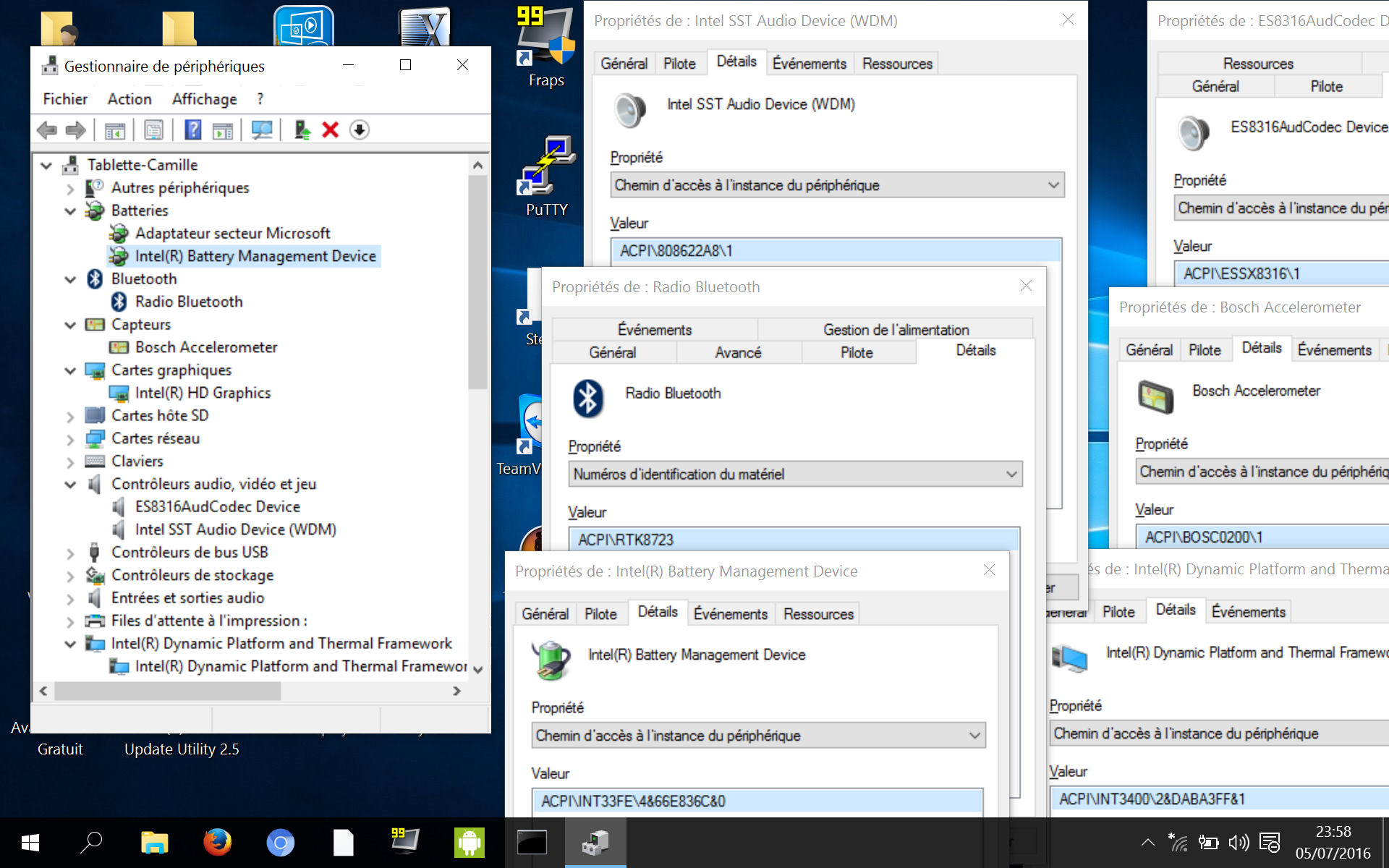
Most of not working hardware on our tablets (Chuwi, Teclast, Onda, Dell…) have the same problem, ACPI Hardware IDs (HID) are not in database of existing drivers, so Linux Kernel who usually detect hardware with PCI IDs don’t know he can use an existant/compatible driver for them ! We need to report theses missing ACPI Hardware ID.I’m thinking it’s a problem with the i2c and SDIO controllers too.
For auto correcting and recompile dsdt.dsl to dsdt.aml (apparently it’s possible to manually correcting errors of ACPI DSDT table, and load it on Initramfs boot, i don’t know how to do that but all is here) :
iasl -tc dsdt.dslExample with the dsdt for chuwi Hi10 with DualOS bios dumped, extracted, decompiled : http://vavar60.online.fr/share/tablet/chuwi_hi10/Chuwi_hi10-DualOS-dsdt.dsl.txt
“OBDA” is the four letters for identify Realtek HID (Hardware ID) in DSDT part of ACPI table, after research i’ve found this for wifi sdio soc :
             Device (RTLW)
            {
                Name (AHID, "RTL8723")
                Name (ACID, "RTL8723")
                Name (_ADR, One)  // _ADR: Address
                Name (_DEP, Package (0x02)  // _DEP: Dependencies
                {
                    GPO1,
                    GPO2
                })
                Method (_STA, 0, NotSerialized)  // _STA: Status
                {
                    Return (0x0F)
                }

              Method (_RMV, 0, NotSerialized)  // _RMV: Removal Status
                {
                    Return (Zero)
                }

                Name (_S4W, 0x02)  // _S4W: S4 Device Wake State
                Name (_S0W, 0x02)  // _S0W: S0 Device Wake State
                Method (_CRS, 0, NotSerialized)  // _CRS: Current Resource Settings
                {
                    Name (RBUF, ResourceTemplate ()
                    {
                        GpioInt (Edge, ActiveHigh, ExclusiveAndWake, PullDown, 0x0000,
                            "\\_SB.GPO2", 0x00, ResourceConsumer, ,
                            )
                            {   // Pin list
                                0x000A
                            }
                        GpioIo (Exclusive, PullNone, 0x0000, 0x0000, IoRestrictionOutputOnly,
                            "\\_SB.GPO1", 0x00, ResourceConsumer, ,
                            )
                            {   // Pin list
                                0x0034
                            }
                    })
                    Return (RBUF) /* \_SB_.PCI0.SDHB.RTLW._CRS.RBUF */
                }

                Method (APS3, 0, NotSerialized)
                {
                    If (^^^^GPO1.AVBL == One)
                    {
                        ^^^^GPO1.WLD3 = Zero
                    }
                }

                Method (_PS3, 0, NotSerialized)  // _PS3: Power State 3
                {
                    If (^^^^GPO1.AVBL == One)
                    {
                        ^^^^GPO1.WLD3 = Zero
                    }
                }

                Method (_PS2, 0, NotSerialized)  // _PS2: Power State 2
                {
                }

                Method (_PS0, 0, NotSerialized)  // _PS0: Power State 0
                {
                    If (^^^^GPO1.AVBL == One)
                    {
                        ^^^^GPO1.WLD3 = One
                    }
                }

                Method (APS0, 0, NotSerialized)
                {
                    If (^^^^GPO1.AVBL == One)
                    {
                        ^^^^GPO1.WLD3 = One
                    }
                }
            }
AND
        Scope (URT1)
        {
            Device (BTH3)
            {
                Name (_HID, "OBDA8723")  // _HID: Hardware ID
                Method (_STA, 0, NotSerialized)  // _STA: Status
                {
                    Return (0x0F)
                }

                Method (_CRS, 0, NotSerialized)  // _CRS: Current Resource Settings
                {
                    Name (ABUF, ResourceTemplate ()
                    {
                        UartSerialBusV2 (0x0001C200, DataBitsEight, StopBitsOne,
                            0xC0, LittleEndian, ParityTypeEven, FlowControlHardware,
                            0x0020, 0x0020, "\\_SB.PCI0.URT1",
                            0x00, ResourceConsumer, , Exclusive,
                            )
                        GpioIo (Exclusive, PullDefault, 0x0000, 0x0000, IoRestrictionOutputOnly,
                            "\\_SB.GPO1", 0x00, ResourceConsumer, ,
                            )
                            {   // Pin list
                                0x0004
                            }
                        GpioIo (Exclusive, PullDefault, 0x0000, 0x0000, IoRestrictionOutputOnly,
                            "\\_SB.GPO1", 0x00, ResourceConsumer, ,
                            )
                            {   // Pin list
                                0x0008
                            }
                        GpioInt (Edge, ActiveLow, ExclusiveAndWake, PullDown, 0x0000,
                            "\\_SB.GPO0", 0x00, ResourceConsumer, ,
                            )
                            {   // Pin list
                                0x005A
                            }
                    })
                    Name (WBUF, ResourceTemplate ()
                    {
                        UartSerialBusV2 (0x0001C200, DataBitsEight, StopBitsOne,
                            0xC0, LittleEndian, ParityTypeEven, FlowControlHardware,
                            0x0020, 0x0020, "\\_SB.PCI0.URT1",
                            0x00, ResourceConsumer, , Exclusive,
                            )
                        GpioIo (Exclusive, PullDefault, 0x0000, 0x0000, IoRestrictionOutputOnly,
                            "\\_SB.GPO1", 0x00, ResourceConsumer, ,
                            )
                            {   // Pin list
                                0x0004
                            }
                        GpioIo (Exclusive, PullDefault, 0x0000, 0x0000, IoRestrictionOutputOnly,
                            "\\_SB.GPO1", 0x00, ResourceConsumer, ,
                            )
                            {   // Pin list
                                0x0008
                            }
                        GpioInt (Edge, ActiveLow, ExclusiveAndWake, PullDown, 0x0000,
                            "\\_SB.GPO0", 0x00, ResourceConsumer, ,
                            )
                            {   // Pin list
                                0x005A
                            }
                    })
                    If (OSYS == 0x07DF)
                    {
                        Return (WBUF) /* \_SB_.PCI0.URT1.BTH3._CRS.WBUF */
                    }

                    Return (ABUF) /* \_SB_.PCI0.URT1.BTH3._CRS.ABUF */
                }
            }
        }
Then i’ve returned to the dev of RTL8723bs drivers this part, who contain the HID. And now, he gonna purpose a new patch for support the Hi10 tablet with SDIO setting in bios configured to “ACPI”. 🙂
We have to do the same way for all hardware not actually supported, research, report, test. Then finally, later, Linux Kernel gonna include theses patchs.
I’m not a developer, and before have research for it, i’ve don’t know anything about ACPI table, so everybody can help about it. 🙂
Example with Bosch sensor for rotate screen, actually already supported by Linux kernel with “BOSCH bma2x2 accelerometer driver” project, but you can look inside the driver source code, there is not entry about ACPI HID : https://github.com/BoschSensortec/Linux_Kernel_Drivers/blob/master/drivers/input/misc/bma2x2.c
Ps : i’m giving the best now, but i’m in vacation now, i have a girlfriend, and we gonna travel around the world, wwoofing, etc, so i can’t be active like that anymore, but i’m sure this community, gonna work on all of that and fix theses problem soon. 😉
About bios setting ACPI to PCI, i’ve created an issue, and a dev gonna submit a patch about it : https://github.com/hadess/rtl8723bs/issues/80
Change this setting cause a crash of android when the system connect to AP Wifi.Anyway, if you have HiBook or Hi10, purpose your ACPI HID of your Wireless SOC, on this issue, after that the driver gonna recognize the Wifi without change this setting, (And ACPI have better power management/efficient)
For Hi10 DualOS, after updating 4.6 kernel, i can successfully write on internal memory partition. I’ve repartition Windows, and DD the linux partition on the USB key to internal memory.
After first boot of Linux On internal memory, we need to use a command for not need the USB key for booting anymore.
first, backup /boot/efi/EFI/manjaro and delete it, after that, use this command for generate a new /boot/efi/EFI/manjaro/grubx64.efi :
sudo grub-install –target=x86_64-efi –efi-directory=/boot/efi –bootloader-id=Manjaro –recheck
Don’t you read previous posts ?…
We need the kernel and driver source code without this things there is nothing to do with this tablet
I agree and disagree. It will be more easy with the Linux kernel and modules source code of Android build for Hi10, but we can’t abandon, most of unsupported devices are now supported, and other hardware are supported but the kernel don’t know ACPI Hardware IDs of our tablet and can’t purpose to use an existant compatible module.
Yes, this is work, but i think it’s possible to look existant drivers on Github repositories, and compare compatible driver used in Windows and ask a patch compatibility on github & cie.Ive found something interesting in the DSDT ACPI table about the touchscreen, the hardware ID is CHPN0001, and this touchscreen seems to be compatible with PNP0C50 ID generic driver on windows but i don’t know if he exist on Linux. https://github.com/torvalds/linux/blob/master/drivers/hid/i2c-hid/ seems be the good way too.
The first way gonna to help the kernel (with a patch driver) to recognize this ACPI Hardware ID (CHPN0001) and purpose him to use this driver (purposed in PM by Zak) or PNP0C50 driver if he is present, exactly like here ( https://github.com/hadess/rtl8723bs/issues/80 ). I’ts seems be the same way for all drivers, Chuwi SoftTeam have choosed to use ACPI call, not PCI calls, energy efficient but it’s require more work for include all theses Hardware ID in the existings kernels drivers, but can’t be used actually because kernel&drivers can’t recognize it without thems :Scope (I2C6)
{
Device (TCS1)
{
Name (_ADR, Zero) // _ADR: Address
Name (_HID, “CHPN0001”) // _HID: Hardware ID
Name (_CID, “PNP0C50” /* HID Protocol Device (I2C bus) */) // _CID: Compatible ID
Name (_SUB, “HAMP0003”) // _SUB: Subsystem ID
Name (_S0W, Zero) // _S0W: S0 Device Wake State
Name (_DEP, Package (0x02) // _DEP: Dependencies -
AuthorPosts

