


Forum Replies Created
-
AuthorPosts
-
June 19, 2017 at 9:14 pm in reply to: Accessories for cube i7 book (powerbanks, chargers, hdmi etc) #68318
<p data-keeper-edited=”yes”>With external power banks, how long you’ve been able to run cube?</p>
Does 60mm long SSD (2260) fit, with modding? Asking because I have one already..
Edit: Does not fit, there is plastic subframe which should be cut and then maybe, but I’m not going to cut it.
I don’t think these Chinese vendors are even paying for Microsoft (and definitely not buying retail licenses), that’s why there is no license in BIOS. Windows that ships with the devices is most likely just some kind of “hack” which manages to pass activation.
After the mod, how does the casing of the tablet feel when doing things like surfing, watching video’s etc? Since I won’t be benchmarking 24/7, I don’t care about high casing temperature during that, but I would like to be able to hold the tablet without burning my hands when doing regular things.Well it still gets warm, though not so much just by surfing and YouTube. Only game I play atm is Age of Empires : Castle Siege and during game tablet gets warm but I haven’t got it hot (though my game sessions arent that long)
I don´r understand your point number 6. Where do you attach cooper pad to stock cooler??? Can you post a photo or explain better??? Your mod it´s in my opinion the best…
I made blog post where I tried to explain my setup more detailed, and some pics. Should taken more pics but forgot. Not trying to compete Chris 🙂
I meant just to put tape around the DC connector so that it wont touch the chassis when you plug it in. Sincee chassis is metal and there is no plastic etc isolation around ports..
Cubes charger is not grounded one.. Try to isolate cubes chargers jack and tablets metal chassis?
Sorry my previous post had typo, mailman dropped 20×20 0,5mm copper shims, Silicone heatsink paster and 0,5mm cooling pads today, just before christmas ^_^
- Removed stock cooler and removed thermal pad
- “Attached” copper shim on cpu with silver paste, ajusted so that it doesnt touch anything (because its bigger than CPU)
- Put some thermal glue on stock cooler bumb
- Screwed stock cooler back in place, waited the glue to dry out (~15mins)
- Removed stock cooler, checked that copper shim came with it. Yes, it was glued properly and positioned properly
- Cut and attached cooling pad to stock cooler
- Screwed cooler back in and assembled tablet
I managed to break side of battery connector. One of the pins is exposed but it seems to stay in securely enouhg. Hope that black wire is ground, though there is no loose stuff inside anyways.
I attached screenshot of XTU showings during 3D Mark 11 performance test before and after mod. It seems that my mod was successfull, there is 19C difference with peak temps. Its not long and torough test though.
Attachments:
You must be logged in to view attached files.December 21, 2016 at 10:06 am in reply to: Accessories for cube i7 book (powerbanks, chargers, hdmi etc) #59022Hey, guys. I read the whole thread and I see I would need USB PD to charge using the type-c port. If I use USB hub with power delivery, what charger should I use to power the hub? Do I need charger with USB PD too or any charger (with sufficient power ofc) is fine as long as the hub itself is USB PD?
I would assume so, because USB-PD changes voltage to 9/15/20V and I don’t think any usb-c hub does 5v->20V conversion. 20V 2A would require something like 5V 8A + loss anyways so its not possible.
Bought Clas Ohlson Exibel 45W USB-C USB-PD charger. 44,90eur (inc. tax 24%), this and Apple one were only ones available locally. Seems to charge Cube with same rate as regular DC charger.
December 20, 2016 at 8:24 pm in reply to: Wifi Bluetooth and Camera Not Working after upgrading SSD #59003I’ve used Veeam Endpoint Backup for restoring whole volume back to bigger SSD. Has been working just fine + backup restore test done.
Any information what bios version is included that cube download? Is it the same 5.11?
Windows 10 Media Creation tool already mentioned: https://www.microsoft.com/en-us/software-download/windows10
Before formatting grab the cd-key with Magical Jellybean Keyfinder or other tool from the current installation. Haven’t checked but the key most likely does not exist in bios like tier1 vendors.
I’d say charger is most dangerous part because its the one connected to grid which is 240V atleast in Europe. With 240V AC, 30mA is fatal for humans.
Chris had measured in his review that outside top left corners heats up to 45C, I don’t think its going to make things burst into flames. And for 97C you had to disable GPU powersavings etc. To make CPU package run cooler, I’ve noticed that reducing turbo boost is pretty easy way to do it. You can do it with Intel XTU software, though I haven’t figured out how one could make it start up automatically and load customized profile.
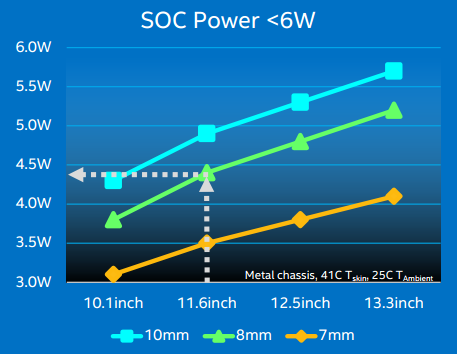
Cube i7 Stylus was thicker but it had same heating issues. According to Intel ~4W is maximum for Cube I7 Book sized passively cooled tablet. So basically Cube is putting too much TDP as stock already.
As far as I understood there is a 1mm thick thermal pad sitting between the DIE and the aluminum heatspreader, therefore you should only change it for something equal in size.
Ok. I ordered:
- Thermal Conductive Plaster Viscous Adhesive Glue
- Copper shims 20x20x1mm
- 0.5mm thermal pad
I try to make “light” cooling mod with original aluminium cooler. I have no intents to overclock this tablet, just make it run cooler with stock settings or slightly less turbo boost without burns in my hand.
How about just using thermal paste between original cooler plate and cpu/gpu, or does it make proper contact?
December 3, 2016 at 9:34 pm in reply to: Problems with camera drivers after format and Windows 10 reinstall #58033Just did fresh install and cameras work ok. I used these drivers:
http://forum.xda-developers.com/showpost.php?p=68622572&postcount=355
Found that this Intel Thermal Framework Driver from Lenovo seems to work:
http://support.lenovo.com/fi/fi/products/laptops-and-netbooks/u-series/u41-70/downloads/ds104500
I downloaded Intel drivers with Intels Driver Update utility, but these should be the same:
Intel GPU:
https://downloadcenter.intel.com/download/26404/Intel-Graphics-Driver-15-45-
Intel wireless:
Intel Bluetooth:
https://downloadcenter.intel.com/download/26419/Intel-Wireless-Bluetooth-Software-for-Windows-10
-
AuthorPosts

