


Forum Replies Created
-
AuthorPosts
-
January 13, 2019 at 6:18 pm #150022
LWin::
January 5, 2019 at 12:04 am #149740nice it fix it for you 🙂 did windows 1809 hang also without boosted volume?
January 4, 2019 at 11:04 pm #149738give it a try, you should be able to roll back from recovery settings
https://www.blogsdna.com/27818/how-to-downgrade-to-windows-10-version-1803-from-1809.htm
or it can be just hw problem that show up after 1y of usage.
January 4, 2019 at 8:18 am #149711it’s hardware issue. try to take out ssd and use windows on emmc if you have same problem again.
ezbook is really bad construction for example on mine when you plug power cord touchpad is getting crazy when notebook is on flat surface. when you rise it a bit it works OK. no problem on battery. also mine sometimes hang with black screen and you need to power it off. sometimes after it hangs it does not see ssd and boots to my windows on emmc, but usually after reboot it see ssd again. twice after hang it didn’t saw touchpad at all. device was there, driver was there, but windows didn’t even show arrow. only solution was to open case and replug battery for touchpad to start working again. for me there is some issue with power charging, some interferences. maybe with ssd it happeds often. like i said if you kept windows on emms i would start with taking ssd out and checking if problem is still there.
December 19, 2018 at 9:25 pm #149291i bought and use this one for ezbook 3 pro, but it should work for x4 as well.
it’s made of 2 parts so you can have as long cable as you need and plug you need.
December 12, 2018 at 9:26 pm #149093there aren’t any official revisions of ezbook, check bios date, last series had 02/01/2018.
December 12, 2018 at 12:53 pm #149068can you take out ssd and boot? it’s probably a matter of bcd settings that you cloned from ssd, but take out ssd and and check if it boots.
when i boot mine ezbook windows boot manager boots internal emmc and windows boot manager (nt-128 kingspec) boots from ssd.
btw: i think you boot from emmc all the time, not ssd, but take it out and we will see 😉
December 12, 2018 at 10:30 am #149029every drive you use for boot becomes C in windows after boot, and non boot drives become D,E,etc.
take out ssd then and check if it boots from emmc or change wallpapers on both boot options and compare.
December 12, 2018 at 9:36 am #149026windows boot manager is from emmc, windows boot manager (ssd name here) is from m2 ssd.
December 3, 2018 at 10:01 am #148757send it on warranty or go to local pc service. i had similar problem with power/charging unit. it didn’t charge battery and didn’t work on power plug, but it did work on battery when it was charged outside unit. they told me it was faulty power/charging unit (didn’t switch between batt and dc), they fixed it for a small price. or maybe it’s faulty battery? it shows 100%, but have no power. when my 1st batt was dead ezbook turn off just after i took power cable out, even when charged to 100%.
November 25, 2018 at 3:09 pm #148479today i had 2nd time problem with touchpad, didn’t work at all. tried 2 different windows instalations (ssd and emmc). i’ve read somewhere on forum that unpluging battery could help and it did (probably bios reset would help as well). this notebook is garbage.
November 24, 2018 at 10:26 pm #148454for me it’s not a big problem coz ezbook is always used on battery and with 20 mhz channel wide there are no problems with wifi.
November 21, 2018 at 9:09 pm #148357if you rise one side on ezbook touchpad works OK even when power is plugged in. similar with wifi, when set to 40 mhz channel wide and standing on flat surface > lots of problems like high ping, pocket loss. rise one side and problems are smaller/gone (lucky it can be fixed setting channel 20 mhz). probably something fucked up in construction that pressure on bottom makes problems.
November 16, 2018 at 9:30 pm #148206i have the same problem, but only when ezbook is charging, on battery no problem. try to rise one side of notebook a few cm up and check if there is still a problem.
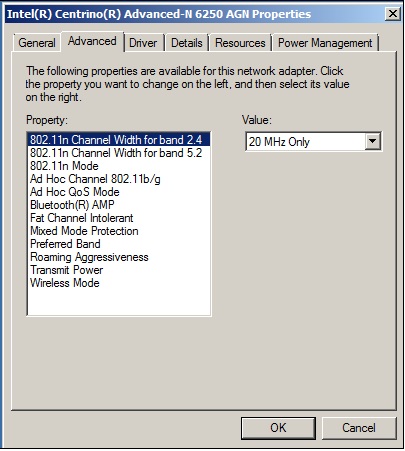
September 11, 2018 at 2:30 pm #146818try to disable auto / 40 mhz channel width in wireless driver settings (device manager -> wifi card -> advanced). on my ezbook when i put it on flat surface ping rise to 1000ms and there is pocket loss. after switching to 20 mhz only there are no such problems anymore.
-
AuthorPosts

