Forum Replies Created
-
AuthorPosts
-
i cant update the driver either. and those who have, i’m not sure if they actually have installed the driver or not…. as when i try to install it, it says its not for this processor series…. which is odd….
when i try to install the update, it shows everything just fine, no error messages. but when i reboot and go back into the intel control panel, it still lists the same driver version. so i tried to install the driver manually, and it came up with an error message that the driver isnt’ for this processor series. so i’m not quite sure whats going on.
if someone has been able to update the driver successfully, would you be able to upload a screenshot of the spot in the driver utilities in the intel graphics menu, where it mentions which driver version its using?
easily 🙂
i’ve been using a VHDL synthisis tool on mine, modelsim and xilinx ISE/SDK. if its powerful enough to run those, it’ll easily be powerful enough to code some java 😀
What charger are you using?
With the charger it comes with, it will charge at 2.1-2.3 amps. Or roughly 12 watts. Which is quite fast.
From any other charger however, if it supports 2 amps output, often this tablet will only charge at 2.5watts, thinking that it’s a usb port on a computer, or after unplugging and plugging in a couple of times, it’ll charge at 7-8watts.
I’ve found the charger it came with (with the supplied cable) is the fastest charger that you can use.
According to the Intel graphics properties I don’t actually have windows 10 home, I have the insiders preview of windows 10 pro.
Is it possible there is some trickery going on at teclast? has anyone verified that they in fact have a 100% legit copy of windows 10 home on their tablet?
It also won’t install the graphics update. it reports as if its been installed if you let it happen automatically, but it doesn’t actually install the update. when you manually install it, it throws and error saying the update isn’t for this processor. has anyone been able to verified that the graphics update has actually installed??
Attachments:
You must be logged in to view attached files.Also, keep in mind, the stress tests I ran, ran this processor to the maximum it could put out, I would think you could safely assume that it would never get to these temperatures in normal usage when gaming. As no game will ever stress the CPU and GPU to 100% utilization.
If you are doing the thermal mod, id suggest use a thermal pad slightly thinner than 1mm between the emi shield and the rear case. Just to limit the pressure between the screen and the digitizer.
has anyone’s drivers actually installed?
turns out that my display drivers didn’t actually update at all, and when i tried to manually update, it turns out the drivers the intel driver update utility found wern’t even for the X5 Z8500, they were for celeron processors… :/
Ok, so I just went into the Intel control panel, and it I’m using the previous version of the driver…… so no idea what’s going on.
The Intel driver also thinks I have windows 10 pro installed. but I swear it said I had windows 10 home somewhere else…..
Anyway I’m installing the graphic drivers again. hopefully it actually installs this time…..
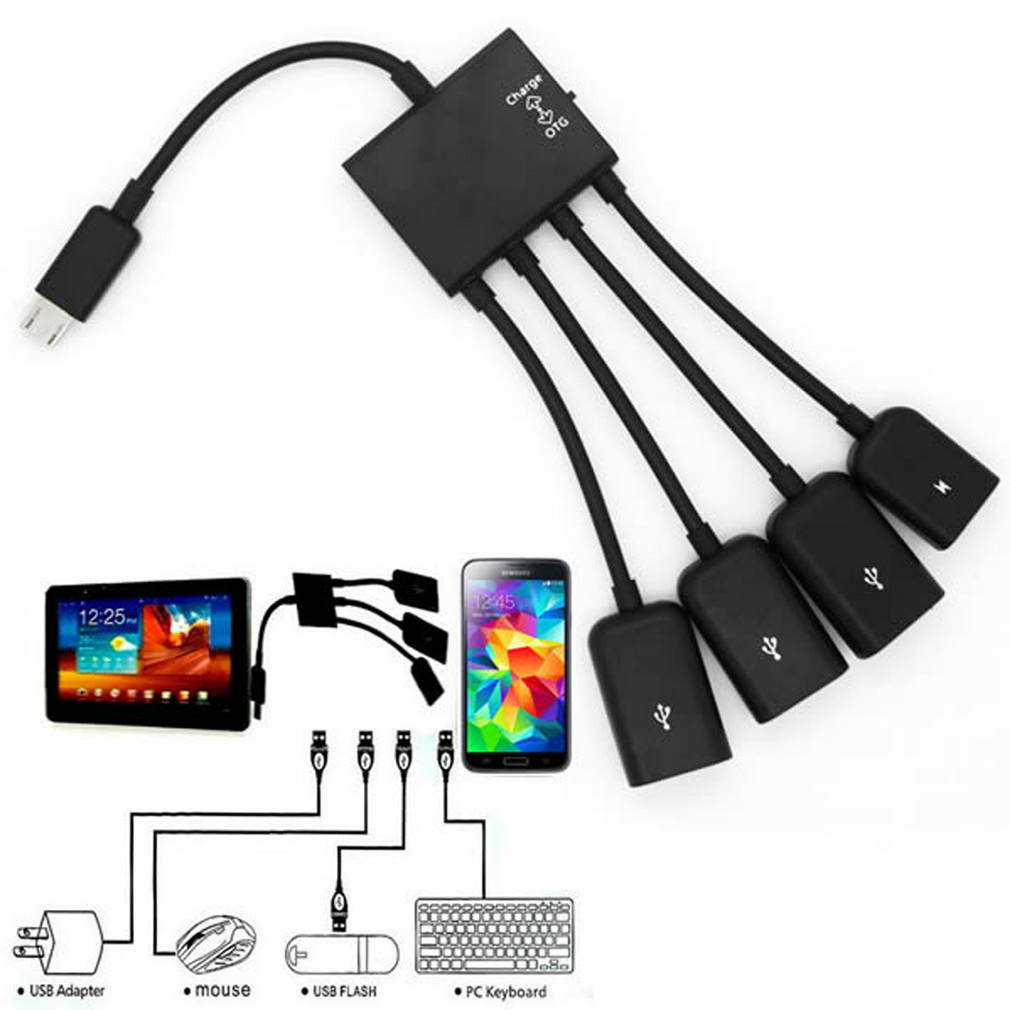
charge = otg + charging.
Otg = otg only.
I use it to charge my tablet while using a keyboard and mouse, and a usb3 USB stick and it works fine. charging at quite a fast rate if you use the charger it came with.
Hmmmmm I just started getting random crashes today as well….. interesting …. I wonder what’s causing it.
its one of these:
in the “charge” position, it will charge the tablet, and also give you access to the USB ports, when its in the OTG position, you cant charge.
i also found that you need to plug it into power with no USB devices plugged in, and its best to plug it in with a USB volt/ammeter as sometimes it only charges at 2.4watts but if you plug it in, and unplug it a few times, it’ll go up to 6 watts on most USB battery packs.
when i have plugged it into the charger it came with, i’ve seen it get up to 9.6 watts. which is just about 2 amps. which was quite nice.
i’m using it at the moment from a USB battery pack, its charging at 6.7 watts. and i’ve been using it for 1:30 hours.
in the last 1:30 hours, the battery has gone down by 2%. i think if i were to plug it into the actual power brick for the wall, it would still charge the tablet while using it.
(i currently am writing a lab report in a word document with images, and i have microsoft edge and google chrome and microsoft word open.)The one I have works fine. its one of the cheapest ones on eBay. will charge at 9 watts when plugged into the power supply. or 2.5 if plugged into a USB port, which means that it wont actually charge, just expend the life.
It needs to be plugged in while no USB devices are attached, preferably with a USB ammeter as well, as sometimes I’ve had to unplug and pug it back in to get the faster charging speeds. but k can reliably get 9w of charging, with the ability to use 3 USB ports at the same time. which is fantastic. I’ve been testing it out for a couple of days and it works really well. even had a usb3 USB plugged in at the same time as a wireless keyboard and mouse, and the tablet still charges at a decent rate. It actually pulls more power from the USB charger as you add more USB devices.
Dfx audio enhancer works wonders, improves the sound quality by 100%. There is also a setting in the speakers properties, which is an Intel enchantment, that degrades the quality quite a bit I have found. So I disabled that as well. there speakers don’t appear to start clipping or distorting even at these higher volumes….. so I’m not sure why they have been limited sooo much.
The one I have works fine. its one of the cheapest ones on eBay. will charge at 9 watts when plugged into the power supply. or 2.5 if plugged into a USB port, which means that it wont actually charge, just expend the life.
It needs to be plugged in while no USB devices are attached, preferably with a USB ammeter as well, as sometimes I’ve had to unplug and pug it back in to get the faster charging speeds. but k can reliably get 9w of charging, with the ability to use 3 USB ports at the same time. which is fantastic. I’ve been testing it out for a couple of days and it works really well. even had a usb3 USB plugged in at the same time as a wireless keyboard and mouse, and the tablet still charges at a decent rate. It actually pulls more power from the USB charger as you add more USB devices.
Its just one of the really cheap ones,
Appears to work perfectly. will do more testing. I also ordered a USB Vollmer and ammeter with an oled screen to keep track of the charging rate.
Have you had the WiFi drives crash? its happened to me a couple of times where no network devices are available. A reboot always fixes it. but wow I love this tablet. Its soooooo nice to use. And that charging hub which arrived today has made it a whole heap more useful!!!
i still havent had another crash since doing the driver update.
also i was able to use a otg charging hub, and the tablet didn’t only charge, but it charged at 9 watts!!!!! which is quite nice.
-
AuthorPosts