Forum Replies Created
-
AuthorPosts
-
October 19, 2015 at 1:01 pm #13613
crash in Windows, black screen and not booting afterwards
This is not a trifling issue !!! And what about this :
My K9C6 began to loop the Bios screen It does not start android or windows. Failed to locate emmc device path for specified controller:Not Found
Ok, you have answered your own question then. Move on, buy something else.
October 1, 2015 at 8:58 pm #12351no problem, but I will do it in the morning, right now it’s 11pm here, so I’m going to sleep
 <noscript></noscript>
OK, thanks!
October 1, 2015 at 8:39 pm #12349ok, the k9c6 windows image (which I posted links in another topic) can be used to restore windows and make it dualboot. You must extract the archives to at least 8GB usb formated as fat32 and set the name of usb to WINPE, otherwise it will fail with disk not found
Care to give us a little writeup from start to finish to get dual boot? Would appreciate it!
September 29, 2015 at 1:01 am #12111Looks like I’m bricked
 <noscript></noscript>I can still get into the fastboot DNX mode. But not the bios.. Got as far as 56% and then the factory format command failed on me.
 Ugh! That’s terrible.
September 28, 2015 at 5:58 pm #12076I have uploaded that 66MB file to google drive, maybe in the meantime someone can translate that pdf with instructions https://drive.google.com/file/d/0ByUOEKnPRz9gdFhrUDYtYlN4bVE/view
Apparently this will leave your tab dual boot, but with no operating system on either partition
September 28, 2015 at 5:46 pm #12072According to the Intel graphics properties I don’t actually have windows 10 home, I have the insiders preview of windows 10 pro. Is it possible there is some trickery going on at teclast? has anyone verified that they in fact have a 100% legit copy of windows 10 home on their tablet? It also won’t install the graphics update. it reports as if its been installed if you let it happen automatically, but it doesn’t actually install the update. when you manually install it, it throws and error saying the update isn’t for this processor. has anyone been able to verified that the graphics update has actually installed??
Mine does install properly.
September 26, 2015 at 12:32 pm #11961Model#K9C6
So finally someone received it!! Can you please post your impressions and test it for overheating ???? How is Android running? Is it 5.0 or 5.1?
DId you look at his pics posted??? Its still hitting 85c. Same tab as the single boot.
September 25, 2015 at 12:46 pm #11906Hi! Has anyone who ordered the X98Pro DualOS (either from AliExpress or BestGear) had it shipped yet? I ordered 14th, and they say the preorder was until 15:th then they´d start shipping it out. But nothing yet. But they still sell the tablet and list it as “70 peices left”
Yea, well typical Chinese order process. They “claim” to have 100 pieces, yet they have none.
September 21, 2015 at 7:59 pm #11724Ouch on the price!! Why not just get a venue pro refurb on eBay??? They are $319 shipped.
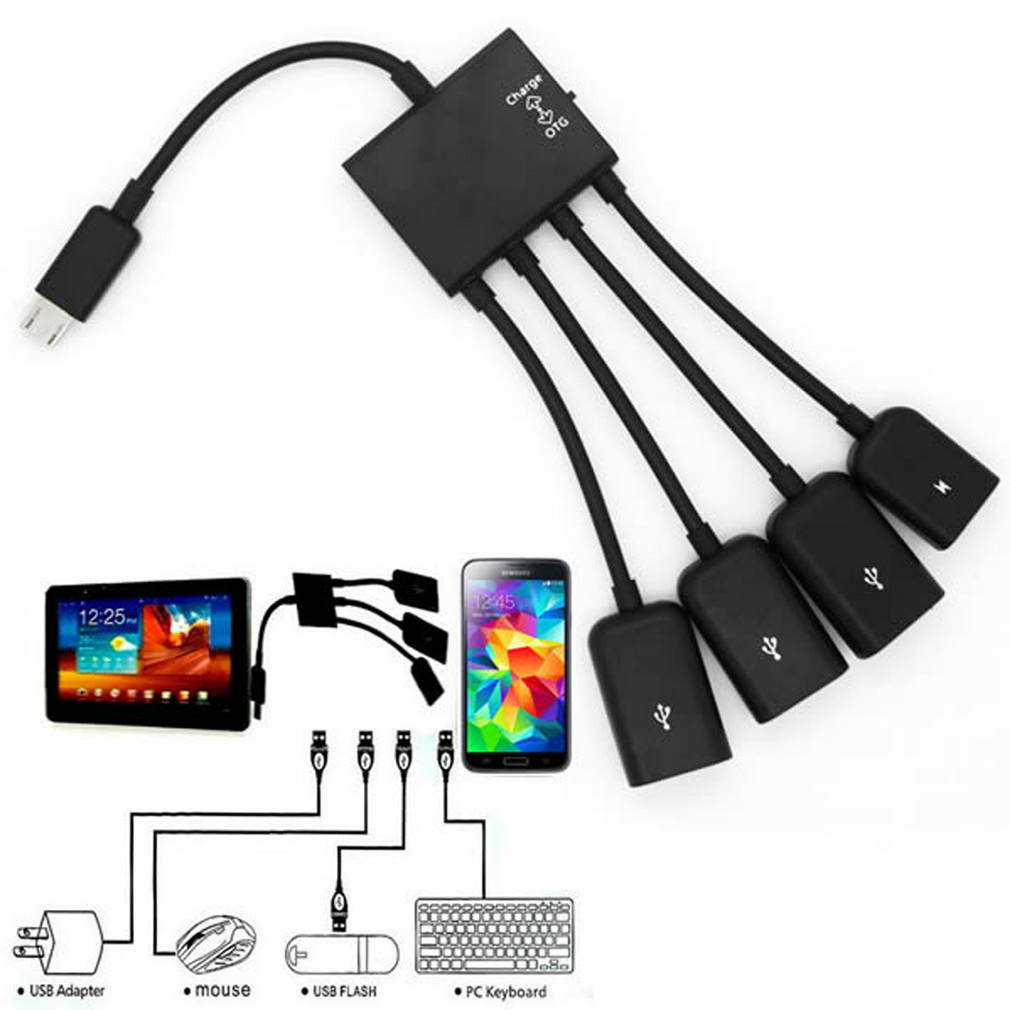
September 18, 2015 at 2:11 am #11597Its just one of the really cheap ones, http://g02.a.alicdn.com/kf/HTB1xPQnHFXXXXX.XVXXq6xXFXXXL/1pc-High-Quality-4-Port-Micro-USB-Power-Charging-OTG-Hub-Cable-Connector-Spliter-for-Android.jpg Appears to work perfectly. will do more testing. I also ordered a USB Vollmer and ammeter with an oled screen to keep track of the charging rate. Have you had the WiFi drives crash? its happened to me a couple of times where no network devices are available. A reboot always fixes it. but wow I love this tablet. Its soooooo nice to use. And that charging hub which arrived today has made it a whole heap more useful!!!
Oh those ones, but hang on they don’t offer charging and OTA at the same time do they? I’m sure someone will make one for the X98 Pro soon.
Strange, I haven’t had one crash in 2 weeks. Sure it gets hot, but that’s my only complaint with the tab. Wondering what’s up with the display crashes some are having??
September 15, 2015 at 6:32 pm #11475Hi Guys…. My copper plate has been order…..All tougether I’m disapointed… My model x98pro -Horrible temps + throtting, quiet speaker, poor battery life,blue screen. I’m thinking to back to windows 8 …switch tablet mode on/off is painfull….no IExplorer on UI …microsoft edge during wideo play give me visable digitaizer line (red coulor specialy) in classic IE and chrome is fine …. I was expect better preformance compare to my Lenovo miix 2 8″ on windows 8 (z3470,2Gb RAM) and honestly i think my lenovo is faster ? I have couple question…
- Its possible to activate windows 8 using windows 10 key?
- Will be avilable android for this device? and any guide hot to install for dual boot?
I would like to say big THX for Chris and his great JOB…great website …carry on sorry for my poor english
Sounds like you have a defective tab. Even with the heat issues, this thing flies. No lag, great screen, quicker than my i3 laptop.
September 15, 2015 at 2:57 pm #11466Next one I open up I will tackle it in a different way, if the bios update doesn’t fix it. But I’m sure that if the turbo boost clocks/limits or boost items are lowered it might fix the issue completely without the need for opening them up. It should also give us a nice battery boost. What I see on many of these tablets from Chinese is first batches can often have minor issues like this, normally they have various revisions to fix minor problems. Just look at how many revisions the X98 Air 3G has had, most are just eMMC changes and dual boot, or non-dual boot. But many were fixes to the cameras and screen inverted issues. There was also a batch with faulty intel GFX that would cause freezing. Nice of OKQI to post that, so at least Teclast are aware of the issue and a bios update is imbound. I will keep an eye on the Teclast forums for a download. @yamvmax I’m not sure the ram needs it, I used a better thermal pad there to at least help. Once we get the bios update all we need to do is find a way to charge and use the tablet at the same time. Unfortunately, my charging USB Hub that works on the X98 Air series and Chuwi tablets will not work here. It will stop charging after a few minutes no matter what I do. There must be a way to wire up a hub to charge and give data. If only we had a D/C power jack in.
I meant big ram heatsink on the cpu
September 15, 2015 at 1:14 pm #114604 watts? This processor will use up to 8 watts at full turbo. which is why we have issues. because it shouldn’t be able to turbo 24/7. not even the Microsoft surface turbos 24/7
I couldn’t find the Cherry Trail TDP, so I estimated it (wrong).
Anyway, we need some far better cooling and maybe BIOS changes re: turbo modes. Oh, Chris, maybe use some modeling clay to see what thickness the sink should be and keep the number of junctions to a minimum. I tried to open the case, like I have several times with my Air II using a guitar pick. Boy, is it tight. I don’t want to mess it up, as mine has really bad speakers, I may decide to return it. If we could fit a ram heatsink on, I think heat issues would be gone.
September 13, 2015 at 7:19 pm #11370My International X98 Pro (US English Windows 10 Home) from Aliexpress has terribly quiet and tinny sounding speakers, MUCH worse than my Air II. Can’t understand that as I think they are supposed to be the same speakers and appear to be so in Device Manager. And the overheating is RIDICULOUS. It instantly zooms to ~85 in a couple of cores when I start a 4K video. Idling it is in the 50s and 60s. My Air II idles in the 40s and hardly budges from that when playing 4K videos. Very disappointed in the X98 Pro. I could try to alter the heatsinks, but the speakers are still an issue and the heat even with feasible heatsinking seems crazy, like it needs a fan.
Not sure what you expected with the heat issue. It’s been stated numerous times that a heat sink mod is NEEDED.
September 9, 2015 at 9:26 pm #11200Well the glass is the touch screen…so it probably is defective. Bummer.
-
AuthorPosts

 <noscript>
 <noscript>