

TechTablets › Forums › Jumper Discussion › EZBook series › Bad EZBook pro batteries – How to replace step by step
Tagged: EZBook batttery replacement
- This topic has 270 replies, 60 voices, and was last updated 11 months, 3 weeks ago by
Chupa.
-
AuthorPosts
-
September 29, 2018 at 4:41 pm #147247
Yes, no problem about that. You choose between batteries I posted before.
OK. I hope they will improve the Ezbook’s battery time. Right now I can’t make it last more than 4 hours, with brightness 25% and wifi off (I am using a USB-Ethernet adapter).
Also, nobody answered to this question… Do you think these things would work?
20pcs/50pcs/100pcs Seal Heat Shrink Butt Wire Connectors Terminals Solder Sleeve Waterproof
https://s.click.aliexpress.com/e/c58I90k1Thanks
October 1, 2018 at 3:35 pm #147305Hi, i’ve a ezbook 3 pro w dead battery soon I bought a new battery on aliexpress, do you have some to suggest ? and also a battery charger 12v 2a to preserve battery life ?
sorry for my englishezbook 3pro rulez
October 2, 2018 at 9:44 am #147314Yes, no problem about that. You choose between batteries I posted before.
OK. I hope they will improve the Ezbook’s battery time. Right now I can’t make it last more than 4 hours, with brightness 25% and wifi off (I am using a USB-Ethernet adapter). Also, nobody answered to this question… Do you think these things would work? 20pcs/50pcs/100pcs Seal Heat Shrink Butt Wire Connectors Terminals Solder Sleeve Waterproof https://s.click.aliexpress.com/e/c58I90k1 Thanks
Two connection points are required soldering (green circles), so the stuff you would like to buy cannot help
Attachments:
You must be logged in to view attached files.October 2, 2018 at 4:53 pm #147343sure he can, he just need to cut the cables, strip and then connect them.
the connectors should work nicely but need heat to make the connection.
the old, twist the ends together and put some electrical tape around, should also work but the I rather would go with some crimp connectors from the same sellers 0.5-1.5mmNeed Help?
1981 soldered my first Sinclair computer 1K, tapedeck * 1984 build and sold IBM clones 8Mhz, 512K, 20MB HDD * 2018 messing with ultrabooksOctober 2, 2018 at 5:43 pm #147345sure he can, he just need to cut the cables, strip and then connect them.
Are you saying that these connections in the green circles hide a cable somewhere?
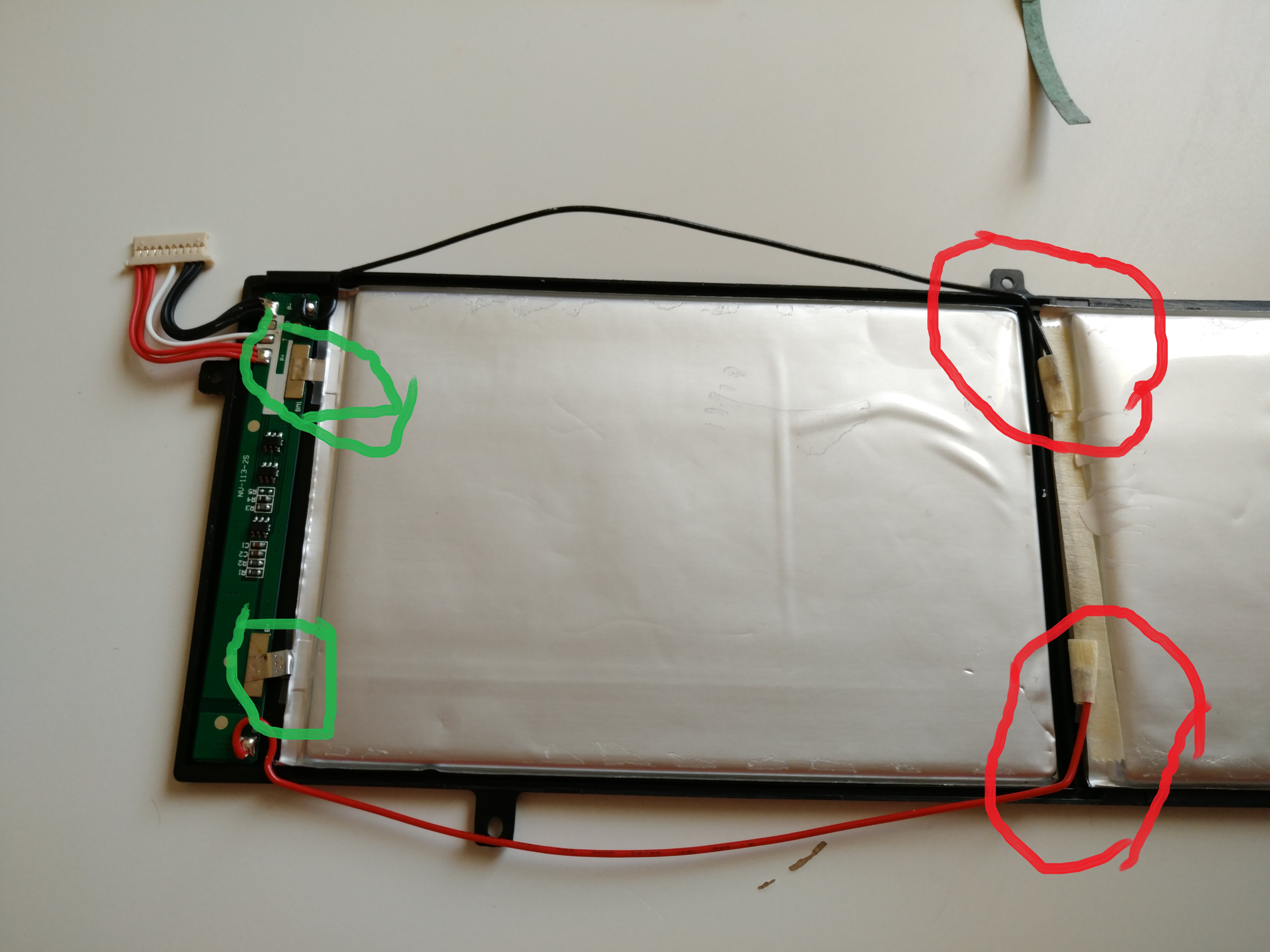
the connectors should work nicely but need heat to make the connection.
Well, I would heat them with the soldering iron, but that should not require any skill…
the old, twist the ends together and put some electrical tape around, should also work but the I rather would go with some crimp connectors from the same sellers 0.5-1.5mm
I have no idea how these work, though. Just crimp them? Or is heat required also?
Thanks
October 3, 2018 at 2:12 pm #147380There is no indication about where the cells are made, though. Also they are 4,8mm thick. Will they leave enough room for the batteries to “breathe”?

Yes, no problem about that. You choose between batteries I posted before.
you mean 7000mah and 8100mah ? what is the best charger 12v 2a for these batteries on aliexpress ?
ezbook 3pro rulez
October 3, 2018 at 2:57 pm #147381what is the best charger 12v 2a for these batteries on aliexpress ?
Why is the charger 12V if the batteries are 7.4V?
Wouldn’t it be more logical to have a 7.4V charger?
October 3, 2018 at 10:44 pm #147411what is the best charger 12v 2a for these batteries on aliexpress ?
Why is the charger 12V if the batteries are 7.4V? Wouldn’t it be more logical to have a 7.4V charger?
original charger is 12v 3A, but seems that 3A damage the battery
ezbook 3pro rulez
October 4, 2018 at 8:29 am #147417original charger is 12v 3A, but seems that 3A damage the battery
I know that, but I was wondering why the charger is 12V when the batteries are not.
October 4, 2018 at 8:52 pm #147439Hi I replaced my batteries with the 5000mAh batteries link in this thread. The thing is the laptop behaves just as it did before it died last time, two hour of light use, charges 0 to 100 in under 2 hours etc.
Doses any have any idees?
Could it be running on one battery only? It looked like only the battery closest to the connector/board was damaged last time.
Cheers
October 4, 2018 at 9:07 pm #147440Hi I replaced my batteries with the 5000mAh batteries link in this thread. The thing is the laptop behaves just as it did before it died last time, two hour of light use, charges 0 to 100 in under 2 hours etc. Doses any have any idees? Could it be running on one battery only? It looked like only the battery closest to the connector/board was damaged last time. Cheers
Have you checked the integrity of the new batteries before soldering them?
October 4, 2018 at 9:40 pm #147441Have you checked the integrity of the new batteries before soldering them?
Sadly no, didn’t even have access to a voltmeter and was eager to get my jumper up and running ?
It’s intirely possible that the batteries I got are low quality/less then spec.
But is it possible to run on only one battery? The voltage would be to low right?
Also how is the discharge rate calculated in battery bar? Mine is crazy high at ~20-30 W
October 5, 2018 at 9:40 am #147459what is the best charger 12v 2a for these batteries on aliexpress ?
I’m not sure if this is “the best” (probably not) but it seems to work with the Ezbook:
1PCS 12V2A AC 100V-240V Converter Adapter DC 12V 2A 2000mA Power Supply EU Plug 3.5mm x1.35mm
https://s.click.aliexpress.com/e/RKg6HOvThis one looks good, too:
AC DC 12V 2A 3.5mm 1.35mm Power Supply Adapter 1.5A Transformer US EU plug High Quality With IC Chip
https://s.click.aliexpress.com/e/bsPUecuhOr this one, which is made by Tp-link so quality might be better than average:
TP-LINK TL-P1220 1A 1.5A 2A 12V/2.0A Power Adapter Network Camera Monitor
https://s.click.aliexpress.com/e/cFzu7VGlOctober 5, 2018 at 4:06 pm #147466luca my comment was for the picture above yours, where you can see cables.
in some cases they used metal tabs to make the connection, these can be cut if the new battery has no tabs and the cables can be squeezed into the pre rounded tabs. but just soldering is much ore easy.regarding the charger as we all discovered some month ago, the 2 amp is more gently to the batteries and they last longer.
the 12 v is, because 9 v charger are quite seldom, 12 v and 5 v are standard.
if you ever charged a car you have seen a 12 v battery is charged with up to 14.5 v
AND if it has just 12 v it is near dead
over 13 v is a charged car battery
12.v is a half capacity battery
12 is an empty batterywhen i charge 12. nicad batteries they have over 1.4 v when full
Need Help?
1981 soldered my first Sinclair computer 1K, tapedeck * 1984 build and sold IBM clones 8Mhz, 512K, 20MB HDD * 2018 messing with ultrabooksOctober 5, 2018 at 10:56 pm #147475so I can answer my own question it’s not possible to run on only one battery/cell, tried it by cutting the wires/connections.
Regarding batterybar, does anyone know how it calculated the discharge rate? It’s just using the reported battery capacity and the capacity at a specific time to calculate right?
Anyways as of now I really discourage any one to get these: https://www.aliexpress.com/item/Free-shipping-5000-mah-lithium-battery-3-7-v-approx-8-inches-Sanei-N83-N86-AMPE/955308174.html?spm=a2g0s.9042311.0.0.3b2e4c4d9oFULd
-
AuthorPosts




- You must be logged in to reply to this topic.
