


Forum Replies Created
-
AuthorPosts
-
I have the same problem with the Jumper. Two days ago it worked fine. And now it will not start. Can you please help me.
Edit: Ok it helped, to open it, remove the batterie and put it back in some mins later.
Now its running fine again!
April 28, 2018 at 9:45 am in reply to: WiFi limited connectivity/disconnecting issues FIX Ezbook 3 Pro V3 #142427Hey together, I also have huge connection Problems.
The connection cuts and cuts and cuts… I can´t download anything, because than connectio gets lost and I ve to start again….
Is there any solution at the moment? I don´t want to pluf in a wireless stick. I want to use the internal card if possible.
Driver at the moment is the 19.51.8.2
So please help me out.
Thank you for the fast and long answer!
Poorly there is nothing in hardware manager .. where I can see any difference between the touchpads.
Also the feeling/structure of both Jumpers Touchpads are the same. Here I can´t feel any difference.
But I also fear, that the new one (my gfs one….) has a much better touchpad (hardware) than mine…
Hey hey, two days ago my second Jumper 3 Pro (I think V4) arrived. Now I startet it for the first time and the first, while Setting it up I recognized was that the touchpad works as fine as I wished for the first one. It works like on all other Laptops….
How could that be possible? Does anyone else have a real new one and can confirm this?
And where can I see which Touchpad and Driver are exactly in it?
Can really nobody help me with this Problem?
The m.2 is not nearly so fast as it should be.
Awesome thank you! It took 2 days for copy to the m.2!!! This can´t be normal? I think everything is copied now. How can I set the m.2 as Default? In Bios I can´t choose the m.2 because it is not listed. It only says: UEFI: Built-in EFI Shell Windows Boot Manager Disabled Can anybody help me with this?
2 days?! That’s absurd. The whole process took me less than half an hour as I remember. Have you checked the format of the new SSD (GPT or MBR) before the cloning process? I had to convert my SSD to GPT to match the eMMC. Here is a tutorial.
Yep, it nearly took exaclty 48 hours. I was also confused… but I let it run.
The new m.2 is in gpd Format. You can see it in the Picture I attached. At the Moment I ve no idea what to do…. I can´t see it in the bios.
A friend of mine says it should be a Driver Problem. because as IDE ATA/ATAPI-Controller is only “Standard SATA AHCI- Controller”
He says I Need the chipset and ahci Driver. Is there an opportunity to download this?
Can sb confirm this?
Attachments:
You must be logged in to view attached files.@ Dennis, Dear Dennis,
The above video link explains how to copy windows using Macrium. This is Chris’ tutorial. Please see around 3.14 minutes of the video. Macrium home edition is free. Install it. Click the software, and it will take you to copy windows and put to a new location/partition. I did it successfully following the instruction of Chris’ tutorial.
Awesome thank you!
It took 2 days for copy to the m.2!!! This can´t be normal?
I think everything is copied now. How can I set the m.2 as Default? In Bios I can´t choose the m.2 because it is not listed.
It only says:
UEFI: Built-in EFI Shell
Windows Boot Manager
Disabled
Can anybody help me with this?
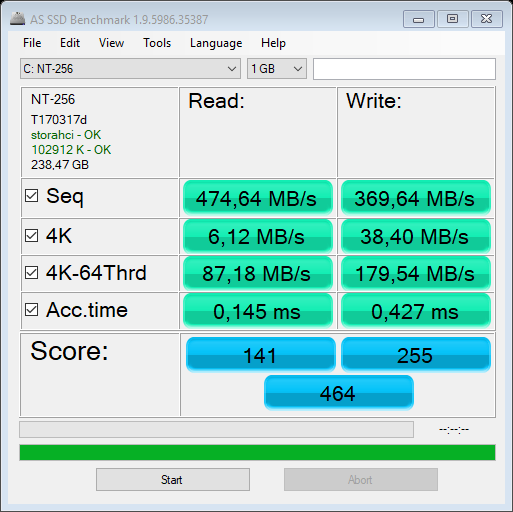
Hi SAVVAS, I cloned my SSD with Macrium Reflect free. I don’t expect it to impact battery life but time will tell. It’s not the fastest drive but fast enough IMHO. These are not my numbers, but I got results very similar to these:
How did you do this with the macrium reflect Tool?
I tried already the Partition wizard without result….
Macrium I don´t exactly know how to use to copy the whole internal Memory to the m.2. Because it is a running System, so how can it copy this?
Please help me to clone the System to m.2, because I really do not want to reinstall Windowss
Yeah the Keyboard is really worse…. it looses some leetters while writing. Is there a possibility to adapt this with a new Driver or sth like this?
November 9, 2017 at 9:35 pm in reply to: Good news: found a way to increase TDP limit on ezbook 3 pro (N3450 Apollo Lake & N4100 Gemini Lake) #74631Hi Chris, Which app do you mean? I installed ThrottleStop and with this I cold set it to 10.
But before I did this it was on 6 and not on 9W. I looked for this with HW Info.
November 9, 2017 at 8:14 pm in reply to: Good news: found a way to increase TDP limit on ezbook 3 pro (N3450 Apollo Lake & N4100 Gemini Lake) #74627Hi, I also ve a V4 with the sandisk Memory.
My Bios is also locked and I don´t ve the Option 🙁
Is it already possible to use the read write Thing to increase the tdp Limit to 10W
Or what can I do right now? I really want to increase the power.
-
AuthorPosts

