Forum Replies Created
-
AuthorPosts
-
October 4, 2016 at 8:25 pm #52673
The integration of the digitizer is not that good in the Cube i7 book…
___EDIT___
I mean : the tech is good, butthe integration is quite lame. There is big area near the edges where the digitzer is just unusable, not precise enough for drawing (you can click in menu but that’s about it). So for a pure drawing/note taking, less than half the area is usable.
October 3, 2016 at 10:57 pm #52610You should try to reset the UEFI using the pinhole near the power button …
September 20, 2016 at 8:19 pm #50299No it’s just to check if you have the tablet screen working while booting on the USB pen drive ?
September 20, 2016 at 7:01 pm #50291Unfortunately if you have no screen display while doing Win+P –> Extended or Duplicate, then you probably have a hardware issue of some kind …
Did you try to reinstall windows from your Win10 bootable drive ?
September 19, 2016 at 7:22 pm #50192it is normal that the device does not charge on 5V, it will only charge through the USB-C port @12V wich a mini USB cannot deliver. So you will have to wait for a USB-C to USB-C cable to charge your device (I do not recommend you to open your device to fix your power plug)
September 16, 2016 at 9:00 am #49880No improvement with W10 anniversary …
September 16, 2016 at 8:16 am #49879When you are in W10 using the HDMI output, press [Windows]+P to bring up the projection menu. Select “Extended” or “Duplicate” options and wait a few seconds. If the tablet screen goes ON and displays something, then it’s just something that is messed up in the UEFI. If the tablet screen does not wake up, you have a bigger issue.
If it’s the UEFI, there is somewhere in the UEFI an option to select the default primary screen. It’s probably set to HDMI or something like that. I can take a look at the good value this evening if need be.
September 14, 2016 at 3:06 pm #49759I switch off the trackpad when I can use a mouse but when I use the tablet in the sofa or bed, I use the touchpad and even if it is not a good touchpad, it’s still workable …
September 14, 2016 at 3:03 pm #49758Do you have the cube logo during the boot ? (the blue chinese text)
Do you have anything plugged in the USB-C port ?
What is the color of the status LED ?
You may have the default video output set to something weird in the UEFI if you have done the install of windows while plugged in a monitor. You have a reset pin hole next to the power button (this is not a mic), it will force the UEFI back to it’s factory setting. Give it a try ..
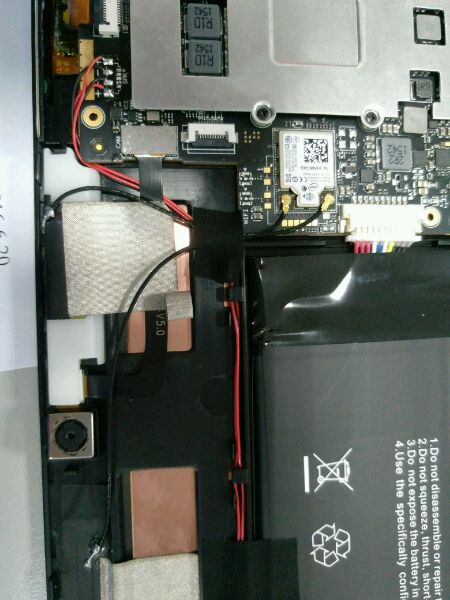
September 4, 2016 at 9:00 pm #48856I opened my tablet today so I took a picture of were are those piece in my device. Send me your mail by mp for me to send you the picture (I agree that I am being lazy here but the picture are on my phone so email is the easiest way for me)
September 4, 2016 at 8:56 pm #48855I had to open my tablet and check : the layout of the Book is a little different : there is about 8mm empty space once the ssd is installed : not enough room for a bigger m2 ssd…
August 28, 2016 at 10:26 pm #48331The thermal mod is meant to bring more heat to the tablet casing, to better cool the inside, so indeed the tablet will feel warmer to the hand while dissipating more heat.
August 27, 2016 at 9:16 pm #48201Google “Snappy Driver Installer”, it will solve most of your problem, except tablet rotation and webcams.
August 19, 2016 at 9:35 pm #47415For me it’s the same behavior with the original charger and with the iVoler USB-C charger…
August 18, 2016 at 10:21 pm #47303you can see one in the middle of this picture :
http://techtablets.com/wp-content/uploads/2016/06/Cube-i7-Book-Internals-0507166.jpg
near the webcam. Do you have one there ?
-
AuthorPosts