Forum Replies Created
-
AuthorPosts
-
September 20, 2016 at 8:19 pm in reply to: [SOLVED] No screen display after a fresh windows 10 install #50299
No it’s just to check if you have the tablet screen working while booting on the USB pen drive ?
September 20, 2016 at 7:01 pm in reply to: [SOLVED] No screen display after a fresh windows 10 install #50291Unfortunately if you have no screen display while doing Win+P –> Extended or Duplicate, then you probably have a hardware issue of some kind …
Did you try to reinstall windows from your Win10 bootable drive ?
it is normal that the device does not charge on 5V, it will only charge through the USB-C port @12V wich a mini USB cannot deliver. So you will have to wait for a USB-C to USB-C cable to charge your device (I do not recommend you to open your device to fix your power plug)
No improvement with W10 anniversary …
September 16, 2016 at 8:16 am in reply to: [SOLVED] No screen display after a fresh windows 10 install #49879When you are in W10 using the HDMI output, press [Windows]+P to bring up the projection menu. Select “Extended” or “Duplicate” options and wait a few seconds. If the tablet screen goes ON and displays something, then it’s just something that is messed up in the UEFI. If the tablet screen does not wake up, you have a bigger issue.
If it’s the UEFI, there is somewhere in the UEFI an option to select the default primary screen. It’s probably set to HDMI or something like that. I can take a look at the good value this evening if need be.
I switch off the trackpad when I can use a mouse but when I use the tablet in the sofa or bed, I use the touchpad and even if it is not a good touchpad, it’s still workable …
September 14, 2016 at 3:03 pm in reply to: [SOLVED] No screen display after a fresh windows 10 install #49758Do you have the cube logo during the boot ? (the blue chinese text)
Do you have anything plugged in the USB-C port ?
What is the color of the status LED ?
You may have the default video output set to something weird in the UEFI if you have done the install of windows while plugged in a monitor. You have a reset pin hole next to the power button (this is not a mic), it will force the UEFI back to it’s factory setting. Give it a try ..
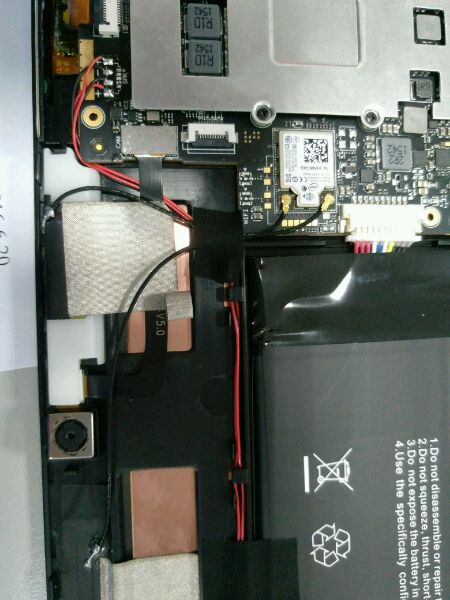
I opened my tablet today so I took a picture of were are those piece in my device. Send me your mail by mp for me to send you the picture (I agree that I am being lazy here but the picture are on my phone so email is the easiest way for me)
I had to open my tablet and check : the layout of the Book is a little different : there is about 8mm empty space once the ssd is installed : not enough room for a bigger m2 ssd…
The thermal mod is meant to bring more heat to the tablet casing, to better cool the inside, so indeed the tablet will feel warmer to the hand while dissipating more heat.
August 27, 2016 at 9:16 pm in reply to: Reinstalling Windows/ Don't use Windows Insider Preview #48201Google “Snappy Driver Installer”, it will solve most of your problem, except tablet rotation and webcams.
For me it’s the same behavior with the original charger and with the iVoler USB-C charger…
you can see one in the middle of this picture :
http://techtablets.com/wp-content/uploads/2016/06/Cube-i7-Book-Internals-0507166.jpg
near the webcam. Do you have one there ?
It’s a 2 cell lipo battery, You have a pair of positive (red) and negative (black) per cell, and one pair for the whole battery (cells are in series), then you have probably some thermal probe and electronic control devices. So you can probably buy a new battery with the model number of this one, but more on components’ web sites than on sellers like Aliexpress …
I don’t think so, you will probably fry it if you try.
-
AuthorPosts