-
Search Results
-
Hoping someone can point me in the right direction. I have already spent a lot of time reading in these (and other) forums and have been able to fix a few minor issues, but I’m clearly missing something really obvious to do with drivers (or possibly BIOS).
My tablet specs:
Chuwi Vi10, model CWI505
BIOS = INSYDE H20 rev 5.0 J1D_S165C_206 dated 21 SEP 2015
Intel Atom Z373F @ 1.33GHz
2GB RAM
(and BIOS shows “OS/BOM = Windows 8.x / BOM 3.1”)
WiFi = Realtek RGN RTL 8723BSThe tablet was purchased in Australia. It came with Windows 8.1 Chinese Windows installed, as well as Android 4.4.4. I have switched Android into English, no problem.
No such luck with Windows 8.1, so I did a complete, fresh install of Windows 10 Enterprise x86 (32-bit) English. This completed just fine. Wifi works fine in Android, however now does NOT work in Windows 10. When I check in Device Manager, there is no network adapter present at all.
I’ve visited here to get what I hoped were the right Windows 10 drivers, but it seems they just don’t work for me. I can confirm that they copy okay into the System32/drivers folder after manually installing them, but Device Manager still shows half a dozen devices with the ‘broken’ icon.
For the time being I’ve attached a USB-Ethernet dongle to get Internet access, and I’m using an external USB Keyboard and Mouse, because all the touch functions are also broken (work fine in Android, so the hardware is fine).
What am I missing here? Is my tablet version different in some material way from the others being discussed here? Or is it the BIOS version which needs updating? (I’m really reluctant to do a BIOS update unless there are clear, unequivocal instructions about this, because I don’t want to brick the device with a bad BIOS load).
Advice/tips would be welcome.
I have received my Teclast X98 Pro tablet last Friday. The shipment from Banggood took about two weeks from the moment of ordering.
My first experiences with this tablet are good. It is built well, feels solid, and the screen looks really good. Also. my tablet is working stable, i have faced no crashes or unexpected restarts this weekend. And about the ‘heat’ problems, i cannot say that the tablet feels hot. I have not checked the temperatures, but it just seems to work normally. I also must say that my tablet contains a Hynix eMCC, which is just working well. Wifi signal is as strong as other devices.
Personally I really wanted to have a Windows tablet. I don’t care about the dual boot at all. That is why I decided to remove the Android partitions from the device. Actually what I did was just booting from USB with Windows 10 setup that I created with the MS tool (just standard, no drived sideloaded). Then within the setup I removed ALL partitions and let Windows setup partition the device automatically.
So, after that I had a Windows 10 Pro NL installation (activated using my own key) on a single ~63 gb partition (next to MSR and EFI partitions). I recoved the drives using the downloads from techtables. At this moment everything is working again except for the Camera and the Gravity Sensor.
- Camera, tried to install unsigned driver, but cannot get it working.
- Gravity Sensor, drivers installer properly, device won’t start
I dont care too much about the above ^^ mentioned problems. The deviced where working fine in stock installation, and I am sure that a workaround will be found soon. That is the risk you take when you start tweaking the device yourself.
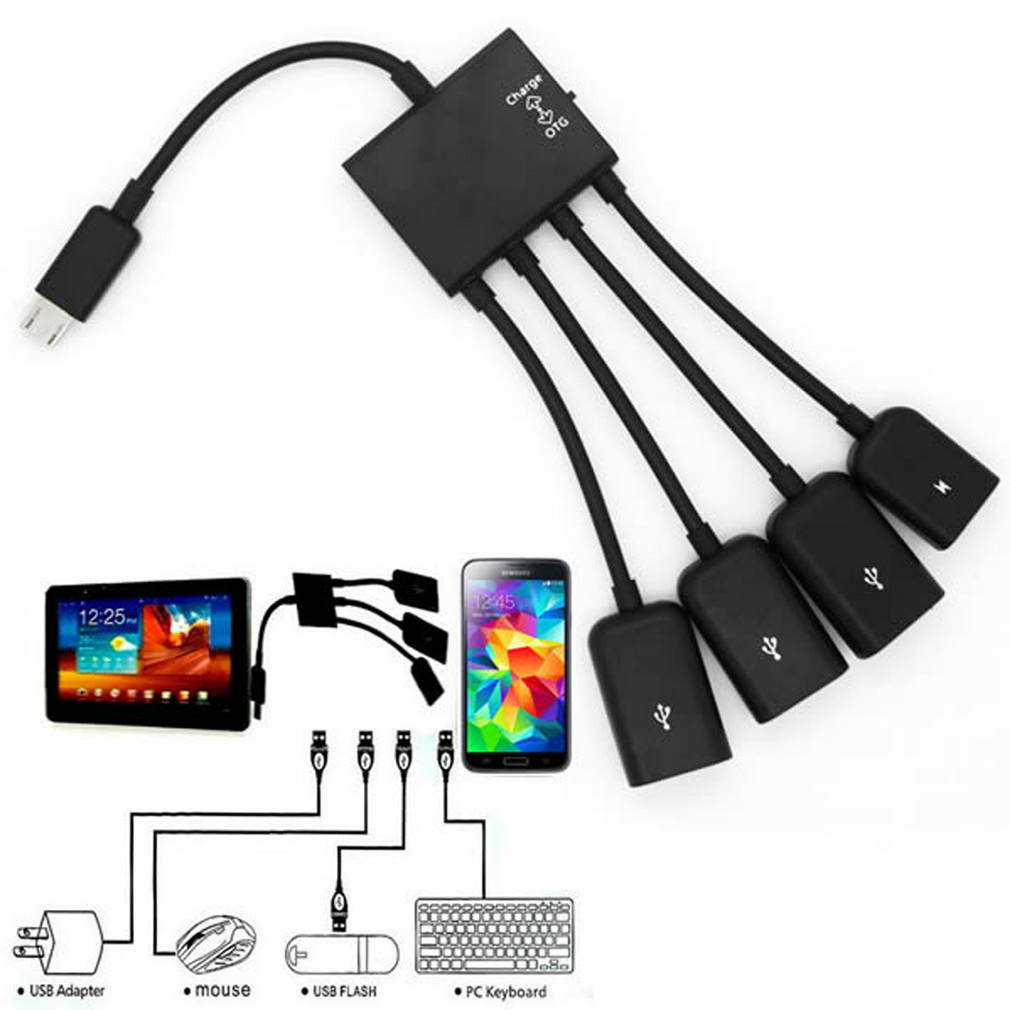
I think battery life is ok, it can work for 4 hours without any problems. My tablet just continues working fine, untill it is shutdown by windows at 6 percent. I couldnt reproduce the shutdown problems mentioned by some other users. The tablet works for 6+ hours when i am using my (second) hdmi screen only. In this setup i feel like having a really slim desktop computer that i can use when i am at home. I also ordered the OTG hub that allows for charging at the same time while using USB devices, which should arrive soon.
The only thing I don’t really trust is the USB charger. It indeed gets really hot. That is why i am using a old smartphone charger at the moment. I will look for a more decent charger soon, probably will pick up one thet delivers >2 amp at local IKEA (which is officially approved and tested..).
I have the feeling that I made a good decision to buy the tablet. Especially the availability of 4gb internal memory and 64gb storage makes it much more future proof then most other tablets within this price range.
Ordered from Banggood 10/11, received today 10/24, not bad, 13 days waiting. Banggood threw away the original package, and use their own packing; it felt used, I mean, you missed the shrink wrap excitement. Also ordered from Gearbest 1st, waited for 6 days, nothing. Order cancelled, and go to Banggood.
It came with the tablet, USB adapter with US plug, OTG cable
The tablet itself is a real beauty. It came w a nice placed screen protector; install such a large screen protector is not an easy job. thanks banggood (or teclast?); even crossed the pacific ocean and 13 days late, tablet booted with 82 % battey left, not bad. Booted to a menu, choose Window or Android.
Android:
Boot time 48 sec, if change from window it becomes 68 sec. It came with somebody’s stuff, the tester or ? Anyway, you do not get to or need to go thru the android startup screen. I do not like that at all. Oh, well. It came with android 5.0, Model X98 Air III(M5C6), Build no V1.01_20150915. It is default to English(US) with some chinese apps. Well, that saved some trouble of change the default language. After a couple of apps installed, space left behind 14.3G and 804 MB Ram. The tablet is not rooted 🙁 . It came with some bloatware, you need root to get rid of them. Kodi ran silk smooth, no stuttering/hiccup; streaming video is fantastic, you cannot tell it is streaming, just as if native i.e., media stays in storage. nice. Of course, a screen of resolution 2048 X 1536, DPI 320, made this an absolute spoil for watching video, a stunning beauty. Internet video open instantly, no waiting or buffering encountered. Wow. Google play store/google now are there and works fine. BT works fine. Antutu benchmark attached. The top performer Samsung galaxy note5 runs 70,000 and this little baby strolling at 30,000.
I do not see any app to switch from android to window. So, one has to turn off the tablet to switch system.
Window:
Boot time 24 seconds; it came with win 10 home, 32 bit OS, activated, with support phone number/online listed in “About”, interesting. It booted to win 10; everything works, did not encounter any problem. Wifi dropped once, did not happen again; Kodi runs smooth like silk except a few channels, known to have problem with their installation, like PBS, but one can down grade to SD, problem solved. Again streaming video and audio are fantastic. Something I did not quite get used to yet, my HDTV screen runs 1920 X1080, which is actually a bit lower than this mobile native screen of 2048 X 1536. Nice. I use window extended display, and watching Kodi TV while using the tablet native screen to do computer work. A BT keyboard w mouse pad runs handy. I use a micro HDMI and a reg HDMI, no problem, instant running straight from the box. BT connect works fine.
Did not get to try WIDI, await connector.
Tasks to do with tablet before anything else:
- make a backup (still trying to figure out…)
2. install antivirus in window OS
3. Go system/Display/Orientation – lock rotation of display, switch it to off to enable gravity sensor.
4. Install the “Programs” button that win8/10 took it from me, right click anywhere at the black border of the screen, Toolbars>New toolbar…>Folder: type “%ProgramData%\Microsoft\<wbr />Windows\Start Menu\Programs” without the quotation, click Select Folder, tada, here comes your “programs” button, just like in the old day window 98 or win 2k. I do not claim credit to this program button, I copied from someone.
After a couple of simple programs installed, space available is 25.2 G
I do not see an icon to switch from Win to Android either.
Enjoy,
Post if questions,
bun
Window:
After a few days of getting X98 K9C6 a little more stable today I installed a fresh Windows 10,
Plugged in USB powered hub to OTG
Keyboard mouse and USB stick with win10 downloaded, using Media creation tool, Option to create USB stick formatted fat32.
Booted from USB thru CMOS.
I don’t need Android presently, did a custom install when booting from usb deleted all partitions.
Then continued on with the Install…took maybe 15~20 minutes.Placed the X98 pro drivers folder on desktop, downloaded from TECHTablets
Device Manager a list a mile long of unknown device.
Right Click on each unknown device one at a time, pointed to folder driver found and installed.
Did this all the way down the list of Unknown devices.
If it complains about waiting for another driver just cancel and go on to the next one,
It will pick it up later, 10 minutes done.Connected my Wifi windows update…
Can take a bit of time installing after the download some so wait
DoneYet to install the Reg Fixes, Battery has gone from 100% to 56% while setting up.
Real temp showing 60~75 up and down while all the install is happening
More to come…Yerterday, i discovered this curious Surface Pro clone tablet from Poland. It has a keyboard similar to the Type Cover, the same shape and an ajustable kickstand like Surface Pro 3’s one. Let`s take a look to the specifications:
- 11’6 IPS FHD display.
- Intel Core M 5Y10c
- 4 GB RAM
- 64 GB SSD
- Full USB 3.0 port, microUSB 2.0, microHDMI, microSD reader, Wifi/Bluetooth, 9500 mAh battery
- Windows 10
- Type Cover-like keyboard included
The Kruger & Matz EDGE 1161 has a price tag around $513 (1949 zł)


Kruger&Matz EDGE 1161 web:
http://www.krugermatz.com/pl/p/EDGE-1161/2181
What do you think about this? 😉
There have been requests for installing (Update) Windows 10 on the Chuwi Vi8. Here is how I did it.
Note: I have the Chuwi Vi8 dual boot that came with Android and Windows 8.1
- Download the ISO for Windows 10 from Microsoft. https://www.microsoft.com/en-us/software-download/windows10ISO
- Download Rufus from here https://rufus.akeo.ie/
- You will also need: a) 32Gig USB drive. b) OTG adapter with power. Something like this is suitable:http://miniimg.rightinthebox.com/images/384×384/201407/vkbvti1405692421115.jpg
- Keyboard and mouse which can be plugged into the OTG. Try and get a OTG with 4+1 ports or use a WIFI mouse+keyboard.
- Download the Latest Chuwi drivers from here(Thanks to user ibrahim on this forum):http://www.mediafire.com/download/jejnn0bnoonv0aw/Vi8_Win10_10240_X86_Drivers_Update_Sorted_By_Junnie_V150806.rar
- Use Rufus to make the USB drive bootable using the Windows 10 ISO (1)
- On the USB drive make a folder and extract the drivers (5) into it.
- Download this file (This is the switcher used to switch OS) and copy it into the drivers folder you created in (6) http://www85.zippyshare.com/v/9Ha3I389/file.html
- Plug in your OTG and make sure the power is plugged in and working. There will be a switch on the OTG for this.
- Plug in your USB drive and in Windows, open File Explorer, navigate to the USB drive and run setup.exe
- Windows 10 Upgrade will start. Follow the prompts on screen and choose to download upgrades.
- Important: After a while Win 10 will report that there is not enough space on the Chuwi to install the upgrade and you will be offered an alternative location to use. Choose your USB drive. https://www.thurrott.com/wp-content/uploads/2015/07/mo-space-needed.jpg
- Also see here https://www.thurrott.com/windows/windows-10/4547/upgrade-a-small-tablet-or-laptop-to-windows-10
- Windows will now continue and will finally reboot into Windows 10. The touch driver installed by Win 10 is wrong. So first thing you do, after logging in, is using your mouse, open explorer and navigate to the Drivers\Touch_PG folder on your USB, right click on SileadTouch.inf and select Install. Now your touch will work properly.
- Install all the other drivers one by one a) if there is a EXE file, run that or else look for the .INF file, right click and select install.
- Finally install the file downloaded (8) and create a shortcut to it on your desktop for easy access.
- You have now successfully updated to Windows 10 on your Chuwi.

Search Results for 'usb wifi'

Search Results for 'usb wifi'