

I’ve had some time on with the Android side of the Dual OS Chuwi Hi12 and I can report back that it’s a good edition to the Hi12, the ROM is fast and light. There are only a few bloat apps and they can all be uninstalled (No root required for that) The tablet is ideal for Google Play Books, gaming in general apart from the most demanding titles. Due to the 2160 x 1440 resolution, the Intel Gen8 GPU of the X5 Z8300 struggles to drive that many pixels in games that run at native resolution like Mortal Kombat X (As seen in the video is just too choppy) Other titles like Real Racing 3 are perfectly smooth.
The audio is better than in Windows. The speakers are much louder and so is the 3.5mm jack, but like my first batch Windows only model there is some light static over the speakers and headphone plug.
The screen is still great like in Windows, but it can’t be lowered down the brightness as low as I would like, I found it too bright the lowest setting when using it late at night. I hope someone has a fix for this minor annoyance. And there was the rare occasional miss touch on the screen. For example 97% of the time, I have no issues. But very rarely I would have to repeat where I touched as I missed the back button or an icon in the launcher. Seemed like an accuracy issue or the screen sleeping for a split second? But it doesn’t happen enough to make an issue at least for me.
Pros:
Light stock-like ROM
Loud audio, much louder than Windows
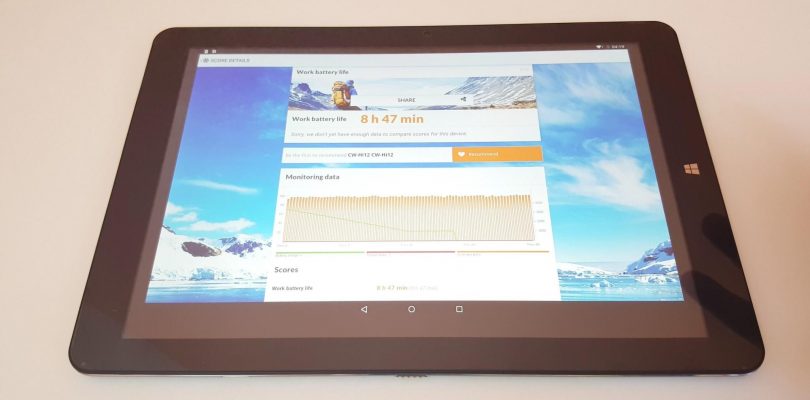
Good battery life.
Very nice screen, great for eBooks, Comics, and PDFs
Doesn’t throttle.
Low standby battery use: 2% battery after 14 hours in sleep.
Stylus works well and seems accurate. Supports pressure and palm reject in apps like OneNote.
Cons:
Updated 14th: Around 20% Battery life it just shut itself off – Possible power issue.
Lowest brightness setting too bright for late night use.
Demanding full res games are choppy (MKX for example)
Light static present over the speakers and 3.5mm jack
Slightly lower benchmark scores than expected for an X5 Z8300
Slow to charge: 4.5 to 5 hours to fully charge from empty


yobbei
if i want to lower the resolution to improve performance what can i do? and what DPI should i use (let’s say 1080p resolution)
BHW
Hello Chris
The screen aspect ratio of Hi12 is 3:2
I would like to know under Android OS, do you have an option to adjust the HDMI out to 16:9 aspect ratio (e.g. 1920X1080), so that you can get the full screen of your TV?
Dean Tosis
I have received my Hi12 and it’s pretty good….except there are no screws in the sides (4 screws missing) I need your help to know what size and type of screws I need so I can purchase some!! please help, thanks
b
I got mine 2 weeks ago. The only problem i have is stuttering playback using plex. Anyone know how I can fix that issue?
Badger Huss
Hi does the screen have yellow tint like the windows version? Thanks for the reviews
Chris G
I don’t have a yellowish tint on mine.
Jhon Lee
Hi christ, I have some error for my dual hi12.
1. When it has only battery life 10~30%, power is auto turned off.
2. As far as I know, Windows hi12 GPU memory clock is 800MHZ and dual boot hi12 GPU memory clock is only 533MHZ.
Please check these issues if you have same issues and for the GPU clock, check the bios.
demorez
2% battery drain after 4 hours in sleep counts as low standby battery use? 2% in 12 hours should be normal and 2% in 24 hours should be good.
Chris G
Typo fixed now.
Michael Vlassopoulos
Does it have a screen protector, from the factory, or should we buy one ??
Chris G
It comes with one pre-applied.
Daniel Zuidinga
nothing about the stylus?!
Chris G
When I receive it I’ll post a video review of it in action.
Robert kalna
Hi, thanks for the great review. When you receve the pen, if it is not too much to ask could you include a quick test with the apps Squid (papyrus) and write beta from stylus labs and see if the pen button(s) work and maybe write a few words to see how smooth the output is. Thank you again for your work
Richard Russell
do you have an estimated delivery date?
syahrul
hi christ, i used app Lux Auto Brightness to lower the bright…maybe you can check that out..
syahrul
#brightness
Chris G
Thanks, I’ll check it out.
Marc
If it’s only about the need for extra dimming (and brightness on auto works well in other situations), then an alternative is “Screen Filter”.
As it lays a kind of grey filter over the screen, it doesn’t dim the backlight.
+ it works on (almost?) all devices
– you have to activate it manually when you need the dimmer display
– it doesn’t save energy (unless you have an amoled screen, so not with the Chuwi)
Dean Tosis
mine should be arriving in the mail this week! cant wait
omer
Can’t wait for the stylus review !