




Teclast To Release An Atom Z8550/Z8750 & 8GB Powered 2-in-1
Teclast’s Weibo just recently posted an image of a Tbook Windows 10 system powered by an Atom Z8550 (The Z8X50’s) are the refreshed slightly faster Atom Cherry Trails chips. It also shows the system has 8GB of RAM. Hopefully it will also have wireless AC. So looks like there will be another Tbook release coming, but it’s great to see it’s not another Z8300 (Finally!) Edit: ...[Read More]
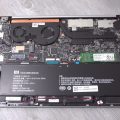

Xiaomi Mi Notebook Air 13.3 Internals SSD Slots And Spare M.2 2242 Slot
Here is a very quick look at the internals of the Mi Notebook 13.3″ version. You’ll see the single heat transfer pipe which has to deal with the Core i5 6200U and the Nvidia 940MX, Xiaomi should have at least used twin heat pipes I feel to help transfer more heat. After all, this kind of power in a 14mm slim notebook is asking a lot with only one pipe. Sure it has two fans which is gre...[Read More]
Unexpected!!!
First Impression(first time buy chinese tablet): unexpected good. at least never lag when i used. nice bright screen pros: smooth (~5 tabs in edge+onenote+audio(vlc player)+facebook) battery life is long enough (>4hrs, for the above case, and i thk >6 hrs for just surfing internet) boot up is ok for me (<30sec, of course new computer without installed any startup program) cons: heavy (jus...[Read More]


Jumper EZPad 5SE 2-in1 Surface 3 Style Tablet with Stylus
Back in April I reviewed the Jumper EZPad 5S, it was okay, a Surface 3 style 2-in-1 it had some issues powering external hard drives from the USB ports. But I did like the solid metal alloy body, kickstand, and the build quality was good. But the touchpad was a bit too small and gestures couldn’t be disabled proving to be quite annoying. Well, now the new EZPad 5SE version is coming with sty...[Read More]
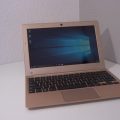

Jumper EZBook Air Unboxing and First Impressions
Jumpers EZbook 2 turned out to be an okay notebook for the price and I enjoyed mine. Which lead me to get this latest model from Jumper,the EZbook Air. It’s 11.6″ with a glossy 1080p screen, it comes in champagne gold only so far. Powered by an Atom X5 Z8300 & 4GB like the Ezbook 2. But the good things are, Intel wireless AC, 128GB eMMC and most metal housing. I say mostly as the s...[Read More]


Xiaomi Mi Notebook Air 13.3″ Core i5 / Nvidia 940MX Review
The larger and more powerful Mi Notebook Air 13 has just recently been reviewed. The 13.3″ Notebook features the same premium build as the 12.5″ model. But instead of s fanless Core M3-6Y30 it’s powered by an Intel Core i5 6200U, 8GB of 2133Mhz DDR4 RAM, dedicated Nvidia 940MX 1GB GPU and 256GB NVMe Samsung SSD. So a big step up in power and in my testing it can even play GTA V w...[Read More]


Chuwi’s 12th Anniversary Sale At Banggood
Chuwi’s currently has their 12th-anniversary sale on their tablets with various websites participating. Banggood has various coupons with discounts ranging from 13 to 16% off Chuwi tablets. You can find the deals listed here: Chuwi 12th Anniversary sale page By the way? Who else had no idea Chuwi was 12 years old? I wouldn’t have guessed it. I had never heard of them until the Vi10 an...[Read More]
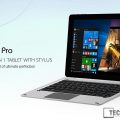

Deals: Chuwi Sale: Hi10 Pro Remix OS & Windows 10 2-in-1 For $160
Edit: This deal is part of the Gearbest Chuwi 12th Anniversary sale now on here until the 25th. Spotted by Radial Apps, Gearbest has dropped the price of the Chuwi Hi10 Pro (I just received mine last week) to $160. It’s basically a Chuwi Hibook, but I see it as an improved version so far in my use of it. USB type-c runs at USB 3.0 and it has Remix OS 2.0 based on Android instead of stock And...[Read More]
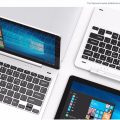

Teclast Tbook 12 Pro 2-in-1 Dual OS 12.2 Inch Tablet
Another new Teclast release, I spotted this on the new release devices listed on Gearbest. It looks just like a larger version of the Tbook 16 Pro but instead of 11.6″, it’s 12.2″ with a 1920 x 1200 16:10 aspect ratio screen. Teclast claim the thinnest edge of the tablet is just 4mm, and it has thin bezels. Here’s hoping that’s true as the Tbook 16S I’m currentl...[Read More]

PiPo X10 Review Now Complete.
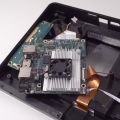
I’ve just finished my Pipo X10 review, unfortunately, it’s no better in my eyes than the Pipo X9. Sure if has a few upgrades but in the end the rest of the hybrid mini pc/tablet is let down by quality issues. You can see the Pipo X10 review here with pros and cons and my final verdict or catch the review below: Next up the Teclast Tbook 16S review, Jumper EZBook Air (Cheap Atom Macbook...[Read More]
PiPo X10 Downloads
Pipo X10 downloads. The drives are a straight Windows CMD dump using DISM. How to restore. Extract to a folder. From the CMD prompt as admin run: dism /online /Add-Driver /Driver:C:\YOURFOLDERNAME /Recurse [wpfilebase tag=list id=’195,196,197′ tpl=data-table pagenav=1 /]
