
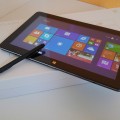

After four Month with my tablet I´ll do a Review for it.
I´ll copy the style of Chris Review so you can compare it a bit.
As soon as I get home I can upload a few Images.
My Setup:
1 x Cube i7 Stylus Tablet PC
1 x MicroUSB 3.0 to USB 3.0 adapter
1 x Screen protector (tempered glass Screen protector)
1 x DC Power adapter (US two prong) 12v – 2.0A
1 x Original Keyboard Dock
1 x Wacom Bamboo Stylus
My Usage:
Im a Student at a University in Germany. So I manly use it while I have class for all Kind of Office stuff. At the Moment im using One Note, Powerpoint and Eclips.
While not having class I draw a bit with PaintToolSai and Photoshop.
Build Quality:
The tablet isn´t really a light one with ist 700 gram but compared to my 2,2 Kilo Laptop it is really light. It feels really nice constructed. The Color gives it a nice finish but as Chris mentioned it is really easy to scratch.
The home button works and the Feedback is a nice Feature but I don´t use it. Sometimes I accidentually press on it while drawing, which is quite annoying…
I haven´t used the camera once so I can´t tell something about it.
Keyboard dock:
The build Quality of the Keyboard is pretty good. The USB 2.0 ports work and I had no Problems with them so far. Docking the tablet is easy and the tablet wont fall that easy because of the Magnets.
The trackbad is by far the worst I´ve ever used. It is pretty small and not that accurate. I have Problems with my Buttons aswell. So if I press the left button the tablet detects the right one which gets really annying.
What I´ve noticed that sometimes the Keyboard writes a random „Y“ while my Hands are on the trackpad. Since I started this Review the Cursor jumped a few lines, marked everything and I wrote over it. Sometimes it doesn´t mark it and I write in another line.
The Keyboard itself is a bit small but you get used to it pretty fast. The Buttons feel really nice while typing and give a good Feedback. The downside here is the layout. I´ve never written on another layout than the german one. So letters as „ä, ö, ü“ are missing. If you can´t write blind it might be a Problem.
Stylus:
I´ve got the following pen:
This Stylus works quite well and got detected from the start. I´m using the pen for Notes in OneNote and in PaintToolSai. In the beginning I had a gap of 1 cm from the actual tip of the pen but after calibrating with a Wacom Programm it is quite accurate.
The pressure sensitivity works and I hadn´t any Problems so far with the pen itself.
Sadly the detection of the pen doesn´t work that well in the left top and bottom Corner. I get a 1cm gap between the tip and the Screen and I can´t calibrate. If someone got a fix for this I would be quite happy.
Screen:
I won´t go in Detail in this part. Just read the Review from Chris.
The Screen is sharp and the Colors are excellent. Im quite impressed about it actually. The pre applied Screen Protector is pretty bad so I replaced it with this one:
The protector is good but it doesn´t fit exactly on the Screen, leaving a 1mm gap on my device.
The Ratio of this Screen is 16:9 which is a downside. I´d rather prefere a 16:10 ratio.
It isn´t really the best Ratio for working or Surfing but if you like to watch Videos it is really good.
I´ll put some into this Review later on, so you can see how it Looks if you have a Word document or a pdf document infront of you.
Storage:
The SSD is really fast but a bit small, I would´ve gone for a 128GB Version if they had one but oh well 64GB. My Samsung MicroSD gets detected without any Problems and writes/reads with ist full Speed.
Wireless:
The Adapter in this tablet is ok. My best result was 103 Mbit/s while I was sitting in the room with the router. We have 200 Mbit at max Speed but I quite happy about the Speed above.
Gaming:
I´ve only tested League of Legends so far but it works really fine.
Im playing with low-medium Settings and I capped it at 60 fps. No Problems there and everything is smooth.
Battery life:
I get about 4,5-6 hours ot of the tablet depending on the usage. It is ok for the power you get, if you can´t take the big fat charger with you all the time this might be a Problem.
Heat:
This tablet can get really hot. You can´t burn yourself but I don´t really like to hold such a hot tablet over a Long time. With the Keyboard and the upside Position it is better than before.
I don´t know if I do something wrong but it throttles and gets hot while watching Youtube Videos. The Video stops sometimes and buffers. I have to wait till it is a bit colder to continue to watch Videos.
Is there something I can do?
Charge time:
It takes about 3:45-4h to Charge from 0. So it is ok but Keep in mind you have to have the big Adapter with you all the time if you want to use the tablet the whole day.
Audio Quality:
At the beginning the Audio Quality isn´t that good at all. It has a low volume and as Chris mentioned the Sound is really flat.
I´ve updated the Driver and it is much better. I really recommend this update:
http://techtablets.com/forum/topic/low-volume-i7/
Conclusion:
So Overall this is a really nice tablet. I got it for 280$ (after cashback). The wacom Support is pretty good and im happy about the Overall Performance of this tablet. The Keyboard is pretty bad compared to others I used so far. Windows 10 runs without any Problems and is really smooth and fast.

Grandalf
Next time I should write it when I have more time 🙂
I recommend turning the trackpad off, it does more worse than it does good. (At least for my unit)
Chris G
Nice review thank you for this!
Grandalf
Thank you.
I can´t post pictures afterwards?