
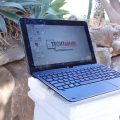


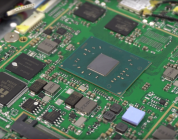
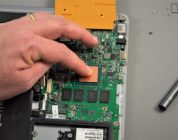
The Cube i7 gets pretty darn hot, opening it up I discovered the lack of a thermal pad on between the heatsink and outer metal rear housing. Odd because the X3 Pro, Cube i7 stylus and Cube i9 have this, which helps transfer heat away from the SoC and through the rear alloy housing. But Cube opted to not do it this time around to keep the outer metal cooler? And odd choice if you ask me. Well, I decided to create whole new heatsink out of copper. Now I don’t recommend following this path, it was a huge hassle. But the simple approach I used on the Cube i9 should be more than enough.
This video was recorded as I went along with my mod, it contains plenty of info for would-be modders, but it’s a bit long and drawn out. Raw unscripted vids can be like this… Remember if you open your own tablet, it’s at your risk. You could short something out and kill it completely to never boot again. So make sure you are aware of the risks involved. TechTablets isn’t liable for any damaged Cube i7 Books! 🙂
My recommended mod: (Much easier, still gives good results)
This larger copper plate mod in the video does lower temps more, but not worth the hassle.
Steps for the recommend mod:
- Open it as seen in the video above.
- Unplug the battery, we don’t want it to power on!
- Remove the stock heat sink.
- Remove the stock thermal pad.
- Clean the CPU (only if needed)
- Add a 20 mm x 20 mm x 1 mm copper shim with thermal adhesive to the stock heat sink underside,
- Add a tiny bit of thermal paste to the CPU (half a grain of rice, my paste job was too much).
- Install the stock heat sink with copper.
- Add a large ( The larger the better) thermal pad to the top where the CPU is (1 mm thick or 2mm if you just use the recess area for the CPU)
- Put it all back together.
- First boot takes longer, don’t freak as it resets the bios removing the power cable it seems.
- Enjoy a cooler, faster Core M3.
Like the mod results? Want to help me out? Please make sure you subscribe to the YouTube channel and Twitter. Social media stats has a huge effect on me getting review units from major brands.




Matias Almeida
Great video. As for insulation, that yellow tape is probably kapton tape. you can buy some and apply it.
Dal
What is the recommended thickness to avoid screen pushing issue? 1.5mm combined of copper shim + thermal pad? Or should I go for 1mm?
Jay
Would a 0.5mm thermal pad work with the copper heatsink (as done in the video)? Or would it still be too thick and require cutting up (as you had to do with the 1mm)?
Also – and it’s my experience with desktops talking here so maybe it’s a non-issue, or even a horrible idea – would it be worthwhile to add some thermal pads between the ram chips + heatsink? I’m not sure that having them “share” a heatsink with the CPU would be a good idea, but who knows?
(PS: I’m mainly interested in the answer to the first question(s), the second ones are more of a random thought)
Chris G
Yes that would work. And I wouldn’t worry about the ram using a thermal pad on them. They would only get hotter from that hot Core M3.
Mario Fajardo
CHris one random question that just popped up, which thermal adhesive did you used?
Chris G
A generic one, just some stuff from eBay. For a Core M I don’t find it to be an issue. If it was my i7 desktop, brand name like artic silver or IC diamond.
Mario Fajardo
I meant the one you used to secure the copper shim to the stock heatsink. Sorry if I wasn’t too clear, I am used to CPU thermal pastes (too many years building computers), but not thermal adhesives, and I am a bit unsure on which one would be good for this purpose.
Johnny Jeppesen
Hi Chris
Would it be possible to use a 2260 ?
i havent received my Cube i7 book yet, but i can see your video that it looks like there is a little more space to use for a longer m.2 drive… I can see the skrew wont fit, but i recon you could secure it other ways ?
anyway my quest is, do you know if it would fit ?
Chris G
Will not fit unless you cut some plastic. I wasn’t willing to do that.
Piotr
I just got my i7, and now have some dilemma…
Is it reasonable to open it up risking breaking something, if I will never play any games on it…
Is this 70-80 degrees safe for device in longer period of time ?
What you think?
Thanks.
Samuel
Hi, for those that bought the tablet from aliexpress during the $299 (only tablet) sale a week+ ago, did it come with any usb type C OTG cable?
Piotr
Yes, OTG cable is in my box.
Piotr
sorry, but… not type C, so NO
Craig Walkerdine
do a gaming test, but a bit more demanding
gta v
fallout 4
battlefield
etc!
planning on buying this then learn how to switch harddrive and heat sink mod it
Chris G
Will try and find some time, I planned to test out GTA V. Fallout 4 before had some issues running, only got 1fps on Intel GFX.
blackvalley007 .
I think gta V is a bad test since it laggs on every PC with 4gb of ram. I am really curious about the gaming improvement after the mod.
Craig Walkerdine
you can lower the graphics in the files 🙂 chris did some minor tweaking using the cube i9 the game hovered around 30fps, had the odd stutter but was still playable 🙂
mshayanh13
Where can I purchase all the material required to do the thermal mod?
Craig Walkerdine
EBAY/AMAZON
mshayanh13
Where can I buy all the material for this thermal modification?
matt
my Hi 10 chuwi entered into deep sleep after bios update due to problems with micro SD. How can I wake it up? HDM1 will not work. Anyone with workable idea?
KM Chan
Hi Chris,
I have brought the i7 book from Aliexpress, but unfortunately it has a dust under the screen like this
https://drive.google.com/file/d/0B7eLcJF39Cm8MTA3cU9vbHRfMnVnZkUxQkZ5eTgwZzBiOXdj/view?usp=sharing
Is there any easy the remove the dust, or should it return it to the seller?
Please advice.
Thanks a lot.
Piotr
Hi, Just remove protective film :)!
KM Chan
Hi Piotr,
I have already removed the protective film, the dust was found under the glass panel, and I have no idea on how to wipe it 🙁
If anyone knows, please advice.
Thanks a lot.
Chris G
I’ve seen your photo, that dust in stock under the screen protector (Not the screen), peel it back and use some tape to remove it.
KM Chan
Hi Chris,
One more stupid question: the screen protector is sticking so tightly to the screen, and I am not able to peel it back. Do you have any tips on this problem?
Thanks
Michael Welshy Lloyd
Not sure why I can’t reply to your later post, but I had similar issues with the screen protector. At first, I thought it was just how it looked and wsa dissapointed. When I realised it was definitely a screen protector I couldn’t remove, I used a needle carefully under one corner, which lifted it up evenly since it’s quite rigid.
Took the protector off, and was blow away by how much better the display looked.
Mario Fajardo
Do you think that with just the large thermal pad will do a noticeable difference? Wondering if we can get away doing that only to improve temps (being a bit lazy here). Also, I do recall on your video mentioning the thermal pad on the CPU was not on ideal conditions due to the extreme heat the CPU/GPU was putting out. Do you think it would be a good idea to check it after some time of use (6 months)? And good to know that the SSD can be changed easily for a bigger one, I suspect that 64 will get small sooner rather than later, specially since I want to mess around a bit and install another OS’s (namely Linux).
Chris G
Just a large thermal pad should do the trick. Lower temps enough that it doesn’t reach mid 90s. I think with the mod there wouldn’t be a need to check it again as it’s not going to reach 97.
Mario Fajardo
Good to know, my main concern is not reaching mid 90 degrees more than getting a bit on the warmer side. It is fanless after all, being a bit warm is a given. I’ll see as I use it if can get delayed until the SSD upgrade or not. Who knows, maybe I’ll even slightly underclock/undervolt the chip for that matter if it works as fast as I want it to. Thanks!
Yew Chee Hian
Hi Chris, is there any other way to cool the tablet without modding it? Maybe like running a USB fan at the back like the Surface Pro 3 mod?
Samuel
Hi, have a few questions.
1. will a 15x15x1mm copper shim works fine instead of the 20x20x1mm?
2. if the copper shim is placed on the cpu, does the aluminum heatsink press onto the copper shim? Is the adhesive glue necessary? or will thermal paste on both sides of the copper shim be sufficient?
3. What is the exact form factor and type of the SSD? Sata M.2?
Will http://www.goplextor.com/Product/Detail/M6GV#/Spec , http://www.goplextor.com/Product/Detail/M7V_M.2_2280#/Spec or http://www.samsung.com/us/computer/memory-storage/MZ-N5E500BW fit in?
Likoum
The exact form factor is M2 2242 : The smallest of the M2.
I have successfully installed that one in my cube i7 book : https://www.amazon.com/Transcend-256GB-MTS400-Solid-TS256GMTS400/dp/B00KLTPUG4/ref=sr_1_1?ie=UTF8&qid=1468952679&sr=8-1&keywords=m2+2242
Samuel
Hi, care to share the read and write speeds you are getting from this SSD?
Chris G
Hi Samuel, I got one of these for my i7 Book. 256GB. Gets 500 Mb/s reads and 300 mb/s writes. 4k read of 26mb/s, 4k write 106 mb/s. (aprox) It’s not bad, a good step up for write speeds Vs the stock 64GB Forsee unit.
Johnny Jeppesen
Hi Likourm
Would it be possible to use 2260 ?
i havent received my Cube i7 book yet, but i can see in the video her ein techtablet of the internals that there is a little more space to use for a longer m.2 drive…
Chris G
1. Yes 15 x 15 should work. 2. Just thermal paste should do the job. I just made sure it wouldn’t ever move with the adhesive. 3. 22mm x 42mm is the m.2 size.