

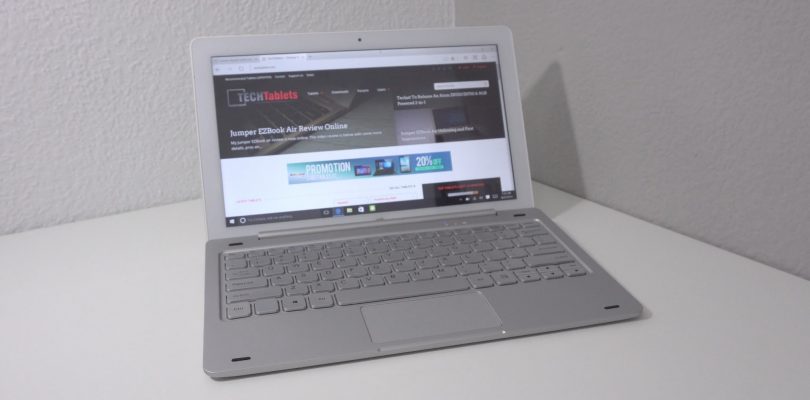
I reviewed the Tbook 16S last week, this is the Tbook 16 Pro version that has no kickstand and uses an ASUS transformer style keyboard. The keyboard is sadly most all plastic apart from the metal supports, it looks metal in the press images and somewhat thinner too.
It’s $209 from GearBest, the keyboard is an additional $35.
The tablet is solidly built, but I discovered that in suffers from a very common issue, none of the USB ports, including the docks two USB 2.0 ports output enough power to power an external hard drive. My Western digital and Toshiba 1TB drives spin up, but later make clicking noises as they have insufficient power to access the data on the drivers. So they don’t work.
Memory like the Tbook 16S is also underclocked to only 1066Mhz, the Atom X5 Z8300 supports up to 1600Mhz, but for some reason it has been lowered for stability or battery saving.
First impressions:
The good:
- Better 1080p screen than the Tbook 16S (no matte coating and brighter)
- Toshiba 64GB eMMC
- Lite bloat free ROM
- Can access 128GB MicroSD’s
- Active stylus support with palm rejection
- Solid build quality
The bad:
- USB ports fail to fully power external hard drives
- Stylus doesn’t have pressure sensitivity levels and the metal tip scratched up my screen protector.
- RAM only running at 1066Mhz
- Average sounding speakers
- Keyboard is mostly plastic



Walt
The wi-fi connection on Teclast Tbook 16 Pro 2in1Tablet/Keyboard is abysmal. It has a limited range (distance to the router) to connect, takes forever to connect and when it does it’s often drops the connection after that. Speedtests for uploading and downloading on the internet were 25mbs for an Acer laptop and an Apple desktop, 12mbs for the Cube i9 2 in 1 Tablet/Keyboard from GearBest, and less than 1mbs for this Teclast TBook Pro 2-in-1. I so badly wanted to like this unit for it’s appearance, size, price and convenience. Tablets are used primarily to browse the internet or watch movies and you cannot do either with the Teclast Tbook 16 Pro. Support to improve it from GearBest has not been productive to date. It’s a dust collector.
RuiFragoso
Thanks Chris for this preliminary review!
Regarding the sylus, did you had the chance o try the non metal stylus from teclats? (the black version which i think its plastic).
Would it allow for pressure level and palm rejection?
Also the tip seems softer.
Thanks again.
Rui
Chris G
That active black stylus doesn’t work on it. Just this metal tipped one.
RuiFragoso
OK Thanks… Guess i’ll have to stick with the hard tip version 😉 and be careful with the screen.
Lorenzo Crispi
Regarding memory underclocked to 1066Mhz has the Chuwi Hi10 Pro the same problem? Have you been able to power external hard drive through USB type C with the Hi10 Pro? Thanks…
Chris G
My Hi10 Pro has 1066Mhz, but I changed it in the bios to 1600Mhz. It’s odd because the HiBook Pro I had has 1600Mhz as default. It seems it varies from batch to batch. The Hi10 Pro type-c port can power HDD’s (USB 3.0 speed too) but the keyboard ports cannot.
Lorenzo Crispi
Thanks for your accurate answer! Did you try to change ram frequency setting also for this Teclast Tbook 16 pro?
Chris G
Not yet, it can be risky on some devices as the RAM is only 1066 spec and will brick if set to 1600Mhz.