


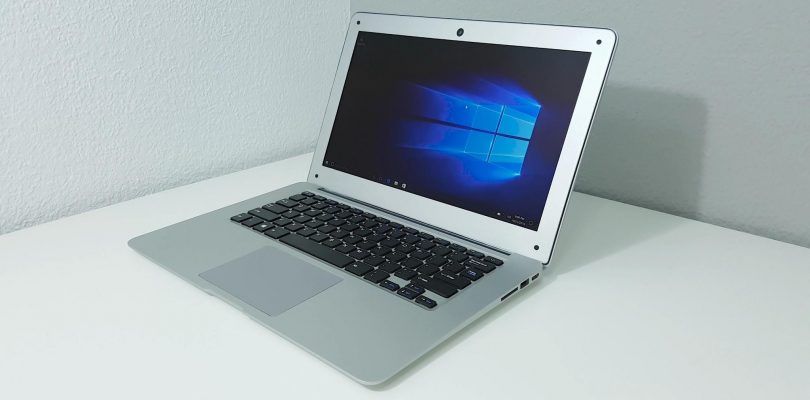
A competitor to the Jumper EZBook 2 has just recently released, the YEPO 737S. It has a very similar spec sheet to the EZBook 2, a 1080p screen (Glossy) An Atom X5 Z8300, 4GB of RAM , wireless N and Windows 10. But a few minor differences, it’s 13.3″ vs the EZbooks 14 inches and has a larger Samsung 128GB eMMC. The battery is smaller at 8,000 mAh. Here’s my first look at the 737S:
Edit: This laptop was returned for a refund. Windows 10 is hacked, no recovery partition so can’t be reset, trouble booting to USB ports from the bios to do a clean Windows install. This shouldn’t be happening. Time to move onto other tech worthy of my time. I cannot recommend this laptop due to the above major issues it has. Better to look at the Jumper EZBook 2 and Chuwi LapBook.
First impressions:
- Windows 10 doesn’t want to activate on my unit…
- The rear is indeed completely made of alloy (This should help thermals)
- 4GB fo RAM is clocked to 1066Mhz only, the Atom X5 Z8300 supports up to 1600Mhz (I’ll see if this can be changed to 1600Mhz without bricking it!)
- Typing experience seems good, about 1.6mm of key travel, some keyboard flex
- The touchpad is large and usable however, not the greatest and loud sounding left and right mouse buttons.
- The screen is a 1080p glossy one, I would have preferred matte like the EZBook 2
- The screen doesn’t seem to display all colors on my desktop wallpaper as if it’s only a cheaper 16-bit panel? Or driver issue.
- The 128GB eMMC is partitioned into a 30GB and 80GB drives. It’s a Samsung eMMC
- The build is plastic, silver paint job to make it look like metal. But the hinge feels solid and the build in general.
- It feels light for the size.
- The speakers distort a bit at full volume and don’t seem to have any visible grill or it’s located around the hinge area
- DC in charging 3A 5 volts.
- The charge time looks to be around 4-5 hours. (using battery bar as an estimate)
At this point if I cannot solve the Windows 10 license issue, I’m not sure I’ll commit any time to fully review this as at this point I don’t see any reason too. (Unless you guys really want a full review of it) It’s currently going for $199 over at Gearbest.
So far after my initial hands-on time with it, its looking like thermals might be better on this 737S, but the larger battery, faster RAM times and activated Windows 10 of the Jumper EZBook 1 makes it look like the better deal still and the best Atom 4GB 1080p laptop/notebook around.


buzzly
My post was buried in the middle of this thread so I re-post this.
If you have Windows 10 activation error, since you got the winodws pre-activated in it, you’ll need to run following command in a separate Powershell window with administrator access.
In powershell, type in this command to reveal windows 10 product key
(Get-WmiObject -query ‘select * from SoftwareLicensingService’).OA3xOriginalProductKey
Save the product key.
Re-activiate Windows 10
Type in the product key, then reboot.
Chris G
Thanks for that, so it works? unfortunately too late for me.
nicolas poupinet
Yepo’s bios is here: https://mega.nz/#!WoQVRJQB!QZSJZBCIlr5oDr5mdVZ-vAXo8_WC7Mu59qxmo6h9sow
buzzly
There was on use manual that come with this. I have discovered a better way to “lock” the memory speed to 1600hz. In the bios menu, disable DVFS, and enable “auto detect DDR3 memory speed” ( not sure about the exact wording). That is it.
With this setting, bandwidth testing results are slightly above 1660MB/s.
buzzly
Chris, there is a way to change the memory speed
In the bios menu, under memory setting, Enable DDR DVFS, then Set Frequency A and B. A could be 1066mhz B 1666 mhz, or set both A and B to whatever values the memory chip can run on.
Jason
Has this fix been confirmed by any one else to have worked?
buzzly
It is me again.
I did a very simple memory speed test using Userbenchmark.exe
There seem to be just two settings in the bio – disable DVFS and set the memory frequency to 1066hz (default) or enable DVFS then set frequency on demand between 1066 – 1666hz.
The simple memory latency test showed the slower (default) setting resulted in 215ns vs. faster setting with 200ns.
This is clearly not a detailed test, but it did show the memory speed can be adjusted in bios.
However, in both settings, hardware monitoring software such as cpu-z reported the same 1066hz memory speed.
Jason
So I guess either way it’s slower than advertised. That no good. Has has the jumper ezbook or similar device been confirmed at 1600 through the same tests?
Chris G
My Chuwi Lapbook also runs at 1066Mhz, but some have managed to get it to run 1600Mhz. There is also a 14.1 LapBook version coming with Celeron N3450 (apollo lake) that will be much faster.
buzzly
Jason.
To reply your question below.
Frequency A is max
Frequency B is min.
Jason
Thank you for your comprehensive review and contributions
Chris G
Thanks for the test, but What about bandwidth?
buzzly
OK. Turn out that there are 3 potential settings. I ran a PassMark memory test for bandwidth for each setting.
1) Default: Disable DVFS and set the max memory frequency to 1066hz (min freq setting is grayed out)
1522 MB/s average
2) Enable DVFS and set max memory frequency to 1600hz, min to 1067hz.
1640 MB/s average, 1550 MB/s average (on a second test)
3) This is weird as the bandwidth became slower than the default lower frequency setting.
Disable DVFS and set the max memory frequency to 1600 hz
1422 MB/s 1480 MB/s (second test)
I am leaving memory setting as #2 of course.
Jason
Not sure why I couldn’t respond to Buzzly’s response ..maybe too far down the comment change but. I want to be clear for setting option two:
2) Enable DVFS and set max memory frequency to 1600hz, min to 1067hz.
In the bios is shows Frequency A and B. Is Freq A min and Freq B the max?
I have this unit in the mail so I can’t test myself at the moment.
Chris G
I might be better to just set the RAM timings to faster and leave the speed as default. With no legit Windows install or CD key, RAM at 1066 and no recovery my review was super negative. I canned it, threw my towel in on this one. Also issues boot from USB ports.
nicolas poupinet
Can anyoone share a bios backup link please?
shashank tyagi gave a tuto to do it: http://techtablets.com/forum/topic/request-ezpad-mini3-bios/
It’s easy, I managed to do it!
buzzly
I just received my 737s and have the same Windows 10 activation problem. Chris, have you resolved the problem? This is disappointing.
buzzly
***************************Solution ***************************
I MIGHT have fixed the Windows 10 activation problem.
Run Powershell and type in this command to extract/reveal product key
(Get-Wmiobject -query ‘select * from SoftwareLicensingService’).OA3xOriginalProductKey
my key looks like this WCC8N-9CC3C-P4GWR-T4VV3-@@@@, yours may be the same since OEM uses a OEM master key.
ell
Then go to activation menu, get the error msg, then go to Change Product Key and then type in the product key you receive from running Powershelll Done.
Mine seems to be “fixed”, at least for the last few hours.
buzzly
I meant to say the Powershell command reveals the Activation Key, not the Product Key. They are not the same.
fra
Hi all,
is there any way to reset the bios without keyboard?
Ivan Bosnovic
Hello,
I was quite satisfied with yepo 737s i’ve bought from Gearbest for app. 2 weeks untill I started to have a problem with wifi. I have suddenly lost internet connection and the wireless adapter gone missing in device manager (can’t see it even in hidden devices).
Any clue? shall i suppose there is a HW problem? Googling it I found out there is no way to replace network adapter card as it’s directly on the MB. I’m going to reinstal all the drivers from the links some guy posted previously, but I really doubt it will be of some help…
Anyway,the unit I have was delivered with not-activated Windows what drives me crazy (I really do not want to spend another 100 Euros for activation key) + I have also discovered the RAM speed is only 1066 MHz…
Did you guys found a way to fix it?
nicolas poupinet
Maybe original drivers? http://bbs.chuwi.com/forum.php?mod=viewthread&tid=1157&extra=page%3D1%26filter%3Dtypeid%26typeid%3D53
nicolas poupinet
Sorry, here http://pan.baidu.com/s/1jI8Ytpk#list/path=%2F
Ivan Bosnovic
Thanks for your support. I somehow managed the wifi is back and working (for few hours already). I will use that driver if it disappears again.
Ivan Bosnovic
wifi adapter got disappeared from device manager so i§m forced to use external USB one. After few hours (had turn the laptop off at night and rebooted in the morning with connected external wifi) it appeared again and it’s working correctly.
I have no explanation for such a behavior – I make sure the driver is up to date so that’s not an issue.
Browsing a net I found out I’m not the only one who face to such a problem (although different devices) http://answers.microsoft.com/en-us/insider/forum/insider_wintp-insider_devices/realtek-rtl8723bs-wireless-lan-sdio-driver/e88840b2-5e1e-4894-a871-af03776530d4
This might be a reason I think however I really don’t know what is the trigger of such a stupid behavior of network adapter.
I’m forced to use external one to make sure I’m not disconnected…
Is there anybody facing to such the problem also?
buzzly
The commonly used integrated RealTek RTL8723BS Wireless LAN SDIO is the problem. I have a Asus 10.6″ tablet with detachable keyboard. Once awhile, the wireless Lan complete died and icon disappeared. From searching on the Internet, the workaround was to power down using the physical POWER button and then restart. (Using Start -> Power software button did not work).
david velkeneers
hi Chris,
any news on the win 10 issue? I would love to see the full review. especially how it holds up against the ezbook 2
i’m doubting wich one of those 2.
little advantage for the yepo (bigger eMMC + A brand and the alloy bottom for heating issue…)
Cheers
nicolas poupinet
Take a look to my french review! http://www.tablette-chinoise.net/yepo-737s-les-tests/
david velkeneers
Hi Nicolas,
I’ve seen it. But i still dont know how it holds up towards the ezbook 2. what about heating? is it really cooler? is the yepo as smooth as the ezbook? what about speeds of the eMMc…
david velkeneers
also memory speeds seem to be lower on the yepo…
nicolas poupinet
Screen is really better with Yepo, and 120GB eMMC! Yes it’s smooth. For tests, look at this page, I compared Gfxbench’s results between both. http://www.tablette-chinoise.net/yepo-737s-les-tests/
nicolas poupinet
eMMC is slowest than Jumper. Look at 7’30 in my test’s video https://www.youtube.com/watch?v=ufetGo5HpZU
david velkeneers
Hi Chris,
Any luck with the windows 10 issue? I would love to see a full review!. like to know how it holds against the ezbook 2.
i want to buy i unit and still in doubt for the yepo or ezbook.
yepo has litlle advantage because of the samsung emmc and especially the alloy bottem to prevent heating…
nicolas poupinet
Chris, could you upload Yepo’s bios please?
I made a silly mistake in the bios, no more display …
Thanks!
r0b0c0p
Would Gearbest take any responsibility for the Windows problem? It would be great to know if you ever get it sorted and are able to do a full reveiw.
Brad
Hey Chris, this may be a stretch but maybe try the FREE Windows clone OS called ReactOS. Burning and booting a Live-USB prob wont’ take much of your time. FYI, -Brad-.
Gallery: https://www.reactos.org/gallery
Download: https://www.reactos.org/download
stephendt
Yeah, that’s not going to work well. ReactOS barely works on supported hardware
Brad
pity
Brad
Well, if it will run Linux, at least you can run Windows in a VM like Oracle Virtualbox. Prob safer way to run it anyway… use a snapshot of fresh install and revert back to it each time. Avoids viruses.
buzzly
I saw a dissemble video on a French (?) site showing little to no conductive material to transfer the CPU heat to the metal bottom. This Yepo (pronoun as ye–po) may have the same overheating problem as that of the Jumper Ezbook 2.
Chris G
So far it seems okay, but I’ll have yet to push it harder and really get it working and check the thermals. If they didn’t include some thermal pads to transfer heat to the rear bottom then that is plain stupid!
buzzly
http://www.tablette-chinoise.net/yepo-737s-deballage-et-allumage/
Ivan Bosnovic
any way to get it translated to English? or written comments at least please eventually a brief result. Just wondering how it is with thermal issue.
nicolas poupinet
It don’t warm, aluminium part do the job!
Ivan Bosnovic
perfect. Good to hear so. Thank you 😉